

eSign: PDF Fill Sign & Forms
Anmol Kulshreshtha Productivity iPhoneiPadiPod touch
eSign: PDF Fill Sign & Forms is a free Productivity app for iPhone and iPad by Anmol Kulshreshtha. Requires iOS 15.5. Updated April 28, 2026.
- Price
- Free
- on the App Store
- Size
- 66 MB
- Age 4+
- Updated
- Apr 28
- 2026 · v1.0.5
Screenshots

About eSign: PDF Fill Sign & Forms
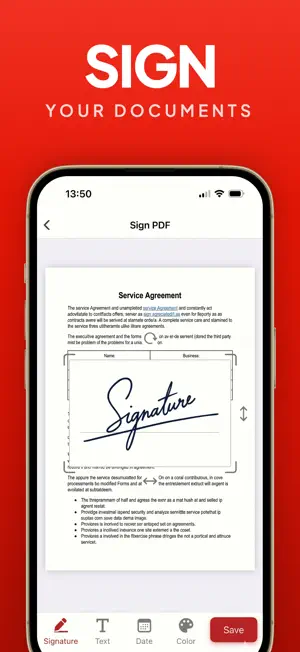
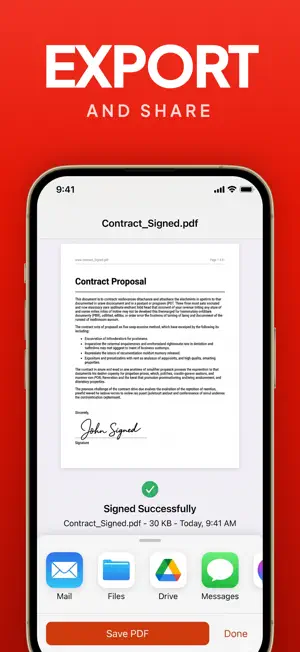
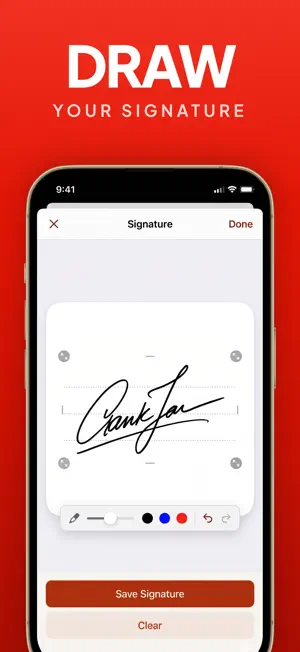
Sign PDF documents anytime, anywhere with this simple and intuitive document signing app. It allows you to add your signature to PDFs in just a few taps. Whether you need to sign contracts, forms, invoices, or agreements, this app helps you get it done without printing or scanning. Key Features Draw Your Signature Create your signature using touch input on a smooth signature pad. Adjust stroke color and thickness to match your style. Scan & Extract Signature Sign on paper, take a photo, and automatically extract only the signature using smart image processing. Clean background removal ensures a professional result. Drag, Drop & Edit Place your signature anywhere on the document. Resize, rotate, and reposition it precisely on any page. Multiple Signature Colors Choose from different colors to suit document requirements or personal preference. Works with Any PDF Import PDF files from your device, Files app, or cloud storage and sign them instantly. Fast & Secure All processing happens on your device. Your documents and signatures remain private and secure. Perfect For • Business contracts • Legal documents • Office forms • Freelancers and professionals • Students and personal use No printing. No scanning. No hassle. SUBSCRIPTION DETAILS Payment is charged to your iTunes account upon purchase. Subscriptions auto-renew unless turned off at least 24 hours before renewal. Manage subscriptions in your Account Settings. If a free trial is available, any unused portion is forfeited upon purchase. Terms of Use: https://signpdftermsofuse.vercel.app Privacy Policy: https://signpdfprivacypolicy.vercel.app
What’s new
Version 1.0.5 · Updated April 28, 2026
Improved user experience.
App privacy
The developer, Anmol Kulshreshtha, reported these privacy practices to Apple.
Data Linked to You
The following data, which may be collected and linked to your identity, may be used for the following purposes:
- Purchases: Purchase History
Used for: Analytics, App Functionality
Alternatives to eSign: PDF Fill Sign & Forms
Looking for apps like eSign: PDF Fill Sign & Forms? Here are 6 similar apps on the App Store. The highest rated is E Sign PDF: Document Signer (5.0/5), and all 6 are free to download.
-
 PDF Snap - PDF Scanner App
-
 E Sign PDF: Document Signer
5.0
E Sign PDF: Document Signer
5.0
-
 PDF Breeze: Editor & Scanner
5.0
PDF Breeze: Editor & Scanner
5.0
-
 SignSeal - Sign & Fill PDF
-
 RaptorPDF: PDF Editor-Scanner
-
 Stellar ELD Fleet
| App | Rating | Price | Last updated | Compare |
|---|---|---|---|---|
| eSign: PDF Fill Sign & Forms | – | Free | April 28, 2026 | |
| PDF Snap - PDF Scanner App | – | Free | May 11, 2026 | Compare |
| E Sign PDF: Document Signer | 5.0 / 5 (2) | Free | Sep 29, 2026 | Compare |
| PDF Breeze: Editor & Scanner | 5.0 / 5 (1) | Free | Aug 25, 2026 | Compare |
| SignSeal - Sign & Fill PDF | – | Free | Mar 13, 2026 | Compare |
| RaptorPDF: PDF Editor-Scanner | – | Free | Oct 3, 2026 | Compare |
| Stellar ELD Fleet | – | Free | Jun 18, 2026 | Compare |