

E Sign PDF: Document Signer
Paul Smith Productivity iPhoneiPadiPod touch
E Sign PDF: Document Signer is a free Productivity app for iPhone and iPad by Paul Smith. Rated 5.0/5 from 2 ratings. Requires iOS 15.0.
- Rating
- 5.0
- 2 ratings
- Price
- Free
- on the App Store
- Size
- 83 MB
- Age 4+
- Updated
- Sep 29
- 2026 · v1.6.0
Screenshots


About E Sign PDF: Document Signer
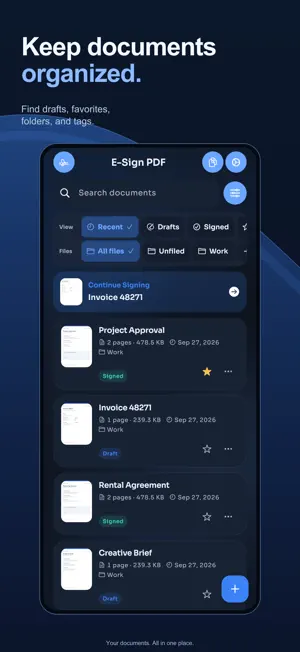
Sign documents without printing, signing by hand, and scanning them again. E Sign PDF brings document importing, signing, organization, and export into one place. Start with a PDF, photos, or a camera scan, then add the details you need. SIGN AND FILL • Draw, type, or import a signature. • Add initials, stamps, text, dates, and checkmarks. • Move, resize, rotate, duplicate, and arrange fields. • Undo changes and continue from your autosaved document. MANAGE YOUR PAGES • Scan paper documents or import PDFs and photos. • Reorder, rotate, duplicate, and remove pages. • Adjust page appearance and combine PDFs. FIND AND REUSE • Recognize text on your device, search it, and copy or correct it. • Organize documents with folders, tags, and favorites. • Save your own reusable templates with empty field layouts. EXPORT YOUR WORK • Create signed PDFs and searchable PDFs. • Export pages as JPG or PNG, or export recognized text. • Share, save to Files, or print through supported services. • Add a password to a PDF and protect app access with App Lock. LOCAL DOCUMENT STORAGE Documents are stored in the app on your device unless you choose to export or share them. Text recognition runs on-device. No account is required. This version does not include automatic document sync. Eligible new subscribers can start with a discounted first week. The subscription then renews weekly at the regular price shown before purchase unless canceled. Prices and introductory-offer eligibility vary by country and Apple Account. Manage or cancel your subscription in your Apple Account settings. Existing subscribers can restore purchases. Privacy Policy: https://www.paulsmith.codes/privacy Terms of Use (EULA): https://www.apple.com/legal/internet-services/itunes/dev/stdeula/
What’s new
Version 1.6.0 · Updated September 29, 2026
Now available in Italian, Spanish, French, German, and Brazilian Portuguese. The app interface, editor, and subscription wording follow your device language. Your existing documents are not translated.
App privacy
The developer, Paul Smith, reported these privacy practices to Apple.
Data Not Linked to You
The following data, which may be collected but is not linked to your identity, may be used for the following purposes:
- Purchases: Purchase History
- Location: Coarse Location
- Identifiers: User ID, Device ID
- Usage Data: Product Interaction
- Diagnostics: Crash Data, Other Diagnostic Data
Used for: Analytics, App Functionality
Alternatives to E Sign PDF: Document Signer
Looking for apps like E Sign PDF: Document Signer? Here are 6 similar apps on the App Store.
-
 Easy Sign: PDF Signer
-
 Signature Maker: Scan&Sign PDF
-
 SourceTwin AI
-
 Thesus
-
 eSign: Sign & Fill PDF
-
 SignSeal - Sign & Fill PDF
| App | Rating | Price | Last updated | Compare |
|---|---|---|---|---|
| E Sign PDF: Document Signer | 5.0 / 5 (2 ratings) | Free | September 29, 2026 | |
| Easy Sign: PDF Signer | – | Free | Jan 16, 2026 | Compare |
| Signature Maker: Scan&Sign PDF | – | Free | Nov 5, 2025 | Compare |
| SourceTwin AI | – | Free | Aug 6, 2026 | Compare |
| Thesus | – | Free | Jan 14, 2026 | Compare |
| eSign: Sign & Fill PDF | – | Free | Jul 21, 2026 | Compare |
| SignSeal - Sign & Fill PDF | – | Free | Mar 13, 2026 | Compare |