

eSign: Sign & Fill PDF
Duc Nguyen Ba Trung Productivity iPhoneiPadiPod touch
eSign: Sign & Fill PDF is a free Productivity app for iPhone and iPad by Duc Nguyen Ba Trung. Requires iOS 17.0. Updated July 21, 2026.
- Price
- Free
- on the App Store
- Size
- 10 MB
- Age 4+
- Updated
- Jul 21
- 2026 · v1.0
Screenshots
About eSign: Sign & Fill PDF
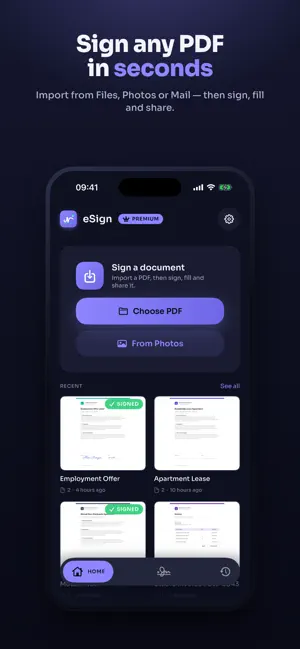
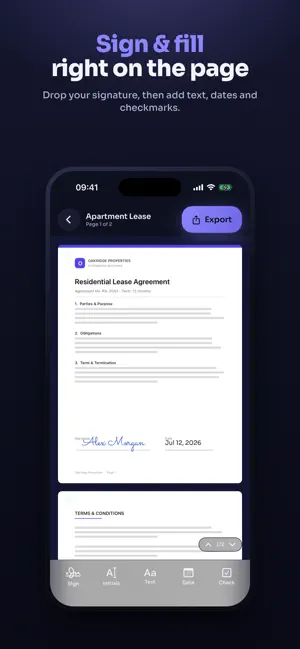
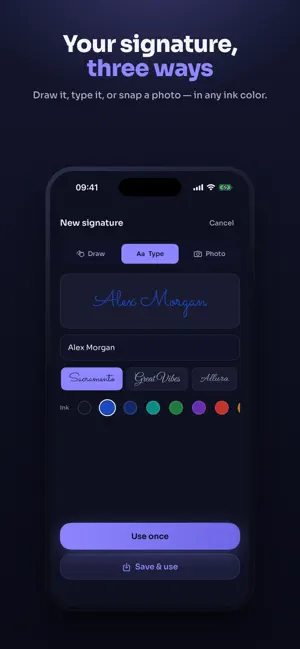
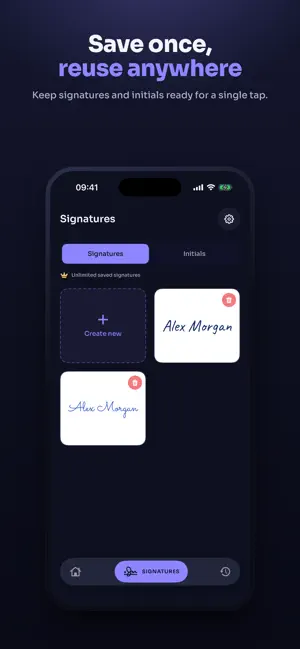
Sign, fill, and finish any PDF — right on your iPhone and iPad. eSign turns paperwork into a 30-second task: import a document, drop your signature, fill in the details, and share a clean, flattened PDF. No printer, no scanner, no account. WHY ESIGN • 100% on-device — your documents never leave your iPhone or iPad. Nothing is uploaded to a server. • Fast and focused — a signing editor, not a bloated office suite. • Built for iPhone and iPad. SIGN ANY WAY YOU LIKE • Draw your signature with your finger or Apple Pencil • Type it and choose from 12 handwriting-style fonts • Snap a photo of a signature on paper — the background is removed automatically • Pick from 8 ink colors and adjustable pen thickness • Save signatures and initials once, then reuse them with a single tap FILL IN EVERYTHING • Add text anywhere on the page • Insert today's date in a tap • Place checkmarks on forms and agreements • Move, resize, and rotate every element precisely IMPORT FROM ANYWHERE • Files, Photos, iCloud Drive, or email attachments • Open a PDF from any app with "Open in eSign" • Scan paper documents with your camera EXPORT & SHARE • Flatten to a tamper-resistant PDF • Share via Messages, Mail, AirDrop, or save back to Files • Keep a tidy history of everything you've signed and imported FREE & PREMIUM eSign is free to import, sign, and fill. The free plan includes 3 exports per month and 2 saved signatures. Upgrade to Premium for: • Unlimited PDF exports • Unlimited saved signatures and initials • No watermarks Premium is offered as a monthly or annual auto-renewable subscription. Payment is charged to your Apple ID at confirmation of purchase. Your subscription renews automatically unless canceled at least 24 hours before the end of the current period; your account is charged for renewal within 24 hours before the period ends. Manage or cancel anytime in your App Store account settings. Terms URL: https://www.apple.com/legal/internet-services/itunes/dev/stdeula/ Privacy Policy URL: https://docs.google.com/document/d/e/2PACX-1vRBoPRdt804Zl65f6ehxNdFCeHi-R_O6H1_ehyPX1cYZbIj3VQ_WAnD9QLMpw1zynh5UYQXnh0sl71L/pub
App privacy
The developer, Duc Nguyen Ba Trung, reported these privacy practices to Apple.
Data Not Collected
The developer does not collect any data from this app.
Alternatives to eSign: Sign & Fill PDF
Looking for apps like eSign: Sign & Fill PDF? Here are 6 similar apps on the App Store. The highest rated is FormFill: Fill & Sign PDF (5.0/5), and all 6 are free to download.
-
 ASAPDF: PDF Editor, Sign, Fill
-
 The PDF Signer App
-
 MinutedAI: AI Meeting Notes
-
 eSign - Sign & Fill PDF
-
 PDF Signature: Sign & Fill
-
 FormFill: Fill & Sign PDF
5.0
FormFill: Fill & Sign PDF
5.0
| App | Rating | Price | Last updated | Compare |
|---|---|---|---|---|
| eSign: Sign & Fill PDF | – | Free | July 21, 2026 | |
| ASAPDF: PDF Editor, Sign, Fill | – | Free | Oct 2, 2026 | Compare |
| The PDF Signer App | – | Free | Sep 15, 2026 | Compare |
| MinutedAI: AI Meeting Notes | – | Free | Sep 22, 2026 | Compare |
| eSign - Sign & Fill PDF | – | Free | Mar 22, 2026 | Compare |
| PDF Signature: Sign & Fill | – | Free | Aug 31, 2026 | Compare |
| FormFill: Fill & Sign PDF | 5.0 / 5 (1) | Free | Sep 15, 2026 | Compare |