

eSign - Sign & Fill PDF
Loic Veteau Productivity iPhoneiPadiPod touch
eSign - Sign & Fill PDF is a free Productivity app for iPhone and iPad by Loic Veteau. Requires iOS 26.2. Updated March 22, 2026.
- Price
- Free
- on the App Store
- Size
- 16 MB
- Age 4+
- Updated
- Mar 22
- 2026 · v1.0.1
Screenshots



About eSign - Sign & Fill PDF
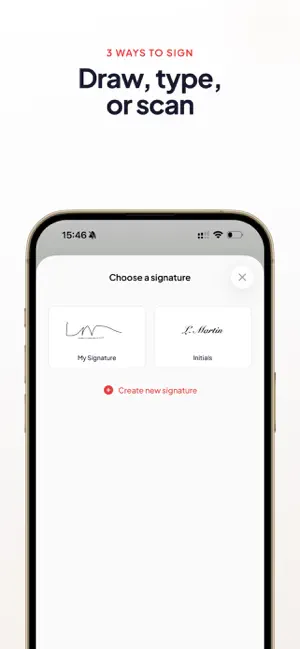
Sign your PDFs the simple way. eSign is the simplest app to sign PDF documents. No account to create, no hidden subscription. Open your PDF, place your signature, send. That's it. Stop struggling to sign a lease, a contract, or a government form. eSign does one thing and does it well: lets you sign documents from your iPhone or iPad in seconds. HOW IT WORKS 1. Import your PDF from Files, Mail, or any app 2. Create your signature (draw, type, or scan) 3. Place it on the document 4. Export and share CREATE YOUR SIGNATURE - Draw with your finger or Apple Pencil — trace your signature just like on paper - Type your name — choose from several handwritten font styles - Scan an existing signature — take a photo of your paper signature, the background is removed automatically YOUR SIGNATURES, ALWAYS READY Save your signatures in your personal library. Full signature, initials, or paraph — find them instantly every time you need them. FILL AND SIGN DOCUMENTS - Add free text: name, date, address - Check boxes in forms - Insert today's date automatically - Navigate multi-page documents easily SHARE IN ONE TAP Send your signed document via Mail, Messages, AirDrop, or any other app. Save it to Files or your photo library. The exported PDF keeps its full quality. WHY ESIGN - No account required — open the app and sign, that's it - No subscription — no surprise on your bank statement - 100% offline — your documents stay on your device - Fast — sign a document in under 30 seconds - Works on iPhone and iPad — with Apple Pencil support - Available from the Share menu in any app PERFECT FOR - Signing a lease or rental agreement - Approving a quote or purchase order - Filling and signing government forms (IRS, DMV, insurance) - Signing a permission slip or consent form - Approving business documents - Initialing every page of a contract FREE AND AD-FREE Use eSign for free. Upgrade to eSign Pro for unlimited signatures, no watermark, and all handwritten fonts. Terms of Use (EULA): https://www.apple.com/legal/internet-services/itunes/dev/stdeula/
What’s new
Version 1.0.1 · Updated March 22, 2026
- Bug fixes
App privacy
The developer, Loic Veteau, reported these privacy practices to Apple.
Data Not Collected
The developer does not collect any data from this app.
Alternatives to eSign - Sign & Fill PDF
Looking for apps like eSign - Sign & Fill PDF? Here are 6 similar apps on the App Store.
-
 eSign: Sign & Fill PDF
-
 ZentoPDF: Edit, Sign & Fill
-
 PDF Editor : Sign & Scan
-
 Heimlane Vault
-
 InkFill Sign
-
 QuickSign: PDF Sign & Fill
| App | Rating | Price | Last updated | Compare |
|---|---|---|---|---|
| eSign - Sign & Fill PDF | – | Free | March 22, 2026 | |
| eSign: Sign & Fill PDF | – | Free | Jul 21, 2026 | Compare |
| ZentoPDF: Edit, Sign & Fill | – | Free | Apr 15, 2026 | Compare |
| PDF Editor : Sign & Scan | – | Free | Aug 12, 2026 | Compare |
| Heimlane Vault | – | Free | Apr 23, 2026 | Compare |
| InkFill Sign | – | Free | Mar 9, 2026 | Compare |
| QuickSign: PDF Sign & Fill | – | Free | Aug 20, 2026 | Compare |