

PDF Breeze: Editor & Scanner
Penguin Labs Productivity iPhoneiPadiPod touch
PDF Breeze: Editor & Scanner is a free Productivity app for iPhone and iPad by Penguin Labs. Rated 5.0/5 from 1 ratings. Requires iOS 16.6.
- Rating
- 5.0
- 1 ratings
- Price
- Free
- on the App Store
- Size
- 15 MB
- Age 4+
- Updated
- Aug 25
- 2026 · v1.2
Screenshots

About PDF Breeze: Editor & Scanner
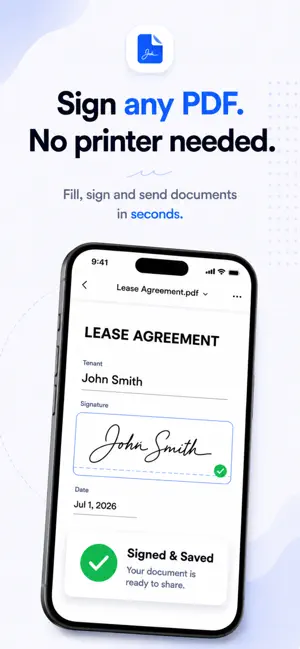
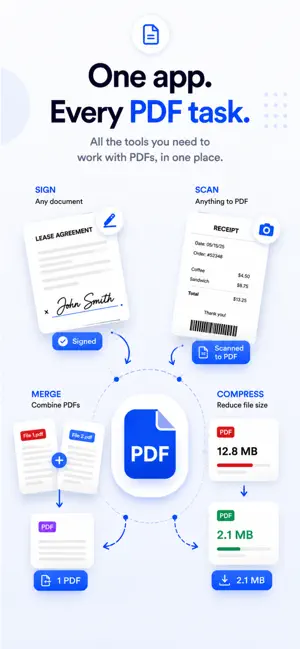
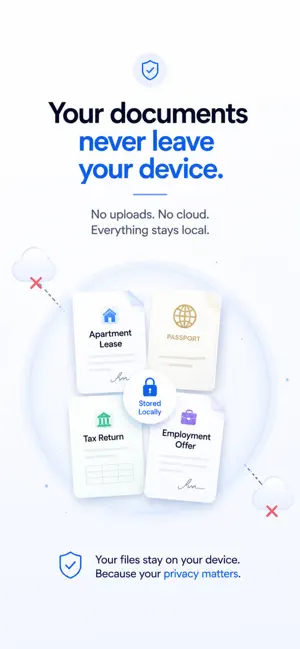
YOUR FILES NEVER LEAVE YOUR IPHONE. PDF Breeze is the only all-in-one PDF toolkit that works 100% on your device. No cloud. No uploads. No account required. Whether you're signing a contract, scanning a receipt, or compressing a file before sending it — everything happens on your iPhone, instantly. SIGN ANY PDF IN SECONDS Draw your signature or type it. Place it anywhere on the document. Export as a clean, signed PDF — no printer, no scanner, no fuss. Works on contracts, forms, NDAs, lease agreements, and any document that needs your name on it. SCAN DOCUMENTS TO PDF Point your camera at any document — contracts, letters, receipts, forms — and PDF Breeze instantly detects edges and creates a crisp, clean PDF. Multi-page scanning supported. Everything processed on your device. COMPRESS WITHOUT LOSING QUALITY Reduce your PDF file size before emailing or sharing. Choose your compression level — low, medium, or high — and get a smaller file without destroying the readability. Perfect for email attachments with size limits. MERGE MULTIPLE PDFs INTO ONE Combine two or more PDFs into a single document in seconds. Drag to reorder pages before merging. Great for combining chapters, reports, or multi-part forms into one clean file. PROTECT WITH A PASSWORD Add password encryption to any PDF to prevent unauthorized access. Your documents stay private and locked — only accessible to those who know the password. SPLIT & EXTRACT PAGES Select specific pages from a PDF and extract them into a new document. Perfect for pulling out individual pages from a large report or form pack. CONVERT IMAGES TO PDF Select photos from your library and convert them into a multi-page PDF instantly. Receipts, whiteboards, notes — anything you photograph becomes a shareable PDF. ANNOTATE & HIGHLIGHT Highlight text, draw freehand, add typed annotations. Everything you need to mark up a document without leaving the app. EXTRACT TEXT WITH OCR Use built-in OCR to extract all readable text from any PDF. Copy it, edit it, or search within it — even from scanned documents. CONVERT WORD TO PDF Open a .docx or .doc file and convert it to a clean PDF document, entirely on your device. No Microsoft Office required. 100% PRIVATE BY DESIGN Most PDF apps upload your documents to their servers. PDF Breeze never does. Every action — signing, scanning, compressing, merging — happens locally on your iPhone. • No cloud uploads • No account required • No data collection • Works fully offline Your contracts, tax documents, medical records, and personal files stay exactly where they belong: with you. SUBSCRIPTION INFO PDF Breeze Pro is available as a monthly or annual subscription. The annual plan includes a 7-day free trial with full access to all features. • Annual plan: 7-day free trial, then auto-renews yearly. Cancel anytime before Day 7 and you won't be charged. • Monthly plan: no trial, billed monthly. • Payment is charged to your Apple ID at confirmation of purchase. • Subscriptions renew automatically unless canceled at least 24 hours before the end of the current period. • Manage or cancel your subscription anytime in iOS Settings → Subscriptions. Privacy Policy: https://www.penguinlabs.cc/products/pdfbreeze/privacy Terms of Use: https://www.apple.com/legal/internet-services/itunes/dev/stdeula/
What’s new
Version 1.2 · Updated August 25, 2026
bug fixes
App privacy
The developer, Penguin Labs, reported these privacy practices to Apple.
Data Not Linked to You
The following data, which may be collected but is not linked to your identity, may be used for the following purposes:
- Identifiers: Device ID
- Usage Data: Product Interaction
- Purchases: Purchase History
- Diagnostics: Crash Data
Used for: Analytics, App Functionality
Alternatives to PDF Breeze: Editor & Scanner
Looking for apps like PDF Breeze: Editor & Scanner? Here are 6 similar apps on the App Store. The highest rated is Vivy – Offline PDF Editor (5.0/5), and all 6 are free to download.
-
 PDF Target
-
 AI Audio Editor
-
 AI Phone Case Design Maker
-
 Vivy – Offline PDF Editor
5.0
Vivy – Offline PDF Editor
5.0
-
 DocFill – PDF Editor & Merger
5.0
DocFill – PDF Editor & Merger
5.0
-
 PDF Editor : Editor
4.2
PDF Editor : Editor
4.2
| App | Rating | Price | Last updated | Compare |
|---|---|---|---|---|
| PDF Breeze: Editor & Scanner | 5.0 / 5 (1 rating) | Free | August 25, 2026 | |
| PDF Target | – | Free | Aug 19, 2026 | Compare |
| AI Audio Editor | – | Free | Aug 24, 2026 | Compare |
| AI Phone Case Design Maker | – | Free | Jul 8, 2026 | Compare |
| Vivy – Offline PDF Editor | 5.0 / 5 (1) | Free | Sep 13, 2026 | Compare |
| DocFill – PDF Editor & Merger | 5.0 / 5 (1) | Free | Jun 11, 2026 | Compare |
| PDF Editor : Editor | 4.3 / 5 (4) | Free | Aug 20, 2026 | Compare |