

AI Audio Editor
Ruiguang Yan Productivity iPhoneiPadiPod touch
AI Audio Editor is a free Productivity app for iPhone and iPad by Ruiguang Yan. Requires iOS 14.0. Updated August 24, 2026.
- Price
- Free
- on the App Store
- Size
- 42 MB
- Age 4+
- Updated
- Aug 24
- 2026 · v0.1.0
Screenshots
About AI Audio Editor
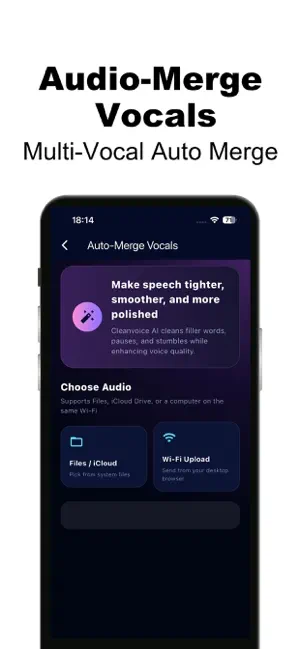
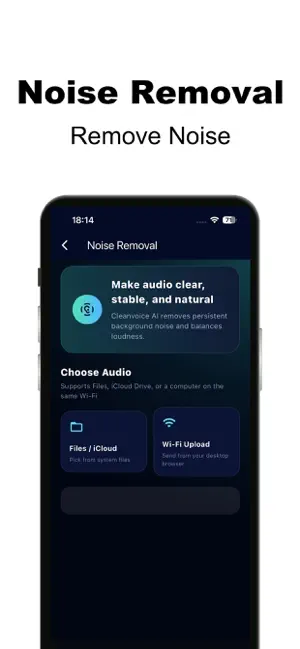
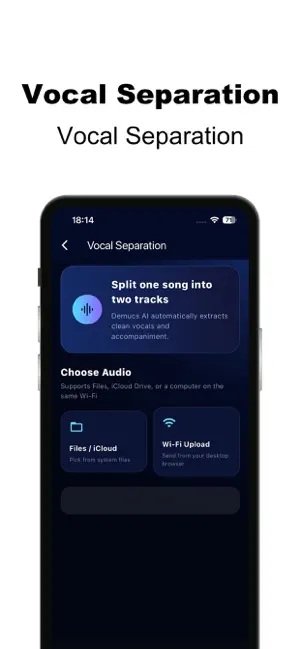
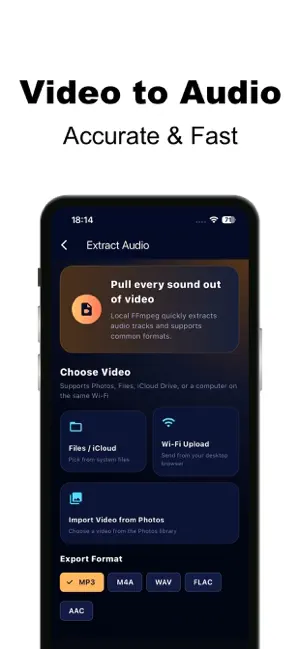
AI Audio Editor is an AI audio toolkit for creators. Separate vocals, clean noise, polish spoken audio, and extract audio from video — fast and simple. 【Key Features】 • Vocal Separation: Split vocals and accompaniment for covers, remixes, and post-production • Noise Removal: Reduce background noise for cleaner recordings • Auto-Merge Vocals: Smooth fillers, pauses, and stutters for clearer voiceovers • Video to Audio: Extract audio from photos/files with multiple export formats • Task Center: Keep processing after you leave the page and revisit results anytime 【Getting Started】 Download and try core tools right away. New users receive free Credits. AI tasks such as vocal separation, denoising, and vocal merge consume Credits. You can also subscribe to receive recurring Credits and member benefits. 【Pro Membership (Auto-Renewable Subscriptions)】 • Weekly Pro: $2.99 / week — 100 Credits each period • Monthly Pro: $6.99 / month — 500 Credits each period (Recommended) • Yearly Pro: $39.99 / year — 6000 Credits each period (about 500 Credits / month) Membership benefits include recurring Credits, priority processing queue, and full task history (see in-app details). 【Credit Packs (One-time Consumable Purchases)】 • 80 Credits • 220 Credits • 560 Credits • 1280 Credits Credits are used for AI processing and other paid features. Actual cost per task is shown in the app. 【Auto-Renewable Subscription Terms】 • Payment will be charged to your Apple ID account at confirmation of purchase. • Subscription automatically renews unless auto-renew is turned off at least 24 hours before the end of the current period. • Your account will be charged for renewal within 24 hours prior to the end of the current period, and will identify the cost of the renewal. • Subscriptions may be managed or canceled by going to Settings > Apple ID > Subscriptions after purchase. • Restore Purchases: If you change devices or reinstall the app, use “Restore Purchases” on the Profile page. Privacy Policy: https://new.ziti2.com/audioeditor/legal/privacy.html Terms of Use (EULA / Subscription Terms): https://new.ziti2.com/audioeditor/legal/terms.html For support, please contact us via the App Store support link.
App privacy
The developer, Ruiguang Yan, reported these privacy practices to Apple.
Data Not Collected
The developer does not collect any data from this app.
Alternatives to AI Audio Editor
Looking for apps like AI Audio Editor? Here are 6 similar apps on the App Store. The highest rated is AI Transcript: Audio to Text (4.7/5), and all 6 are free to download.
-
 Stingwave: AI Voice Keyboard
-
 Recordd: Voice Memos Recorder
3.3
Recordd: Voice Memos Recorder
3.3
-
 ThriveWell: Built for Families
3.4
ThriveWell: Built for Families
3.4
-
 Transcribe: MP4 to text
4.3
Transcribe: MP4 to text
4.3
-
 AI Transcript: Audio to Text
4.7
AI Transcript: Audio to Text
4.7
-
 AI Noise Eraser & Remover
1.0
AI Noise Eraser & Remover
1.0
| App | Rating | Price | Last updated | Compare |
|---|---|---|---|---|
| AI Audio Editor | – | Free | August 24, 2026 | |
| Stingwave: AI Voice Keyboard | – | Free | Oct 17, 2026 | Compare |
| Recordd: Voice Memos Recorder | 3.3 / 5 (3) | Free | Sep 22, 2026 | Compare |
| ThriveWell: Built for Families | 3.4 / 5 (5) | Free | Sep 24, 2026 | Compare |
| Transcribe: MP4 to text | 4.3 / 5 (14) | Free | Oct 2, 2026 | Compare |
| AI Transcript: Audio to Text | 4.7 / 5 (11) | Free | Oct 7, 2026 | Compare |
| AI Noise Eraser & Remover | 1.0 / 5 (2) | Free | Sep 18, 2026 | Compare |
Compare AI Audio Editor with the top alternatives: ratings, updates, ASO score and keyword gaps →