

Collage Maker: Image Creator
Triin Mikk Photo & Video iPhoneiPadiPod touch
Collage Maker: Image Creator is a free Photo & Video app for iPhone and iPad by Triin Mikk. Requires iOS 17.0. Updated June 22, 2026.
- Price
- Free
- on the App Store
- Size
- 83 MB
- Age 4+
- Updated
- Jun 22
- 2026 · v1.0
Screenshots



About Collage Maker: Image Creator
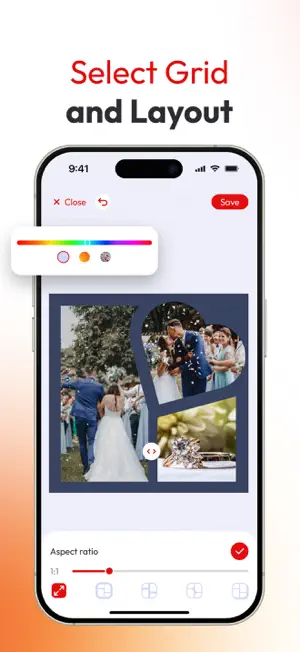
Create, design, and share like never before. This collage and photo editor app gives you everything you need to turn your photos and videos into stunning, professional-quality visuals for any platform. With an easy-to-use interface and thousands of ready-made templates, designing beautiful collages has never been easier. Mix and match up to sixteen photos or multiple videos, adjust layouts, and bring your ideas to life with just a few taps. Freestyle mode lets you design from scratch, giving you full creative control over your content. The built-in video editor allows you to combine clips, trim scenes, and align moments perfectly. You can also apply filters, blur backgrounds, or adjust brightness, contrast, and saturation to make every frame look just right. The app supports popular social media formats and aspect ratios, so your content always fits perfectly wherever you post it. Personalize every design with text, stickers, and logos. Add your own watermark or brand name to keep your content consistent and professional. Choose from a wide selection of fonts, create curved or artistic text styles, and explore endless color and layout options. Whether you’re capturing memories, building your social media presence, or promoting a brand, this all-in-one collage maker and video editor gives you the creative tools to design content that stands out. From quick edits to detailed visual storytelling, you can create anything - anytime, anywhere. Bring your creativity to life and share your story with the world. Terms of Use: https://docs.google.com/document/d/1EgmOyhtTFbQNYl4J1SfaBEOVBPEK2QJXiOvVT8w4GKM/edit?usp=sharing Privacy Policy: https://docs.google.com/document/d/13JA9IXTjxxdi5ct3wC53nKkHKpTnhDjorun_21tdtJE/edit?usp=sharing
App privacy
The developer, Triin Mikk, reported these privacy practices to Apple.
Data Used to Track You
The following data may be used to track you across apps and websites owned by other companies:
- Identifiers: User ID, Device ID
Data Not Linked to You
The following data, which may be collected but is not linked to your identity, may be used for the following purposes:
- Identifiers: User ID, Device ID
- Usage Data: Product Interaction
Used for: Third-Party Advertising, Developer’s Advertising or Marketing, Analytics
Alternatives to Collage Maker: Image Creator
Looking for apps like Collage Maker: Image Creator? Here are 6 similar apps on the App Store.
-
 Collager Maker - PixGrid
-
 Progress Frame
-
 Veduta: Collage & Photo Strips
-
 Video to Photo | Frame Capture
-
 Photo Collage Merge Studio
-
 Picstack - Collage & Layers
| App | Rating | Price | Last updated | Compare |
|---|---|---|---|---|
| Collage Maker: Image Creator | – | Free | June 22, 2026 | |
| Collager Maker - PixGrid | – | Free | Nov 21, 2025 | Compare |
| Progress Frame | – | Free | Jun 22, 2026 | Compare |
| Veduta: Collage & Photo Strips | – | Free | Oct 17, 2026 | Compare |
| Video to Photo | Frame Capture | – | Free | Sep 14, 2026 | Compare |
| Photo Collage Merge Studio | – | Free | Jul 25, 2026 | Compare |
| Picstack - Collage & Layers | – | Free | Oct 2, 2026 | Compare |