

Photo Collage Merge Studio
Durmus Caner Bal Photo & Video iPhoneiPadiPod touch
Photo Collage Merge Studio is a free Photo & Video app for iPhone and iPad by Durmus Caner Bal. Requires iOS 16.0. Updated July 25, 2026.
- Price
- Free
- on the App Store
- Size
- 8 MB
- Age 4+
- Updated
- Jul 25
- 2026 · v1.1
Screenshots

About Photo Collage Merge Studio
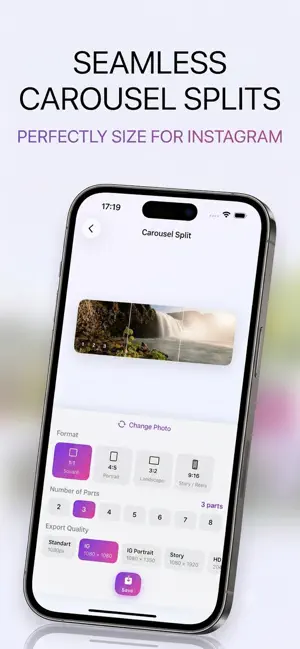
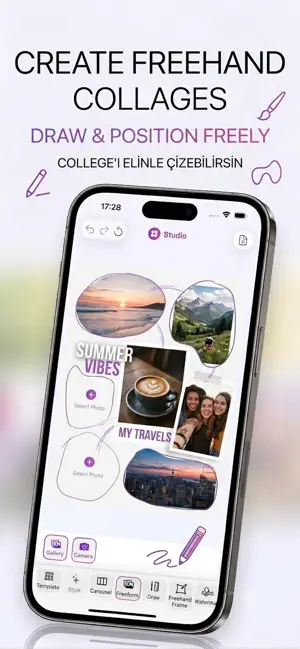
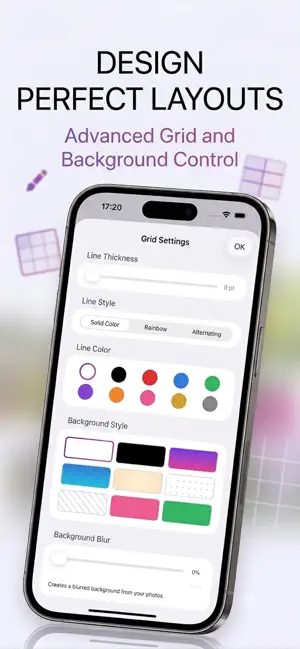
Turn your favorite photos into beautiful collages with Studio The all-in-one photo collage maker designed for speed, creativity, and social media. Whether you are posting on Social Media, sharing a Story, or saving memories in high quality, Studio gives you everything you need in one simple editor. CREATE YOUR PERFECT LAYOUT • Choose from 300+ ready-made templates — grids, mosaics, magazine layouts, geometric shapes, and more • Draw your own custom grid with flexible lines and cells • Use Free Collage mode to place photos freely on the canvas • Adjust borders, spacing, backgrounds, and aspect ratios with ease EDIT EVERY PHOTO • Apply 12+ professional filters — Vivid, Mono, Noir, Sepia, Warm, Cool, and more • Fine-tune brightness, contrast, saturation, sharpness, hue, and temperature • Crop, rotate, flip, and zoom each photo individually • Add portrait background blur for a stunning depth effect • Copy and paste edits across one or all photos instantly MAKE IT YOURS • Add custom text with full styling control • Decorate with stickers and freehand drawing tools • Apply watermarks to protect your work • Choose from style presets — Minimal, Cinematic, Mood, Color, and Premium looks • Customize backgrounds: solid colors, gradients, dots, and stripes BUILT FOR SOCIAL MEDIA • Export in optimized sizes: Instagram Post, Instagram Portrait, Story, Standard, and HD • Carousel Split: slice one wide photo into multiple parts for seamless Instagram carousel posts • Save high-quality collages directly to your photo library SMART & RELIABLE • Undo and redo every change with confidence • Save drafts and pick up where you left off • Add photos from your gallery or take new ones with the camera PREMIUM FEATURES Unlock the full creative toolkit with PhotoEdit Premium: • Carousel Split • Free Collage mode • Custom Grid drawing • Text overlays • Decorative frames • Premium style presets Download Studyo today and start creating collages that stand out. Privacy Policy: https://sites.google.com/view/collagestudioprivacypolicy Terms of Use: https://sites.google.com/view/collagestudiotermsofuse
What’s new
Version 1.1 · Updated July 25, 2026
Small updates & fixes
App privacy
The developer, Durmus Caner Bal, reported these privacy practices to Apple.
Data Not Collected
The developer does not collect any data from this app.
Alternatives to Photo Collage Merge Studio
Looking for apps like Photo Collage Merge Studio? Here are 6 similar apps on the App Store. The highest rated is PhotoSegment (5.0/5), and all 6 are free to download.
-
 Flicto: Trend Photo Styles
-
 Caption Generator - AI Posts
-
 Collage Maker: Image Creator
-
 PhotoSegment
5.0
PhotoSegment
5.0
-
 CollageMix - Collage maker
-
 Live Photo Video Maker
2.5
Live Photo Video Maker
2.5
| App | Rating | Price | Last updated | Compare |
|---|---|---|---|---|
| Photo Collage Merge Studio | – | Free | July 25, 2026 | |
| Flicto: Trend Photo Styles | – | Free | Sep 26, 2026 | Compare |
| Caption Generator - AI Posts | – | Free | Nov 13, 2025 | Compare |
| Collage Maker: Image Creator | – | Free | Jun 22, 2026 | Compare |
| PhotoSegment | 5.0 / 5 (1) | Free | Jan 26, 2024 | Compare |
| CollageMix - Collage maker | – | Free | Dec 22, 2025 | Compare |
| Live Photo Video Maker | 2.5 / 5 (2) | Free | Oct 8, 2026 | Compare |