

Collager Maker - PixGrid
Ashish Kumar Photo & Video iPhoneiPadiPod touch
Collager Maker - PixGrid is a free Photo & Video app for iPhone and iPad by Ashish Kumar. Requires iOS 16.6. Updated November 21, 2025.
- Price
- Free
- on the App Store
- Size
- 38 MB
- Age 17+
- Updated
- Nov 21
- 2025 · v1.0.15
Screenshots


About Collager Maker - PixGrid
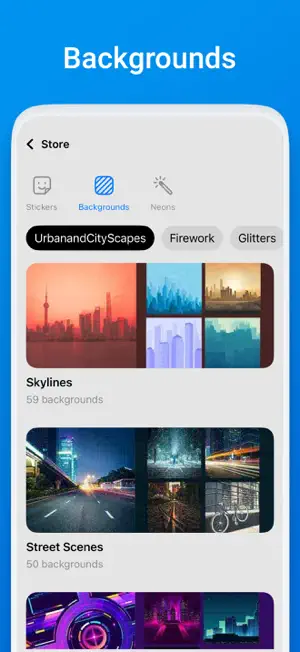
Create stunning photo collages by remixing up to 9 images. With 100+ grid layouts and advanced photo editing tools, you can create trending posts for your Instagram, Facebook, or any other social media app. PixGrid gives you creative freedom to edit your pictures or craft amazing picture collages. KEY FEATURES • Combine up to 9 pictures and create trending photo collages. • Easy-to-use photo editor to edit your pictures like a pro. • Crop your pictures in different shapes like heart, diamond, ellipse, and more. • Make some cinematic adjustments in your image with brightness, contrast, saturation, exposure, and more. • 1000+ trendy Stickers, aesthetic filters, backgrounds, texts, and more. • Neon Effects to turn simple photos into stylish art. • Save your photo collages in high quality and share them easily on multiple social media platforms like Instagram, WhatsApp, Facebook, and more. Photo Editor Collage Maker With Photo Collage Maker creates an attractive picture collage using multiple grid styles. Turn your pictures into an incredible social media post with your favorite layouts. Photo Filters Aesthetic filters to turn your collages and edited pictures into popular posts. Apply these aesthetic filters to set a different vibe to your photos. Cool Stickers Play around with 1000+ cool stickers to create your own stickers. Turn your favourite pictures into a playful memory. Neon Effects Pic Collage maker supports neon effects to turn any image into more fascinating and futuristic. Add Text Add text to your pictures or pic collage to express your thoughts and feelings. Note: Our app is not sponsored or affiliated with Facebook, YouTube, Instagram, or other social sites in any manner. Install PixGrid, a collage maker and photo editor, to make your picture collage stand out with aesthetic filters, cool stickers, easy photo adjustments, and more. We would love to hear feedback from your end, and you can share it freely through reviews and ratings. You can contact us at [email protected]
What’s new
Version 1.0.15 · Updated November 21, 2025
Bug fixes and Improved performance
App privacy
The developer, Ashish Kumar, reported these privacy practices to Apple.
Data Used to Track You
The following data may be used to track you across apps and websites owned by other companies:
- Diagnostics: Crash Data, Performance Data
Data Linked to You
The following data, which may be collected and linked to your identity, may be used for the following purposes:
- Identifiers: User ID, Device ID
Used for: Developer’s Advertising or Marketing, Analytics, Product Personalization, App Functionality
Data Not Linked to You
The following data, which may be collected but is not linked to your identity, may be used for the following purposes:
- User Content: Photos or Videos
- Usage Data: Product Interaction
- Diagnostics: Crash Data, Performance Data
Used for: Developer’s Advertising or Marketing, Analytics, Product Personalization, App Functionality
Alternatives to Collager Maker - PixGrid
Looking for apps like Collager Maker - PixGrid? Here are 6 similar apps on the App Store. The highest rated is Collage Maker: Photo Grid, AI (3.5/5), and all 6 are free to download.
-
 Collage Maker: Image Creator
-
 QuickCollage: Collage Maker
-
 Collage Maker: CollageFlow AI
-
 Photo Grid Collage Maker
-
 Collage Maker: Photo Grid, AI
3.5
Collage Maker: Photo Grid, AI
3.5
-
 PixiePocket: AI Image Maker
| App | Rating | Price | Last updated | Compare |
|---|---|---|---|---|
| Collager Maker - PixGrid | – | Free | November 21, 2025 | |
| Collage Maker: Image Creator | – | Free | Jun 22, 2026 | Compare |
| QuickCollage: Collage Maker | – | Free | Jun 14, 2026 | Compare |
| Collage Maker: CollageFlow AI | – | Free | Oct 28, 2026 | Compare |
| Photo Grid Collage Maker | – | Free | Feb 2, 2026 | Compare |
| Collage Maker: Photo Grid, AI | 3.5 / 5 (2) | Free | Oct 12, 2026 | Compare |
| PixiePocket: AI Image Maker | – | Free | Oct 14, 2026 | Compare |