

Screenshot AI Organizer
George Ter-Grigoryants Utilities iPhoneiPadiPod touch
Screenshot AI Organizer is a free Utilities app for iPhone and iPad by George Ter-Grigoryants. Rated 1.0/5 from 1 ratings. Requires iOS 18.0.
- Rating
- 1.0
- 1 ratings
- Price
- Free
- on the App Store
- Size
- 18 MB
- Age 12+
- Updated
- Aug 19
- 2026 · v3.2.1
Screenshots


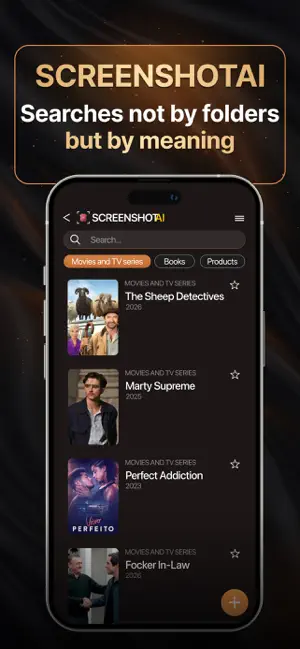
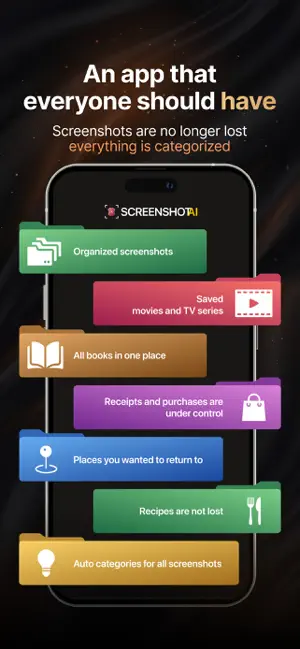
About Screenshot AI Organizer
Turn 5,000 screenshots into a searchable library. Screenshot AI uses on-device AI to read, tag, and organize every screenshot — recipes, memes, receipts, ideas — so you can find anything in seconds. No more endless scrolling. Is your gallery overflowing with screenshots? Can't find that recipe or idea without endless scrolling? Screenshot AI is your personal AI assistant that transforms your chaotic gallery into a structured, searchable knowledge base. Instantly find anything you've saved with smart search and convenient filters. How it works? 1) Add your screenshots: simply upload your images — the AI instantly recognizes the text and automatically assigns tags and categories. 2) Find anything in seconds: forget manual searching. Just type a word, a phrase, or select a tag to get the exact result you need. 3) Enjoy the order: all your recipes, quotes, and ideas are organized into collections thanks to smart automatic sorting. Key Features: - An AI assistant in your pocket: our core is advanced artificial intelligence. It doesn't just recognize text; it understands the context of your content to accurately identify categories (recipe, quote, idea) and assign relevant tags. - Effortless advanced search: combine any search parameters. Search by date, tags, categories, or words within the text. - Your personal knowledge base: the app creates a single, structured space for all the important information you save. It's smarter and faster than any photo gallery or notes app.
What’s new
Version 3.2.1 · Updated August 19, 2026
Under-the-hood update. The app now loads part of its setup at launch, so we can ship certain fixes without waiting for an App Store update. Stability and reliability improvements.
App privacy
The developer, George Ter-Grigoryants, reported these privacy practices to Apple.
Data Used to Track You
The following data may be used to track you across apps and websites owned by other companies:
- Identifiers: User ID, Device ID
- Usage Data: Other Usage Data
Data Linked to You
The following data, which may be collected and linked to your identity, may be used for the following purposes:
- Identifiers: User ID, Device ID
- Usage Data: Other Usage Data
Used for: Developer’s Advertising or Marketing, Analytics
Alternatives to Screenshot AI Organizer
Looking for apps like Screenshot AI Organizer? Here are 6 similar apps on the App Store. The highest rated is ScreenshotAI-AI assistant (5.0/5), and all 6 are free to download.
-
 VizKeeper: Snap, Say, Ask
-
 Screenshot Organizer +
4.2
Screenshot Organizer +
4.2
-
 ScreenshotAI-AI assistant
5.0
ScreenshotAI-AI assistant
5.0
-
 Bookmark Ideas: Pic Mind
5.0
Bookmark Ideas: Pic Mind
5.0
-
 CaptureLab - Smart Screenshots
4.5
CaptureLab - Smart Screenshots
4.5
-
 SnapSort - Smart Screenshots
| App | Rating | Price | Last updated | Compare |
|---|---|---|---|---|
| Screenshot AI Organizer | 1.0 / 5 (1 rating) | Free | August 19, 2026 | |
| VizKeeper: Snap, Say, Ask | – | Free | Oct 14, 2026 | Compare |
| Screenshot Organizer + | 4.3 / 5 (4) | Free | Oct 13, 2026 | Compare |
| ScreenshotAI-AI assistant | 5.0 / 5 (1) | Free | Apr 16, 2025 | Compare |
| Bookmark Ideas: Pic Mind | 5.0 / 5 (7) | Free | Jun 29, 2026 | Compare |
| CaptureLab - Smart Screenshots | 4.5 / 5 (2) | Free | Sep 17, 2025 | Compare |
| SnapSort - Smart Screenshots | – | Free | Mar 24, 2026 | Compare |