

SnapSort - Smart Screenshots
Hui Chan Seo Utilities iPhoneiPadiPod touch
SnapSort - Smart Screenshots is a free Utilities app for iPhone and iPad by Hui Chan Seo. Requires iOS 17.0. Updated March 24, 2026.
- Price
- Free
- on the App Store
- Size
- 4 MB
- Age 4+
- Updated
- Mar 24
- 2026 · v1.0
Screenshots


About SnapSort - Smart Screenshots
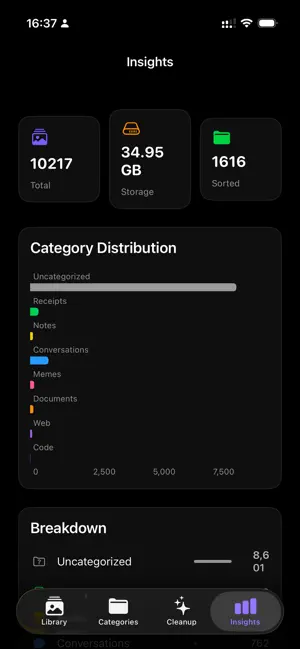
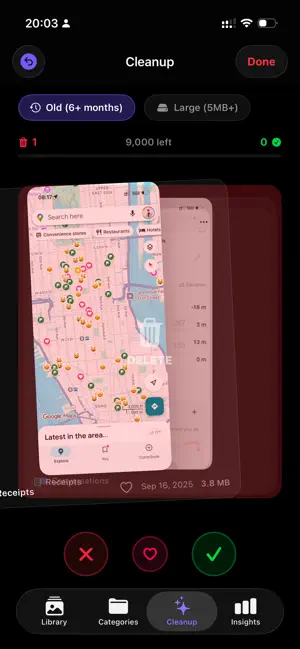
Stop drowning in screenshots. SnapSort uses on-device AI to automatically categorize, search, and clean up your screenshot library. KEY FEATURES • AI-Powered Categorization On-device Vision OCR reads your screenshots and sorts them into 8 categories: Receipts, Notes, Conversations, Memes, Documents, Web, Code, and more. • Smart Text Search Every screenshot is scanned for text. Search by keywords to find exactly what you need. • Photo Detail Viewer Tap any screenshot for a full-screen view with pinch-to-zoom, double-tap zoom, and easy sharing. Delete or organize right from the detail view. • Tinder-Style Cleanup Swipe through old screenshots (6+ months) and large files (5MB+) like a card deck. Swipe left to delete, right to keep. Review your decisions and batch delete in one tap. • Category Browser Browse your organized screenshots by category with clean grid views and quick counts. • Storage Insights Charts and statistics show your screenshot distribution, storage usage, and categorization progress. • Smooth & Responsive Buttery smooth animations, skeleton loading screens, and fluid transitions throughout the app. Every interaction feels polished and instant. • Beautiful Dark Design OLED-optimized black interface that's easy on the eyes and saves battery. DATA PROCESSING & PRIVACY SnapSort uses ONLY Apple's built-in Vision framework for all AI processing. All analysis runs 100% on your device. NO data is sent to any external server or third-party AI service (no cloud AI, no cloud processing). Text recognition (OCR) and image classification are performed locally using Apple's on-device machine learning models. Category assignments are stored locally on your device only. No accounts, no cloud storage, no tracking, no analytics. PERFECT FOR • Anyone with hundreds of unsorted screenshots • Students who screenshot lecture slides • Shoppers saving receipts and deals • Developers capturing code snippets • Anyone wanting to free up photo storage SNAPSORT PRO (Optional) Upgrade to SnapSort Pro to remove all advertisements and support continued development. • Pro Lifetime: $9.99 one-time purchase (Best Value) • Pro Yearly: $4.99/year • Pro Monthly: $0.99/month Payment will be charged to your Apple ID account at confirmation of purchase. Subscription automatically renews unless it is canceled at least 24 hours before the end of the current period. Your account will be charged for renewal within 24 hours prior to the end of the current period. You can manage and cancel your subscriptions by going to your account settings on the App Store after purchase. Terms of Use (EULA): https://www.apple.com/legal/internet-services/itunes/dev/stdeula/ Privacy Policy: https://seochan-company.vercel.app/snapsort/privacy Support: https://seochan-company.vercel.app/snapsort/support
App privacy
The developer, Hui Chan Seo, reported these privacy practices to Apple.
Data Not Collected
The developer does not collect any data from this app.
Alternatives to SnapSort - Smart Screenshots
Looking for apps like SnapSort - Smart Screenshots? Here are 6 similar apps on the App Store. The highest rated is ZT File Manager (5.0/5), and all 6 are free to download.
-
 Screenshot AI Organizer
1.0
Screenshot AI Organizer
1.0
-
 바코드 구조대 - Barcode Rescue!
-
 ZT File Manager
5.0
ZT File Manager
5.0
-
 Quick Timer - Tap & Go
-
 SnapInbox
-
 ScreenCat - Screenshot Cleaner
| App | Rating | Price | Last updated | Compare |
|---|---|---|---|---|
| SnapSort - Smart Screenshots | – | Free | March 24, 2026 | |
| Screenshot AI Organizer | 1.0 / 5 (1) | Free | Aug 19, 2026 | Compare |
| 바코드 구조대 - Barcode Rescue! | – | Free | Jul 15, 2026 | Compare |
| ZT File Manager | 5.0 / 5 (1) | Free | Mar 6, 2026 | Compare |
| Quick Timer - Tap & Go | – | Free | Sep 1, 2026 | Compare |
| SnapInbox | – | Free | Jul 16, 2026 | Compare |
| ScreenCat - Screenshot Cleaner | – | Free | Sep 10, 2026 | Compare |