

ScreenshotAI-AI assistant
Future Share LLC Utilities iPhoneiPadiPod touch
ScreenshotAI-AI assistant is a free Utilities app for iPhone and iPad by Future Share LLC. Rated 5.0/5 from 1 ratings. Requires iOS 15.1.
- Rating
- 5.0
- 1 ratings
- Price
- Free
- on the App Store
- Size
- 22 MB
- Age 17+
- Updated
- Apr 16
- 2025 · v1.0.0
Screenshots


About ScreenshotAI-AI assistant
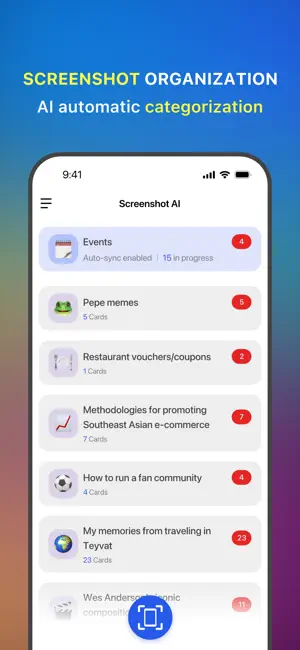
ScreenshotAI is an intelligent app designed to help you manage your phone's screenshots effortlessly. It organizes, categorizes, summarizes, and extracts information from your screenshots, transforming cluttered images into an orderly collection and enhancing their utility. If completed calendar authorization, you can seamlessly sync AI-identified schedule content to your system calendar with a single tap. ScreenshotAI offers various usage modes to fit your needs. By granting full access to your photo album and calendar, and enabling auto-sync in the app, ScreenshotAI will in the background to automatically categorize and sync new screenshots without interruption. For instance, if a friend sends you a schedule, simply take a screenshot. ScreenshotAI will automatically capture the information and sync it to your calendar, making the process smooth and simple. Prefer having more control? You choose to grant limited album access and manually upload or send specific screenshots to ScreenshotAI for processing and calendar syncing. Enjoy a seamless and efficient screenshot management experience with ScreenshotAI. We offer every user a 5-day free trial, during which you can enjoy full access to all product features. Complete tasks to extend your trial or subscribe to continue using ScreenshotAI. Upgrade to PRO and unlock the full power of ScreenshotAI: 1. Unlimited screenshot categorization and organization 2. Automatic syncing of schedule details to your system calendar 3. Unlimited AI-powered summaries and text extraction 4. Unlimited AI-driven screenshot queries Our Subscription Plans: We offer two subscription plans Subscription Plans: 1-Month Subscription: $9.99 per month; 2-Year Subscription Plan: $83.0 per year Payment: Users' iTunes accounts will be charged upon confirmation of purchase. Renewal: Subscriptions will renew automatically according to the selected plan. The Apple iTunes account will be charged within 24 hours before the subscription period ends, and the subscription period will be extended by one subscription period upon successful payment. Cancellation of Renewal: To cancel the renewal, please manually turn off the automatic renewal function in iTunes/AppleID subscription management at least 24 hours before the current subscription period expires. Unlock all features without limits by choosing a subscription. Our commitment is your trust, therefore, by using ScreenshotAI, you agree to our fair privacy policy and terms of use: Privacy Policy: https://www.glbgpt.com/mobile/screenshotai/privacy Terms of Use: https://www.glbgpt.com/mobile/screenshotai/terms Contact us: [email protected]
App privacy
The developer, Future Share LLC, reported these privacy practices to Apple.
Data Used to Track You
The following data may be used to track you across apps and websites owned by other companies:
- Identifiers: Device ID
Data Not Linked to You
The following data, which may be collected but is not linked to your identity, may be used for the following purposes:
- Identifiers: Device ID
Used for: Analytics
Alternatives to ScreenshotAI-AI assistant
Looking for apps like ScreenshotAI-AI assistant? Here are 6 similar apps on the App Store. The highest rated is Quick Screenshot Editor (4.5/5), and all 6 are free to download.
-
 VizKeeper: Snap, Say, Ask
-
 Screenshot AI Organizer
1.0
Screenshot AI Organizer
1.0
-
 ShotSort: Screenshot Actions
-
 Quick Screenshot Editor
4.5
Quick Screenshot Editor
4.5
-
 Screenshot Manager - Organizer
3.8
Screenshot Manager - Organizer
3.8
-
 Screenshot
2.7
Screenshot
2.7
| App | Rating | Price | Last updated | Compare |
|---|---|---|---|---|
| ScreenshotAI-AI assistant | 5.0 / 5 (1 rating) | Free | April 16, 2025 | |
| VizKeeper: Snap, Say, Ask | – | Free | Oct 23, 2026 | Compare |
| Screenshot AI Organizer | 1.0 / 5 (1) | Free | Aug 19, 2026 | Compare |
| ShotSort: Screenshot Actions | – | Free | May 5, 2026 | Compare |
| Quick Screenshot Editor | 4.5 / 5 (10) | Free | May 15, 2025 | Compare |
| Screenshot Manager - Organizer | 3.8 / 5 (38) | Free | Oct 12, 2026 | Compare |
| Screenshot | 2.7 / 5 (114) | Free | Apr 9, 2026 | Compare |