

Screenshot Organizer +
Brandon Briggs Utilities iPhoneiPadiPod touch
Screenshot Organizer + is a free Utilities app for iPhone and iPad by Brandon Briggs. Rated 4.3/5 from 4 ratings. Requires iOS 17.6.
- Rating
- 4.3
- 4 ratings
- Price
- Free
- on the App Store
- Size
- 10 MB
- Age 4+
- Updated
- Oct 13
- 2026 · v1.0.4
Screenshots

About Screenshot Organizer +
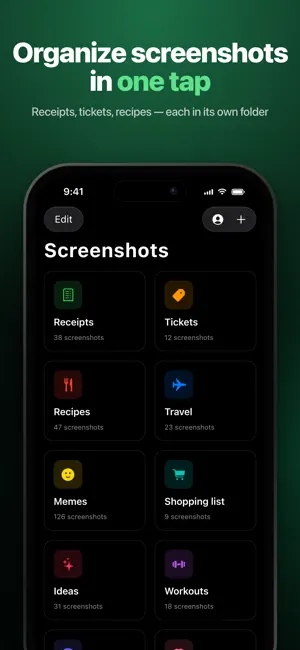
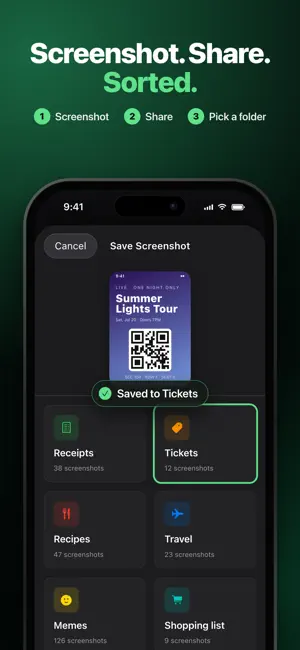
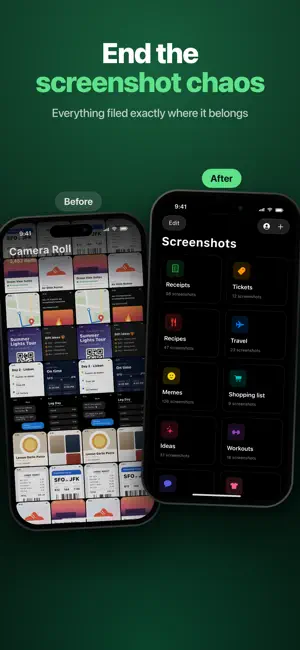
Organize Screenshots Instantly Stop dumping screenshots into your camera roll. Start organizing them the moment you take them. Screenshot Organizer + is the fastest way to organize screenshots on iPhone and iPad. Instead of letting screenshots pile up in Photos, organize them instantly using folders—right from the share sheet. The Problem with Screenshots: Take a screenshot. Tap the checkmark. It disappears into your camera roll with thousands of other photos. Later, you can't find it. Sound familiar? Most people have hundreds of unorganized screenshots mixed in with their photos—receipts, inspiration, work notes, designs, memes, recipes, and more. Finding anything becomes impossible. The Solution: Organize as You Capture Screenshot Organizer + changes how you handle screenshots. Here's how: Take a screenshot Tap the preview thumbnail Hit Share and choose Screenshot Organizer + Select a folder Done Your screenshot is organized from the start. No more digging through Photos. No more endless scrolling. No more clutter. Key Features: Organize Screenshots as You Take Them Save screenshots directly into custom folders using the iOS share sheet. One tap, perfectly organized. Custom Folders & Categories Create unlimited folders for: Receipts & bills Design inspiration Work & productivity Shopping & wishlists Recipes & cooking Travel plans Memes & funny content Study notes & references Real estate & house hunting Gift ideas And anything else you screenshot Keep Your Camera Roll Clean Stop mixing screenshots with your precious photos. Keep your Photos library clutter-free and easy to browse. Quick Access & Management Browse all your screenshots by category. Share, export, or delete screenshots with ease. Find what you need in seconds, not minutes. Customize Your Folders Choose from dozens of icons and colors to personalize your organization system. Make it yours. Premium Features (Optional Subscription) Upgrade to unlock even more power: Unlimited folders for any category you can imagine Unlimited screenshots—never worry about storage limits Batch Operations Export multiple screenshots at once Advanced Customization 50+ folder icons to choose from Full color palette for personalization Create a system that works for you iCloud Sync Seamless sync across all your devices Access screenshots on iPhone and iPad Automatic backup for peace of mind Who This Is For: Freelancers & Professionals Keep client feedback, project inspiration, and work references organized by project. Students & Researchers Organize study materials, lecture notes, and research references by subject. Shoppers & Deal Hunters Save product screenshots, price comparisons, and wishlists without cluttering Photos. Designers & Creatives Build mood boards and inspiration libraries organized by project or theme. Home & Life Management Keep receipts, bills, important documents, and family info perfectly organized. Anyone Who Takes Screenshots If you screenshot more than once a week, you need Screenshot Organizer +. Why Screenshot Organizer + Works: Most organization apps make you organize later. Screenshot Organizer + organizes at the moment of capture. This means you never build up a backlog. Fits Your Workflow Uses the native iOS share sheet you already know. No new habits to learn. Just share to organize. Actually Saves Time Stop spending minutes scrolling through Photos trying to find that one screenshot. Find it in seconds by opening the right folder. Scales With You Start simple with a few folders. Grow your system as your needs change. Premium unlocks unlimited organization. Stop letting screenshots pile up. Start organizing them instantly. Terms of Use: https://www.screenshotorganizer.website/terms.html Privacy Policy: https://www.screenshotorganizer.website/privacy.html
What’s new
Version 1.0.4 · Updated October 13, 2026
• Use the app in landscape on iPhone • Improved layouts for more screen sizes • Minor fixes and improvements
App privacy
The developer, Brandon Briggs, reported these privacy practices to Apple.
Data Not Collected
The developer does not collect any data from this app.
Alternatives to Screenshot Organizer +
Looking for apps like Screenshot Organizer +? Here are 6 similar apps on the App Store. The highest rated is Markever: Photo Backup (4.5/5), and all 6 are free to download.
-
 Snaplio – Screenshot Search
-
 Simple Screenshot Organizer
-
 Screenshot AI Organizer
1.0
Screenshot AI Organizer
1.0
-
 SnapOrganizer Smart Screenshot
-
 ConnectMentibus
-
 Markever: Photo Backup
4.5
Markever: Photo Backup
4.5
| App | Rating | Price | Last updated | Compare |
|---|---|---|---|---|
| Screenshot Organizer + | 4.3 / 5 (4 ratings) | Free | October 13, 2026 | |
| Snaplio – Screenshot Search | – | Free | Oct 20, 2026 | Compare |
| Simple Screenshot Organizer | – | Free | Jun 23, 2026 | Compare |
| Screenshot AI Organizer | 1.0 / 5 (1) | Free | Aug 19, 2026 | Compare |
| SnapOrganizer Smart Screenshot | – | Free | Apr 6, 2026 | Compare |
| ConnectMentibus | – | Free | Jan 28, 2026 | Compare |
| Markever: Photo Backup | 4.5 / 5 (2) | Free | Aug 20, 2026 | Compare |