

Spring - Video Editor
KineMaster Corporation Photo & Video iPhoneiPadiPod touch
Spring - Video Editor is a free Photo & Video app for iPhone and iPad by KineMaster Corporation. Rated 4.7/5 from 1,037 ratings. Requires iOS 18.0.
- Rating
- 4.7
- 1K ratings
- Price
- Free
- on the App Store
- Size
- 220 MB
- Age 12+
- Updated
- Sep 18
- 2026 · v2.2.2 (2435)
Screenshots

About Spring - Video Editor
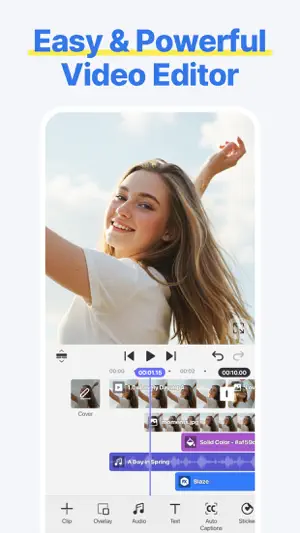
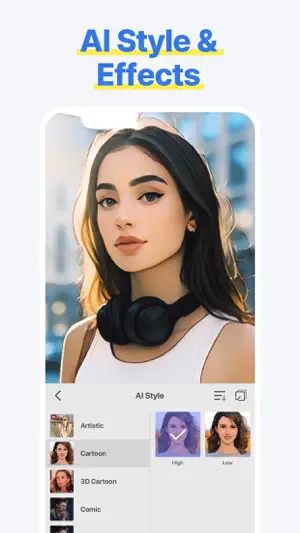
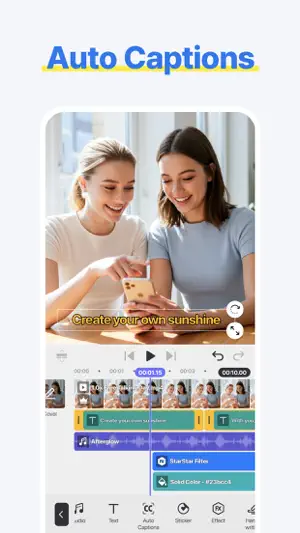
[ Make Your Videos Your Way! ] • Cut, combine, caption, overlay, and animate! • AI tools make editing easy • No watermarks, no sneaky purchases • Supports up to 4K at 60FPS [ AI That Helps! ] • AI Auto Captions: Add subtitles instantly from video or audio • AI Text-to-Speech: Create spoken audio from text with one tap • AI Music Match: Get song recommendations fast • AI Magic Removal & Noise Remover: Cut out the background and zap annoying sounds • AI Tracking, AI Upscaling, and AI Styles: Powerful AI tools to completely change how your video looks • AI Templates: Get a template recommended for your next awesome video! [ Done In 60 Seconds: Reels, Shorts, and TikTok Templates ] • Provides trendy short-form templates • Quickly complete by simply changing images or videos • Supports template saving, sharing, and collaboration functions [ Use Easy & Powerful Editing Tools ] • Make fast cuts, merge clips, make speed adjustments, and rewind • Use pan & zoom, transitions, effects, and slow motion • Add subtitles, text, stickers, and fun visual effects • Make color corrections, voice changes, or animate with keyframes • Multi-Selection Save time by selecting, aligning, duplicating, or repositioning multiple video project layers at once [ "Use-it-Anywhere" Music and Sound Effects ] • Amazing background music and sound effects • Safely upload to YouTube, Instagram, and TikTok [ Design & Decorate Your Videos ] • Choose from tons of stickers, graphic animations, and effects • Vibe with fun, trending and free video creative elements [ Make 4K Videos or HD Clips for Social Media ] • Save up to 4K resolution and 60 frames per second • Upload to social media, including YouTube, TikTok, and Instagram • Create special effects with transparent background videos (ideal for design and motion graphics work) Terms of Use for Spring and Asset Store Use: https://resource.kinemaster.com/document/tos.html Contact: [email protected]
Ratings & reviews
4.7
1K ratings
What’s new
Version 2.2.2 (2435) · Updated September 18, 2026
• Multi-selection: move and align multiple layers • Personalized AI template recommendations • Supports custom font import
App privacy
The developer, KineMaster Corporation, reported these privacy practices to Apple.
Data Not Linked to You
The following data, which may be collected but is not linked to your identity, may be used for the following purposes:
- Location: Coarse Location
- Identifiers: Device ID, User ID
- Usage Data: Advertising Data, Other Usage Data
- Purchases: Purchase History
- Other Data: Other Data Types
- Diagnostics: Crash Data, Performance Data, Other Diagnostic Data
- Contact Info: Email Address
- User Content: Customer Support
Used for: Third-Party Advertising, Developer’s Advertising or Marketing, Analytics, App Functionality
Alternatives to Spring - Video Editor
Looking for apps like Spring - Video Editor? Here are 6 similar apps on the App Store. The highest rated is VITA - Video Editor & Maker (4.8/5), and all 6 are free to download.
-
 KineMaster (OLD)
4.7
KineMaster (OLD)
4.7
-
 VITA - Video Editor & Maker
4.8
VITA - Video Editor & Maker
4.8
-
 Vozo AI Video Translator & Dub
4.8
Vozo AI Video Translator & Dub
4.8
-
 Filmora HD-Video Editor&Maker
4.7
Filmora HD-Video Editor&Maker
4.7
-
 Zeemo: AI Video&Auto Captions
4.7
Zeemo: AI Video&Auto Captions
4.7
-
 Adobe Premiere AI Video Editor
4.8
Adobe Premiere AI Video Editor
4.8
| App | Rating | Price | Last updated | Compare |
|---|---|---|---|---|
| Spring - Video Editor | 4.7 / 5 (1,037 ratings) | Free | September 18, 2026 | |
| KineMaster (OLD) | 4.7 / 5 (261,728) | Free | Sep 8, 2025 | Compare |
| VITA - Video Editor & Maker | 4.8 / 5 (77,935) | Free | Aug 13, 2026 | Compare |
| Vozo AI Video Translator & Dub | 4.8 / 5 (2,121) | Free | Jun 10, 2026 | Compare |
| Filmora HD-Video Editor&Maker | 4.7 / 5 (2,843) | Free | Dec 22, 2025 | Compare |
| Zeemo: AI Video&Auto Captions | 4.7 / 5 (1,479) | Free | Sep 23, 2026 | Compare |
| Adobe Premiere AI Video Editor | 4.8 / 5 (25,278) | Free | Sep 17, 2026 | Compare |