

Filmora HD-Video Editor&Maker
Shenzhen Wondershare Software Co., Ltd Photo & Video iPhoneiPadiPod touch
Filmora HD-Video Editor&Maker is a free Photo & Video app for iPhone and iPad by Shenzhen Wondershare Software Co., Ltd. Rated 4.7/5 from 2,842 ratings.
- Rating
- 4.7
- 2.8K ratings
- Price
- Free
- on the App Store
- Size
- 381 MB
- Age 4+
- Updated
- Dec 22
- 2025 · v14.3.27
Screenshots


About Filmora HD-Video Editor&Maker
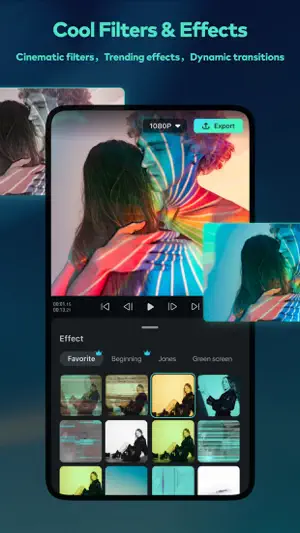
Filmora is an easy yet powerful video editor, enables you to quickly and easily create video stories from your video clips, photos, and music. An easy-to-use video editing app with advanced features and tons of music, stickers, filters, effects and transitions to be creative. You’ll save time and have a blast. [What you can do with Filmora Video Editor] - When you are on vacation, you’d like to make a vlog and share on YouTube / TikTok / Facebook / Instagram in short time. - When you are on business, you need to make a creative project presentation video on the road. - You could continue to finish the rest of the iPad/iPhone video project on your Mac. You could edit anywhere anytime. [Why you’ll love Filmora Video Editor] POWERFUL VIDEO EDITING [NEW] - Mask - Speech To Text (STT) - Speed Ramping(Curve Speed) - Keyframe - Tons of Tracks - Intuitive Timeline Zooms - Trim or Split Video - Adjust Video Speed - Rearrange Clips - Copy / Paste / Rotate Clip - PIP (Add Videos on Your Clips) - 4K export - User-friendly gesture for iPad [NEW] - Save in the cloud, edit videos anytime and anywhere AUDIO/MUSIC NEW - Beat detection - Music Library - Sound Effects - Voice Recording - Split Audio Clips - Volume Controls / Mute - Voice-Over TEXT / STICKERS - Add Texts or Stickers on Video or Photo - Fun Stickers - Personalize Text EFFECTS - Brightness, Temperature - Customize Filters and Overlays - Various Cool Transition [Filmora Video Editor Subscription Info] - With Filmora Unlimited subscription, you have access to all features and paid editing materials including stickers, exclusive filter, audio effects, 4K video export, etc. Also, watermark will be removed automatically. - Subscription length: Monthly, Annually or One-time Purchase. - No cancellation of the current subscription is allowed during active subscription period - Subscriptions will automatically be renewed unless auto-renew is turned off at least 24 hours before the time of renewal. - You can turn off auto-renewal at any time through your Account Settings. - Any unused portion of a free trial period, if offered, will be forfeited when the user purchases a subscription. [Terms of Use] https://www.wondershare.net/company/terms_conditions.html [Privacy Policy] https://www.wondershare.net/privacy.html [Contact Us] We value your feedback. Facebook: @filmoravideoeditor Twitter: @Filmora_Editor Instagram: @filmora_editor Web: https://filmora.wondershare.com User Guide: https://filmora.wondershare.com/guide/ [About Developer] Wondershare is a global leader in application software development with 6 offices around the globe and 1000+ talented employees. Our technology is powerful, that's how we provide simple and convenient software to millions of users in over 150 countries. Creativity is in our DNA. We empower digital creators with software solutions tailored to their imagination. Start imagining and jump into creative editing with Wondershare Filmora.
Ratings & reviews
4.7
2.8K ratings
What’s new
Version 14.3.27 · Updated December 22, 2025
Bug Fixes: Enhanced performance and user experience.
App privacy
The developer, Shenzhen Wondershare Software Co., Ltd, reported these privacy practices to Apple.
Data Used to Track You
The following data may be used to track you across apps and websites owned by other companies:
- Usage Data: Product Interaction, Other Usage Data
- Diagnostics: Crash Data, Performance Data, Other Diagnostic Data
Data Linked to You
The following data, which may be collected and linked to your identity, may be used for the following purposes:
- Purchases: Purchase History
Used for: Analytics, Product Personalization, App Functionality, Other Purposes
Data Not Linked to You
The following data, which may be collected but is not linked to your identity, may be used for the following purposes:
- Usage Data: Product Interaction, Other Usage Data
- Diagnostics: Crash Data, Performance Data, Other Diagnostic Data
Used for: Analytics, Product Personalization, App Functionality, Other Purposes
Alternatives to Filmora HD-Video Editor&Maker
Looking for apps like Filmora HD-Video Editor&Maker? Here are 6 similar apps on the App Store. The highest rated is VITA - Video Editor & Maker (4.8/5), and all 6 are free to download.
-
 KineMaster (OLD)
4.7
KineMaster (OLD)
4.7
-
 Filmmaker Pro - Video Editor
4.6
Filmmaker Pro - Video Editor
4.6
-
 Magisto Video Editor & Maker
4.6
Magisto Video Editor & Maker
4.6
-
 KineMaster - AI Video Editor
4.7
KineMaster - AI Video Editor
4.7
-
 VITA - Video Editor & Maker
4.8
VITA - Video Editor & Maker
4.8
-
 DaVinci Resolve for iPad
4.5
DaVinci Resolve for iPad
4.5
| App | Rating | Price | Last updated | Compare |
|---|---|---|---|---|
| Filmora HD-Video Editor&Maker | 4.7 / 5 (2,842 ratings) | Free | December 22, 2025 | |
| KineMaster (OLD) | 4.7 / 5 (261,803) | Free | Sep 8, 2025 | Compare |
| Filmmaker Pro - Video Editor | 4.6 / 5 (263,143) | Free | Oct 27, 2026 | Compare |
| Magisto Video Editor & Maker | 4.6 / 5 (123,393) | Free | Mar 26, 2025 | Compare |
| KineMaster - AI Video Editor | 4.7 / 5 (43,358) | Free | Nov 1, 2026 | Compare |
| VITA - Video Editor & Maker | 4.8 / 5 (78,136) | Free | Aug 13, 2026 | Compare |
| DaVinci Resolve for iPad | 4.5 / 5 (2,997) | Free | Oct 27, 2026 | Compare |