

Adobe Premiere AI Video Editor
Adobe Inc. Photo & Video iPhoneiPadiPod touch
Adobe Premiere AI Video Editor is a free Photo & Video app for iPhone and iPad by Adobe Inc. Rated 4.8/5 from 25,196 ratings. Requires iOS 18.0.
- Rating
- 4.8
- 25.1K ratings
- Price
- Free
- on the App Store
- Size
- 207 MB
- Age 12+
- Updated
- Sep 17
- 2026 · v26.20.1
Screenshots



About Adobe Premiere AI Video Editor
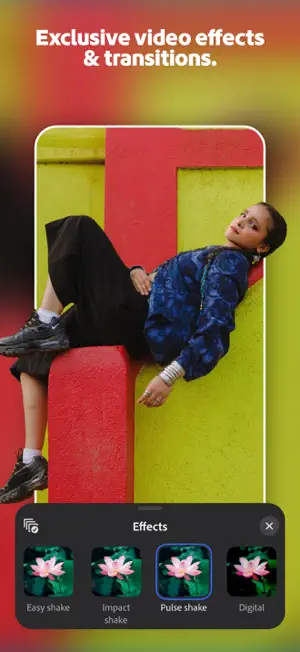
Adobe Premiere mobile brings you effortless video editing with total control. Meet the fast, free, and focused AI video editor that's powerful enough for any idea, yet simple enough for anyone to use. Enjoy a video editor without ads or watermarks for quick and seamless content creation. Get unmatched speed on a precise multi-track timeline, and studio-quality audio with crystal clear voice recordings. Create stand out video edits to share on TikTok, YouTube Shorts, Instagram Reels, and Facebook, and level up your content with AI video editing tools. Kickstart your project with images, sound effects, stickers, and videos from Adobe’s massive library of free creative assets, or create your own with our AI video generator. Get inspired with exclusive templates for YouTube Shorts, record voiceovers, and speed up your editing with auto captions. Capture the moment and create trends with the Adobe Premiere all-in-one video editor. ADOBE PREMIERE VIDEO EDITOR FEATURES: LIGHTNING-FAST VIDEO EDITING TIMELINE • Frame-Accurate Edits: Trim, split, crop, or merge clips in seconds. • Auto Captions: Generate captions instantly with AI speech-to-text. • Smooth Speed Effects: speed up, slow down, reverse or freeze key moments. • Unique Color Presets: Apply Lightroom presets and fine tune to fit your aesthetic. • Instant AI Background Removal: Cut out subjects in a tap. Create overlays and title effects. EDIT VIDEOS WITH PRECISION CONTROL • Video Editor with Unlimited Tracks: Overlay clips and organize your timeline with no limits to your creativity. • Post to Any Platform: Resize videos to fit any aspect ratio and share anywhere easily. • Advanced Clip Controls: Flip, fit, fill, or extract audio from video clips. • Keyframes: Animate elements with total control. • Video Effects & Transitions: edit videos with trending effects like glitch, blur, wipe and more. GENERATIVE AI VIDEO EDITING TOOLS • Text to Image AI Video Generator: Generate videos and images using Firefly AI and top third-party AI models from Google, ChatGPT, and more. • AI Background Expansion: Extend, enhance, or replace backgrounds instantly. • AI Enhance Audio: Create studio quality voiceovers with AI. • Generate Sound Effects: Use your voice to create unique sounds. EXPLORE VIDEO TEMPLATES • Get going with quality images, sounds, and videos from the Adobe library. • Exclusive YouTube Shorts Templates: Get inspired with our library of free video templates to create the perfect post. • Video Filters: add cinematic film filters or adjust video brightness, contrast, and more to match your aesthetic. • Edit Videos with Music: Select from free and royalty free tracks. • Fonts for Any Style: Match your creative vision with free Adobe Fonts. SPEED AND PERFORMANCE • Get a video editor built natively on iOS for fast and smooth video editing. • Import assets from your device or favorite cloud storage provider. • Focus on video editing without pop-up ads or watermarks. • Export videos in 4k for free. • Respects Creator Content Ownership: Adobe never trains on user content. FREE TO DOWNLOAD AND USE • Everything you need to edit videos is available for free. Only pay when you need Firefly generative AI credits. TERMS & CONDITIONS: Your use of this application is governed by the Adobe General Terms of Use http://www.adobe.com/go/terms_linkfree_en and the Adobe Privacy Policy http://www.adobe.com/go/privacy_policy_linkfree_en. Do not sell or share my personal information: www.adobe.com/go/ca-rights-linkfree
Ratings & reviews
4.8
25.1K ratings
What’s new
Version 26.20.1 · Updated September 17, 2026
Bug fixes and improvements Plus, here's what launched this past month: • Share your projects easily: bundle all your media and project files into one zip to send to a friend, drop into storage, or AirDrop across your Apple devices • New project settings let you control clip snapping, project background, and when the social overlays show on your projects • Apply to All now works across every track, so it's easier than ever to apply filters or volume changes • Speed adjustments can now be applied to audio only clips
App privacy
The developer, Adobe Inc., reported these privacy practices to Apple.
Data Used to Track You
The following data may be used to track you across apps and websites owned by other companies:
- Identifiers: Device ID
Data Linked to You
The following data, which may be collected and linked to your identity, may be used for the following purposes:
- Purchases: Purchase History
- Contact Info: Email Address, Name
- Usage Data: Product Interaction
- User Content: Photos or Videos, Audio Data
- Identifiers: User ID, Device ID
Used for: Developer’s Advertising or Marketing, Analytics, App Functionality, Other Purposes
Data Not Linked to You
The following data, which may be collected but is not linked to your identity, may be used for the following purposes:
- Location: Precise Location
- Diagnostics: Crash Data
Used for: Analytics, App Functionality
Alternatives to Adobe Premiere AI Video Editor
Looking for apps like Adobe Premiere AI Video Editor? Here are 6 similar apps on the App Store. The highest rated is Evoto: Photo Editor & Retouch (4.9/5), and all 6 are free to download.
-
 DaVinci Resolve for iPad
4.5
DaVinci Resolve for iPad
4.5
-
 Evoto: Photo Editor & Retouch
4.9
Evoto: Photo Editor & Retouch
4.9
-
 Luminar: Image Editor&Enhancer
4.8
Luminar: Image Editor&Enhancer
4.8
-
 OpusClip - AI video clipping
4.9
OpusClip - AI video clipping
4.9
-
 YouTube Create: Video editor
4.6
YouTube Create: Video editor
4.6
-
 CapCut Pad
4.3
CapCut Pad
4.3
| App | Rating | Price | Last updated | Compare |
|---|---|---|---|---|
| Adobe Premiere AI Video Editor | 4.8 / 5 (25,196 ratings) | Free | September 17, 2026 | |
| DaVinci Resolve for iPad | 4.5 / 5 (2,945) | Free | Sep 8, 2026 | Compare |
| Evoto: Photo Editor & Retouch | 4.9 / 5 (2,799) | Free | Sep 25, 2026 | Compare |
| Luminar: Image Editor&Enhancer | 4.8 / 5 (4,548) | Free | Sep 23, 2026 | Compare |
| OpusClip - AI video clipping | 4.9 / 5 (7,053) | Free | Sep 22, 2026 | Compare |
| YouTube Create: Video editor | 4.6 / 5 (3,059) | Free | Sep 24, 2026 | Compare |
| CapCut Pad | 4.3 / 5 (1,053) | Free | Sep 18, 2026 | Compare |