

Luminar: Photo Editor&Enhancer
Skylum Photo & Video iPhoneiPadiPod touch
Luminar: Photo Editor&Enhancer is a free Photo & Video app for iPhone and iPad by Skylum. Rated 4.8/5 from 4,734 ratings. Requires iOS 17.0.
- Rating
- 4.8
- 4.7K ratings
- Price
- Free
- on the App Store
- Size
- 667 MB
- Age 4+
- Updated
- Oct 22
- 2026 · v4.5.1
Screenshots



About Luminar: Photo Editor&Enhancer
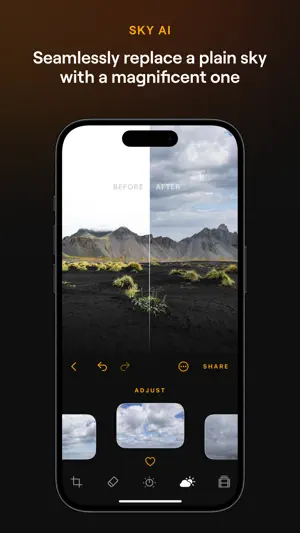
Luminar — Your all-in-one, on-the-go photo editor and creative companion for iPhone, iPad and Vision Pro. Explore powerful AI-driven tools and an interactive interface that responds to your touch, delivering a uniquely engaging photo editing experience. Streamlined design with unparalleled control Luminar's user-friendly design allows you to edit your photos with intuitive gestures, featuring smoothly gliding sliders and spinning dials that respond realistically to your touch with motion and sound. With Luminar, there are no complicated functions or processes. Less fuss, more creativity. Smart AI enhancements Powered by cutting-edge technology, Luminar is the revolutionary smart AI photo enhancer for your every need: - SkyAI: Seamlessly replace dull skies with brilliant ones for impressive backdrops - EnhanceAI: Effortlessly enhance photo quality with a single slide, adjusting color, tone and clarity for professional results in seconds - StructureAI: Unlock hidden details and clarity in your images, enhancing contrast and texture for striking visual impact - Light Depth: Add natural depth and dimension with AI-powered, depth-aware lighting - FaceAI: Automatically enhance face features, brighten the face and subtly refine proportions - SkinAI: Automatically retouch the skin and remove imperfections for a clean and smooth result - BodyAI: Shape a subject’s midsection in a realistic way by adding or removing volume - BokehAI: Blur backgrounds, adjust focus, customize bokeh shapes All-in-one powerhouse - Curves: Edit photos with precise color and tone adjustments, achieving the perfect balance and mood - Details: Enhance every detail with just a tap, bringing your images to life with clarity and sharpness - Crop: Easily trim, align, flip and rotate for the perfect composition, ensuring your images stand out - Landscape: Transform your landscapes with ease and enhance golden hour lighting, brighten foliage, or remove haze for breathtaking results - Monochrome: Convert your color photos to stunning black and white masterpieces, adding depth and mood to your images - Erase: Effortlessly remove distracting elements from your photos to place focus on your subjects - Photo Filters: Enjoy a diverse collection of photo effects that add a unique style to your shots - RAW File Support: Edit your RAW photos directly on your mobile, preserving maximum image quality Seamless integration with Apple devices Designed for the Apple ecosystem, Luminar makes it easy to edit photos taken on your iPhone or iPad, enhancing your editing workflow. On the iPad, you can add personal touches using the Apple Pencil for sharper details and convenient edits. Plus, discover a new immersive editing experience with Vision Pro, optimized for iPadOS and VisionOS. Luminar — Envision more Whether you're a beginner or a pro, the Luminar AI photo editor offers a range of features to suit your needs, including detail enhancement, photo retouching, color adjustment, and more. Try Luminar now and experience next-level photo editing at your fingertips. Compatibility Note: The Luminar picture editor is optimized for devices running iOS/iPadOS 17 and newer. Please note that on iPad 6-gen, certain advanced features such as Erase, Sky AI and Relight AI are not available. To access all features, you need to purchase one of the plans below: 1 Week subscription 12 Months subscription (+7 days free trial. Once the trial is over, you will be charged a yearly subscription) Lifetime license Subscriptions auto-renew at the cost of the chosen package, unless canceled 24-hours in advance prior to the end of the current period. The subscription fee is charged to your iTunes account at confirmation of purchase. You may manage your subscription and turn off auto-renewal by going to your Account Settings after purchase. Privacy Policy: https://skylum.com/legal Terms of use: https://skylum.com/legal-eula
Ratings & reviews
4.8
4.7K ratings
What’s new
Version 4.5.1 · Updated October 22, 2026
Luminar Mobile 4.5.1: Faster and steadier • Stability and performance improvements Update now
App privacy
The developer, Skylum, reported these privacy practices to Apple.
Data Used to Track You
The following data may be used to track you across apps and websites owned by other companies:
- Usage Data: Advertising Data
Data Linked to You
The following data, which may be collected and linked to your identity, may be used for the following purposes:
- Usage Data: Advertising Data
Used for: Analytics, App Functionality
Data Not Linked to You
The following data, which may be collected but is not linked to your identity, may be used for the following purposes:
- Identifiers: Device ID
- Usage Data: Product Interaction
- Diagnostics: Crash Data
Used for: Analytics, App Functionality
Alternatives to Luminar: Photo Editor&Enhancer
Looking for apps like Luminar: Photo Editor&Enhancer? Here are 6 similar apps on the App Store. The highest rated is Evoto: Photo Editor & Retouch (4.9/5), and all 6 are free to download.
-
 Evoto: Photo Editor & Retouch
4.9
Evoto: Photo Editor & Retouch
4.9
-
 Labbet: Photo & Video Editing
4.7
Labbet: Photo & Video Editing
4.7
-
 Leica LUX - Pro Manual Camera
4.9
Leica LUX - Pro Manual Camera
4.9
-
 Capture One
3.5
Capture One
3.5
-
 Snap Pro Camera: Manual DSLR
4.7
Snap Pro Camera: Manual DSLR
4.7
-
 Darkroom: Photo & Video Editor
4.8
Darkroom: Photo & Video Editor
4.8
| App | Rating | Price | Last updated | Compare |
|---|---|---|---|---|
| Luminar: Photo Editor&Enhancer | 4.8 / 5 (4,734 ratings) | Free | October 22, 2026 | |
| Evoto: Photo Editor & Retouch | 4.9 / 5 (3,100) | Free | Sep 29, 2026 | Compare |
| Labbet: Photo & Video Editing | 4.7 / 5 (425) | Free | Sep 22, 2026 | Compare |
| Leica LUX - Pro Manual Camera | 4.9 / 5 (7,971) | Free | Oct 22, 2026 | Compare |
| Capture One | 3.5 / 5 (331) | Free | Oct 2, 2026 | Compare |
| Snap Pro Camera: Manual DSLR | 4.7 / 5 (5,318) | Free | Oct 6, 2026 | Compare |
| Darkroom: Photo & Video Editor | 4.8 / 5 (29,374) | Free | Oct 28, 2026 | Compare |