

YouCut - AI Video Editor
SHANTANU PTE. LTD. Photo & Video iPhoneiPadiPod touch
YouCut - AI Video Editor is a free Photo & Video app for iPhone and iPad by SHANTANU PTE. LTD. Rated 4.8/5 from 22,957 ratings. Requires iOS 15.0.
- Rating
- 4.8
- 22.9K ratings
- Price
- Free
- on the App Store
- Size
- 153 MB
- Age 4+
- Updated
- Aug 19
- 2026 · v1.31.0
Screenshots

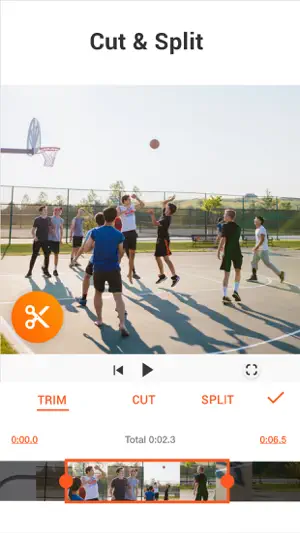


About YouCut - AI Video Editor
YouCut is an easy-to-use [Video Editor] and [Video Maker] for YouTube and social media. Create polished videos faster with an intuitive timeline and AI-powered tools like Auto Captions and Background Removal. [Easy & No Watermark] Edit videos like a pro. Whether you want to make photo videos or share moments with friends, YouCut is the best video editing app with all features you need. Features: [Powerful Video Editor and Movie Maker] YouCut as one of top AI video editor apps, provide you with AI Trim, AI Captions, AI Enhance, AI Cutout, etc. You can zoom in/out timeline for precisely editing. No banner ads. [AI Video Editor] AI Video Enhance - Restore blurry videos and photos to HD. Auto Captions - Generate accurate captions for social media. [Video Speed Control] Fast/slow motion video (Adjust video speed from 0.2× to 100×), Edit video and adjust speed with video filters and effects. [Photo Slideshow Maker] Music video editor with photos, professional video combiner, merge photos to create slideshow. Make video collage easily with Picture-in-Picture (PIP), keyframe. Combine videos with photos, add custom photo cover, auto captions for video, edit videos with music like a pro. [No Watermark] As music video editor and full screen video maker for YouTube, YouCut never add Watermark to your video. There is no banner ads on the screen, unlike other video editing apps. [Add Music to Video] It is a pro TikTok editor and YouTube intro maker that meets all your needs. 1. 100+ music and built-in sound effects. 2. Edit videos with your music. 3. Extract music from video. [Video Filters & AI Effects] Add movie style video filters and AI effects to video. Best Movie maker to enhance quality without watermark. [Video Color Adjust] Adjust video brightness, contrast, saturation, etc. Custom video filters and effects. Best movie cutter and AI captions generator for videos. [Change Video Background] 1. Change background color of your video, blur background. 2. Remove background with AI in a tap. [Keyframe] Add motion to clips by keyframe. [Video Compressor] 1. HD video maker & TikTok editor. 2. YouCut - AI video editor and video maker support resolution up to 4K. [Share Video] Directly share video to YouTube, Instagram, TikTok…to get hundreds of 'likes'! Captions AI with 99+ languages, Photo Slideshow, Add music, materials, AI video, Apply transition effects, Apply FX video filters, Rotate video, Share to YouTube... Fast/Slow motion video editor without losing video quality! If you have any question about YouCut (AI video editor, video cutter & video enhancer, photo slideshow maker), please email us at: [email protected] For more tutorials, subscribe us on YouTube @YouCutApp [YouCut Pro Unlimited Subscription] - With an YouCut Pro Unlimited subscription, you have access to all features and paid editing materials. - YouCut Pro Unlimited subscription is billed monthly or annually at the rate corresponding to the selected plan. - Payment will be charged to iTunes Account at confirmation of purchase. - Subscription automatically renews unless auto-renew is turned off at least 24-hours before the end of the current period. - Account will be charged for renewal within 24-hours prior to the end of the current period, and identify the cost of the renewal. - Subscriptions may be managed by the user and auto renewal may be turned off by going to the user's Account Settings after purchase. - Any unused portion of a free trial period, if offered, will be forfeited when the user purchases a subscription to that publication, where applicable. [Terms of Use] https://inshot.cc/terms/terms_youcut.pdf [Privacy Policy] https://inshot.cc/terms/privacy_youcut.pdf [Disclaimer] YouCut is not affiliated, associated, sponsored, endorsed by, or in any way officially connected with YouTube, Instagram, TikTok, Facebook.
Ratings & reviews
4.8
22.9K ratings
What’s new
Version 1.31.0 · Updated August 19, 2026
• Reduce Noise: Use AI to reduce background noise for clearer audio • Redesigned Home: Discover editing tools and features more easily • Bug Fixes & Improvements: Enjoy a smoother editing experience Thanks for using YouCut - Video Editor! Your feedback and suggestions are important to us. Reach us at: [email protected] For more tutorials and inspiration, visit our YouTube channel: https://youtube.com/@YouCutApp
App privacy
The developer, SHANTANU PTE. LTD., reported these privacy practices to Apple.
Data Used to Track You
The following data may be used to track you across apps and websites owned by other companies:
- Identifiers: Device ID
Data Not Linked to You
The following data, which may be collected but is not linked to your identity, may be used for the following purposes:
- Identifiers: Device ID
- Usage Data: Product Interaction
- Diagnostics: Crash Data
Used for: Third-Party Advertising, Analytics
Alternatives to YouCut - AI Video Editor
Looking for apps like YouCut - AI Video Editor? Here are 6 similar apps on the App Store. The highest rated is Videoshop - Video Editor (4.9/5), and all 6 are free to download.
-
 VideoShow AI Video Editor
4.7
VideoShow AI Video Editor
4.7
-
 Filmmaker Pro - Video Editor
4.6
Filmmaker Pro - Video Editor
4.6
-
 Video Editor ·
4.7
Video Editor ·
4.7
-
 Videoshop - Video Editor
4.9
Videoshop - Video Editor
4.9
-
 VITA - Video Editor & Maker
4.8
VITA - Video Editor & Maker
4.8
-
 KineMaster - AI Video Editor
4.7
KineMaster - AI Video Editor
4.7
| App | Rating | Price | Last updated | Compare |
|---|---|---|---|---|
| YouCut - AI Video Editor | 4.8 / 5 (22,957 ratings) | Free | August 19, 2026 | |
| VideoShow AI Video Editor | 4.7 / 5 (45,695) | Free | Sep 15, 2026 | Compare |
| Filmmaker Pro - Video Editor | 4.6 / 5 (263,048) | Free | Sep 20, 2026 | Compare |
| Video Editor · | 4.7 / 5 (218,035) | Free | Jul 1, 2026 | Compare |
| Videoshop - Video Editor | 4.9 / 5 (363,793) | Free | Apr 5, 2025 | Compare |
| VITA - Video Editor & Maker | 4.8 / 5 (77,931) | Free | Aug 13, 2026 | Compare |
| KineMaster - AI Video Editor | 4.7 / 5 (42,648) | Free | Sep 16, 2026 | Compare |