

3D Snap: LiDAR Room Scanner
BPMobile Productivity iPhoneiPadiPod touch
3D Snap: LiDAR Room Scanner is a free Productivity app for iPhone and iPad by BPMobile. Rated 3.9/5 from 547 ratings. Requires iOS 18.0.
- Rating
- 3.9
- 547 ratings
- Price
- Free
- on the App Store
- Size
- 170 MB
- Age 4+
- Updated
- Sep 30
- 2026 · v3.13
Screenshots

About 3D Snap: LiDAR Room Scanner
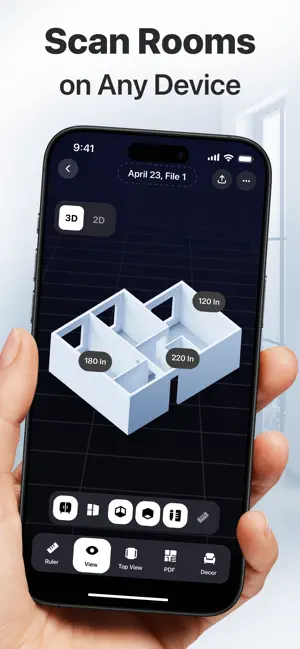
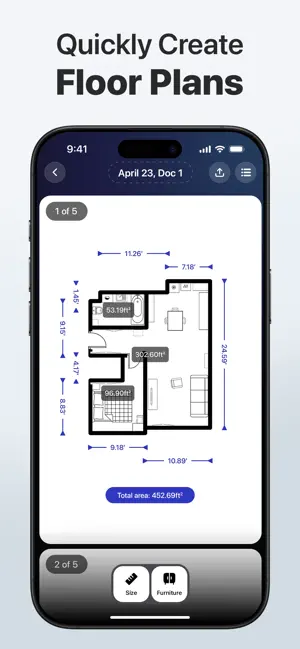
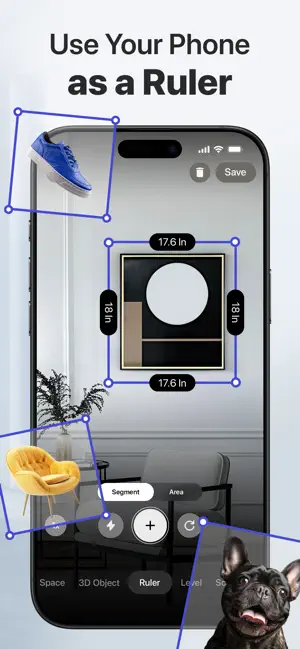
Turn your iPhone into the ultimate floor plan creator with 3D Snap, powered by cutting-edge LiDAR and AI. Renovating your home or rearranging furniture? Moving and want to make sure everything will fit in your new apartment? 3D Snap lets you scan rooms in seconds, saving you hours of manual measuring. Just point your camera and start scanning. The smart LiDAR and AI technologies capture walls, doors, and furniture—delivering complete floor plans, 3D models, and precise dimensions instantly. Join 2 million+ professionals and DIY enthusiasts who plan smarter. WHY 3D SNAP? • Time saved: Scan a room in 30 seconds. • No LiDAR required: AI-powered photo scanning creates a full 3D room plan on any device. • Accuracy you can trust: Measure walls, areas, and furniture for draft planning and fit checks. • Photo to 3D: Capture objects with a single photo for instant 3D visualization. • Professional exports: Share floor plans and 3D models as PDFs or import them into design software. • Easy to use: DIYers and pros alike can scan, plan, and visualize without technical skills. FLOOR PLAN CREATOR Need a floor plan for a contractor or client? Scan any room and get a complete layout instantly. Just walk through with your camera, and walls, doors, and furniture will appear automatically. Get accurate results in just 30 seconds. 3D OBJECT SCANNER Capture any object in full 3D—even items in hard-to-reach places, like ceiling lights, high windows, or tall bookcases. Just snap a photo and let AI create a 3D prototype instantly. Perfect for checking how furniture will fit into your space or creating references for custom orders. MEASURE & ALIGN TOOLS Point your camera at any surface to get instant dimensions with the AR ruler. Calculate areas for flooring or paint estimates. Check horizontal and vertical alignment to hang art or level shelves. EXPORT & SHARE Save your scans as PDFs, 3D files, or images. Send floor plans to contractors, import models into design software, or add them to client proposals. Your scans will be ready for any professional workflow, straight from your iPhone. DECOR & VISUALIZATION Experiment with colors and textures for floors and walls using single-click presets. Try different furniture arrangements to see how your space will look before you buy, build, or renovate. Your all-in-one 3D scanner app is here. Download 3D Snap and turn any space into a plan! 3D Snap PRO – Subscribe to get access to all features. You will be charged after your purchase is confirmed. – Subscriptions auto-renew 24 hours before the expiration date. You can manage your subscriptions in Account Settings on the App Store. Terms of Use: http://bpmob.com/3d_scan_ios/terms/en/ Privacy Policy: http://bpmob.com/3d_scan_ios/privacy/en/
Ratings & reviews
3.9
547 ratings
What’s new
Version 3.13 · Updated September 30, 2026
Thanks for using 3D Snap! In this version: — Bug fixes and performance enhancements We love getting feedback from you! Please leave your reviews so we can keep making the app even better.
App privacy
The developer, BPMobile, reported these privacy practices to Apple.
Data Used to Track You
The following data may be used to track you across apps and websites owned by other companies:
- Purchases: Purchase History
- Location: Coarse Location
- Identifiers: User ID, Device ID
- Usage Data: Product Interaction, Advertising Data, Other Usage Data
- Diagnostics: Performance Data
- Other Data: Other Data Types
Data Linked to You
The following data, which may be collected and linked to your identity, may be used for the following purposes:
- Identifiers: Device ID, User ID
- Usage Data: Advertising Data, Product Interaction, Other Usage Data
- Other Data: Other Data Types
- Purchases: Purchase History
- Location: Coarse Location
- User Content: Customer Support
- Diagnostics: Performance Data, Crash Data
Used for: Third-Party Advertising, Analytics, App Functionality
Data Not Linked to You
The following data, which may be collected but is not linked to your identity, may be used for the following purposes:
- Location: Precise Location
Used for: Analytics
Alternatives to 3D Snap: LiDAR Room Scanner
Looking for apps like 3D Snap: LiDAR Room Scanner? Here are 6 similar apps on the App Store. The highest rated is ArcSite: Quick CAD Floor Plans (4.7/5), and all 6 are free to download.
-
 DrawPlan
3.5
DrawPlan
3.5
-
 Keyplan 3D Lite - Home design
4.5
Keyplan 3D Lite - Home design
4.5
-
 ArcSite: Quick CAD Floor Plans
4.7
ArcSite: Quick CAD Floor Plans
4.7
-
 Home Design 3D: Draw & Plan
4.3
Home Design 3D: Draw & Plan
4.3
-
 magicplan
4.7
magicplan
4.7
-
 Roomle: 3D Room Planner & AR
4.2
Roomle: 3D Room Planner & AR
4.2
| App | Rating | Price | Last updated | Compare |
|---|---|---|---|---|
| 3D Snap: LiDAR Room Scanner | 3.9 / 5 (547 ratings) | Free | September 30, 2026 | |
| DrawPlan | 3.5 / 5 (5,319) | Free | Oct 23, 2026 | Compare |
| Keyplan 3D Lite - Home design | 4.5 / 5 (52,771) | Free | Aug 10, 2026 | Compare |
| ArcSite: Quick CAD Floor Plans | 4.7 / 5 (9,220) | Free | Oct 23, 2026 | Compare |
| Home Design 3D: Draw & Plan | 4.3 / 5 (104,895) | Free | Oct 6, 2026 | Compare |
| magicplan | 4.7 / 5 (41,308) | Free | Oct 27, 2026 | Compare |
| Roomle: 3D Room Planner & AR | 4.2 / 5 (1,492) | Free | Oct 22, 2026 | Compare |