

DrawPlan: Floor Plan Maker AI
Fleet Investments LLC Productivity iPhoneiPadiPod touch
DrawPlan: Floor Plan Maker AI is a free Productivity app for iPhone and iPad by Fleet Investments LLC. Rated 3.5/5 from 5,329 ratings. Requires iOS 15.0.
- Rating
- 3.5
- 5.3K ratings
- Price
- Free
- on the App Store
- Size
- 87 MB
- Age 4+
- Updated
- Nov 6
- 2026 · v6.0.5
Screenshots


About DrawPlan: Floor Plan Maker AI
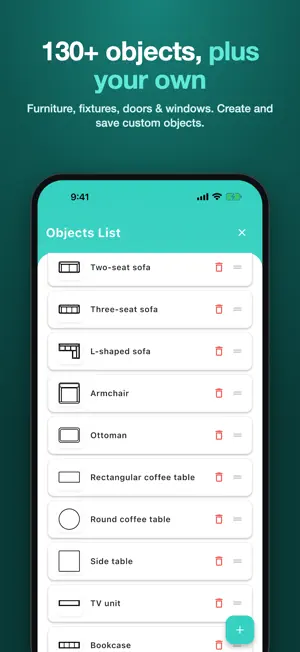
DrawPlan makes it easy to draw clear, professional floor plans, from quick sketches to accurate, to-scale house and room plans. No drafting experience required. Your saved plans are always free to open and edit. Key Features Draw your way - Sketch freely with your finger for quick layouts - Or draw precise, to-scale plans with automatic wall dimensions - Choose which walls show their measurements, for a clean plan AI drawing - Describe the layout you want, such as "a 2 bed, 2 bath apartment", and DrawPlan AI draws it - Let AI help you plan rooms, add furniture and learn faster 130+ objects, plus your own - Furniture, kitchen and bathroom fixtures, doors, windows, stairs and more, sorted by room - Create, save and reuse your own custom objects - Add labels and dimensions anywhere Trace and refine - Import an image of an existing plan - Trace or draw directly over the background Export and share - Export your plan as a PDF, image or DXF - Send it to your builder, client or team Built for real projects - Renovations, real estate, trades, interior design and DIY - Create and manage as many plans as you need - Access your plans across devices with cloud sync Premium Features Upgrade to Monthly or Yearly to unlock: - Cloud sync across all your devices - High-resolution exports (PNG/PDF) - Clean exports without grids or watermarks - Priority support and early access to new features Try it for free! Subscription Notes: Payment will be charged to your Apple ID account after the free trial ends. Subscriptions automatically renew unless canceled at least 24 hours before the end of the current period. You can manage or cancel your subscription anytime in your App Store account settings. Privacy policy: https://www.drawplan.net/privacy-policy/ Terms of use: https://www.drawplan.net/terms-of-use/
Ratings & reviews
3.5
5.3K ratings
What’s new
Version 6.0.5 · Updated November 6, 2026
- 130+ new objects: furniture, kitchen, bathroom, doors and windows, sorted by room - Create, save and manage your own objects - Cleaner dimension labels: show them on the walls you choose - Improved AI drawing - Free access to your saved plans - Bug fixes
App privacy
The developer, Fleet Investments LLC, reported these privacy practices to Apple.
Data Not Linked to You
The following data, which may be collected but is not linked to your identity, may be used for the following purposes:
- Contact Info: Email Address
- Usage Data: Other Usage Data
- Diagnostics: Crash Data, Performance Data
- Purchases: Purchase History
Used for: Developer’s Advertising or Marketing, Analytics, App Functionality
Alternatives to DrawPlan: Floor Plan Maker AI
Looking for apps like DrawPlan: Floor Plan Maker AI? Here are 6 similar apps on the App Store. The highest rated is ArcSite: Quick CAD Floor Plans (4.7/5), and all 6 are free to download.
-
 ArcSite: Quick CAD Floor Plans
4.7
-
 Draft Paper
4.4
-
 Keyplan 3D Lite - Home design
4.5
-
 magicplan
4.7
-
 Home Design 3D: Draw & Plan
4.3
-
 RenoPlan - Floor Plan Creator
4.5
| App | Rating | Price | Last updated | Compare |
|---|---|---|---|---|
| DrawPlan: Floor Plan Maker AI | 3.5 / 5 (5,329 ratings) | Free | November 6, 2026 | |
| ArcSite: Quick CAD Floor Plans | 4.7 / 5 (9,281) | Free | Nov 6, 2026 | Compare |
| Draft Paper | 4.4 / 5 (15,901) | Free | Nov 4, 2026 | Compare |
| Keyplan 3D Lite - Home design | 4.5 / 5 (52,785) | Free | Aug 10, 2026 | Compare |
| magicplan | 4.7 / 5 (41,375) | Free | Nov 4, 2026 | Compare |
| Home Design 3D: Draw & Plan | 4.3 / 5 (104,989) | Free | Oct 6, 2026 | Compare |
| RenoPlan - Floor Plan Creator | 4.5 / 5 (754) | Free | Feb 13, 2025 | Compare |