

Pocket Schedule Planner
Beesoft Apps Productivity iPhoneiPadiPod touch
Pocket Schedule Planner is a free Productivity app for iPhone and iPad by Beesoft Apps. Rated 4.5/5 from 8,265 ratings. Requires iOS 13.
- Rating
- 4.5
- 8.2K ratings
- Price
- Free
- on the App Store
- Size
- 75 MB
- Age 4+
- Updated
- Apr 16
- 2026 · v3.7.13
Screenshots
About Pocket Schedule Planner
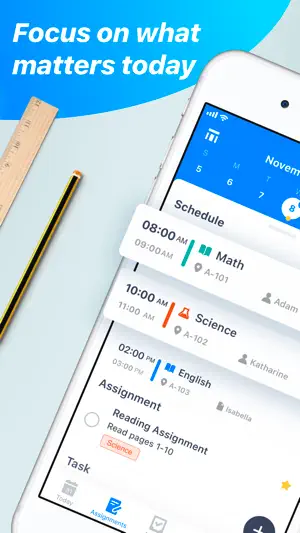
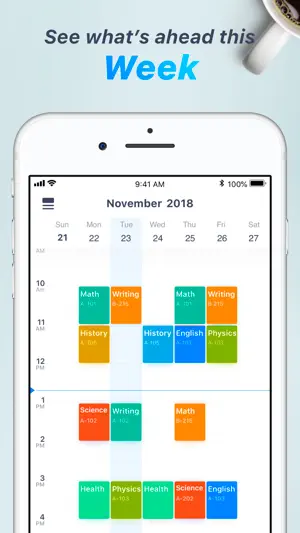
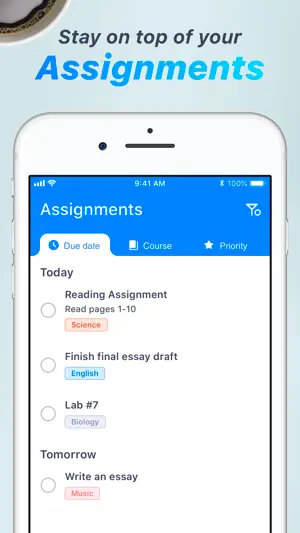
*Are you a student who often troubled with when and where the next class will be? *Are you a teacher who often troubled with different courses of different grades & classes? *Are you a parent who often troubled with that you would like to take care of kids while they are having exam but you do not even know when the exam is? Then Pocket Schedule is for you! Designed and developed by polycents! Our Pocket Schedule is one of the best tools to track down all your courses, classes, and assignments. Once you use the app you will want nothing else to make your school life easier. ORGANIZE COURSES, CLASSES & EXAMS You can easily input and manage your courses, classes, and exams. All your classes will be displayed in a week-view within the schedule module. You are supplied with a set of icons for your courses, and the icons will be continually updated in every upgrade version. By the way, you can cancel the separate class in case of emergency events. MANAGE ASSIGNMENT Kinds of sections are designed to track down all your assignments easily and intuitively. You can either organize your assignments by date, by course or by priority or sort them by completed or uncompleted. KEEP YOU ALERT A powerful notification feature makes sure that you will never miss even one class or assignment. The app allows you to set general notification of all classes and separate alarms of each assignment. FILLED WITH FEATURES -Easily manage different semesters and holidays. -Manage detailed information of all your instructors. -Add a course, exam or assignment easily. -Each course has a well-designed icon. -Sort all assignments into different sections as you want. -Done an assignment easily, just by one tap. -Today’s classes are shown in a specific module so that you can get them intuitively. -Each assignment and class has its own notification. -All classes are shown in a week view, you can scroll to get the information you want so that you will not forget even one class. # Subscription Details # - Monthly, 6 months and annual subscriptions are available. - Payment will be charged to your iTunes account at confirmation of purchase. - Your subscription will automatically renew unless auto-renew is disabled at least 24 hours before the end of the current subscription period. - Automatic renewals will be charged at the same price you were originally charged for the subscription. - Subscriptions can be managed by going to Account Settings on the App Store after purchase. Privacy Policy: https://www.iubenda.com/privacy-policy/55082894 Terms of use: https://polycents.com/terms-%26-conditions-3 Download and start to use the Pocket Schedule to make your school life easier. Think of Pocket Schedule as your classes, exams & assignments alarm clock. If you have any problems or suggestions please send a mail to [email protected], and you will get the response in a short time.
Ratings & reviews
4.5
8.2K ratings
What’s new
Version 3.7.13 · Updated April 16, 2026
Thanks for supporting Pocket Schedule Planner! The new version has fixed some bugs and enhanced the app stability. We'd love to hear your feedback! If you have any ideas or feature requests for future versions of the app, feel free to let us know. Please reach out to us at [email protected].
App privacy
The developer, Beesoft Apps, reported these privacy practices to Apple.
Data Used to Track You
The following data may be used to track you across apps and websites owned by other companies:
- Location: Coarse Location
- Identifiers: Device ID
- Usage Data: Product Interaction, Advertising Data
- Diagnostics: Crash Data, Performance Data
Data Linked to You
The following data, which may be collected and linked to your identity, may be used for the following purposes:
- Diagnostics: Performance Data
- Identifiers: User ID
Used for: Third-Party Advertising, Analytics, App Functionality
Data Not Linked to You
The following data, which may be collected but is not linked to your identity, may be used for the following purposes:
- Location: Coarse Location
- Identifiers: Device ID
- Usage Data: Product Interaction, Advertising Data
- Diagnostics: Crash Data
Used for: Third-Party Advertising, Analytics, App Functionality
Alternatives to Pocket Schedule Planner
Looking for apps like Pocket Schedule Planner? Here are 6 similar apps on the App Store. The highest rated is Smart Tasks - Lists Made Easy (4.7/5), and all 6 are free to download.
-
 Digital Planner for iPad
4.3
Digital Planner for iPad
4.3
-
 Tiny Calendar: Planner & Tasks
4.6
Tiny Calendar: Planner & Tasks
4.6
-
 TimeBloc - Daily Planner
4.3
TimeBloc - Daily Planner
4.3
-
 Flipd: focus & study timer
4.5
Flipd: focus & study timer
4.5
-
 GoodTask: To Do List & Planner
4.6
GoodTask: To Do List & Planner
4.6
-
 Smart Tasks - Lists Made Easy
4.7
Smart Tasks - Lists Made Easy
4.7
| App | Rating | Price | Last updated | Compare |
|---|---|---|---|---|
| Pocket Schedule Planner | 4.5 / 5 (8,265 ratings) | Free | April 16, 2026 | |
| Digital Planner for iPad | 4.3 / 5 (2,099) | Free | Oct 23, 2026 | Compare |
| Tiny Calendar: Planner & Tasks | 4.6 / 5 (20,653) | Free | Nov 5, 2025 | Compare |
| TimeBloc - Daily Planner | 4.3 / 5 (7,404) | Free | Sep 29, 2026 | Compare |
| Flipd: focus & study timer | 4.5 / 5 (6,962) | Free | Feb 25, 2025 | Compare |
| GoodTask: To Do List & Planner | 4.6 / 5 (2,031) | Free | Oct 27, 2026 | Compare |
| Smart Tasks - Lists Made Easy | 4.7 / 5 (4,521) | Free | Oct 23, 2026 | Compare |