

Digital Planner for iPad
Alina Shpak Productivity iPhoneiPadiPod touchMac
Digital Planner for iPad is a free Productivity app for iPhone and iPad by Alina Shpak. Rated 4.3/5 from 2,099 ratings. Requires iOS 17.0.
- Rating
- 4.3
- 2K ratings
- Price
- Free
- on the App Store
- Size
- 223 MB
- Age 4+
- Updated
- Oct 23
- 2026 · v4.5.4
Screenshots

About Digital Planner for iPad
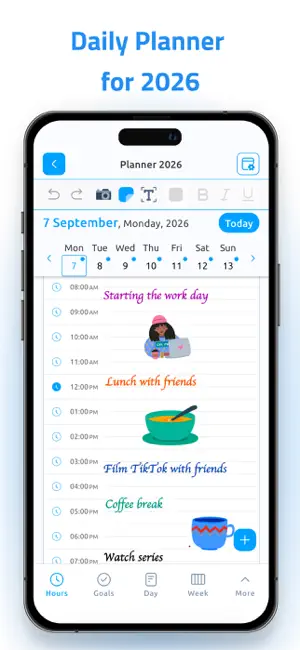
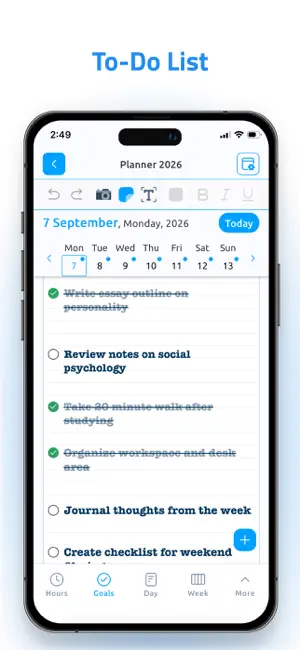
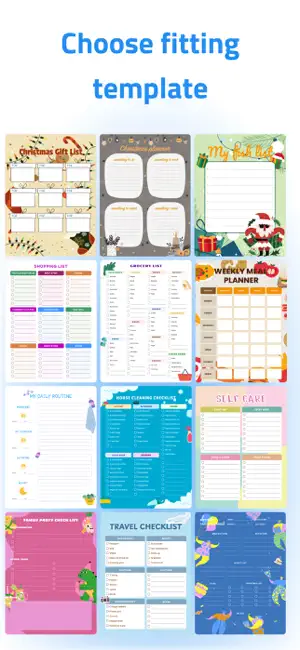
Digital Planner is designed first and foremost for iPad, combining the familiar experience of a classic paper planner with the flexibility of digital planning. Plan your days, weeks, and months, write naturally with Apple Pencil, organize your schedule, and keep your tasks, events, goals, and notes in one place. Digital Planner is also available on iPhone and Mac, so you can keep your planning accessible across your Apple devices. Use iPhone for quick access to your planner, calendar, tasks, and events on the go, or open Digital Planner on your Mac when you're working at your computer. Keep your planning synchronized across devices and easily check or update your schedule wherever you are. PLAN YOUR WAY Stay organized with flexible planning views for everything from detailed daily schedules to long-term goals: • Hourly Planner • Daily Planner • Weekly Planner • Monthly Planner • Yearly Planner • Daily goals, notes, and summaries • Checklists and tasks • Birthday calendar • Customizable planning templates WRITE NATURALLY WITH APPLE PENCIL Turn your iPad into a digital notebook and planner. Write, draw, highlight, add typed text, and organize content naturally. Convert handwriting to text or use speech-to-text when typing isn't convenient. CALENDARS & REMINDERS Bring planning and scheduling together: • Sync with Apple Calendar • Sync with Google Calendar • Create and edit Google Calendar events directly in the app • Connect and work with Outlook Calendar • Work with Apple Reminders • Add and manage events • Share your calendar with others NOTES, PDFs & MORE Use Digital Planner for planning, writing, studying, and organizing: • Create notes • Add stickers and images • Select and move content with the Lasso tool • Import and annotate PDF files • Track books with a reading list • Back up and restore your data MADE FOR EVERYDAY PLANNING Whether you're a student, teacher, professional, or simply enjoy the feeling of a traditional paper planner, Digital Planner gives you the freedom to organize your life your way. Enjoy the space and flexibility of planning on iPad with Apple Pencil, quickly check your schedule from iPhone when you're on the go, and access your planning from Mac while working at your computer. Have an idea or suggestion? Contact our support team and let us know what you'd like to see next. SUBSCRIPTION INFORMATION The app contains the following subscription options: 1-month membership from $6.99. 3-month membership from $12.99. 1-year membership from $29.99 after a 7-day free trial. Prices above are in U.S. dollars (USD) and apply to customers in the United States. Prices in other countries may vary and are displayed in the applicable local currency. Local App Store pricing may differ from a direct conversion based on current exchange rates. Payment will be charged to your Apple ID account at confirmation of purchase. The subscription automatically renews unless auto-renewal is turned off at least 24 hours before the end of the current period. Your account will be charged for renewal within 24 hours before the end of the current period. Subscriptions and auto-renewal can be managed in your Account Settings after purchase. Any unused portion of a free trial will be forfeited when you purchase a subscription. Privacy Policy: https://www.digitalplanner.biz/privacy-policy/ Terms of Use: https://www.digitalplanner.biz/terms-of-use/ EULA: https://www.digitalplanner.biz/eula/
Ratings & reviews
4.3
2K ratings
What’s new
Version 4.5.4 · Updated October 23, 2026
Fixed synchronization issues.
App privacy
The developer, Alina Shpak, reported these privacy practices to Apple.
Data Used to Track You
The following data may be used to track you across apps and websites owned by other companies:
- Usage Data: Product Interaction
- Diagnostics: Crash Data, Other Diagnostic Data
- Other Data: Other Data Types
Data Linked to You
The following data, which may be collected and linked to your identity, may be used for the following purposes:
- Purchases: Purchase History
- Location: Coarse Location
- Identifiers: Device ID
- Contact Info: Name
Used for: Analytics, App Functionality
Data Not Linked to You
The following data, which may be collected but is not linked to your identity, may be used for the following purposes:
- Usage Data: Product Interaction
- Diagnostics: Performance Data, Crash Data, Other Diagnostic Data
- Contacts: Contacts
- Contact Info: Email Address
- Other Data: Other Data Types
Used for: Analytics, App Functionality, Other Purposes
Alternatives to Digital Planner for iPad
Looking for apps like Digital Planner for iPad? Here are 6 similar apps on the App Store. The highest rated is Planmore: Schedule Planner App (4.8/5), and all 6 are free to download.
-
 Pencil Planner & Calendar Pro
4.6
Pencil Planner & Calendar Pro
4.6
-
 CalenDraw: Calendar Notes
4.5
CalenDraw: Calendar Notes
4.5
-
 Planner Pro - Daily Planner
4.5
Planner Pro - Daily Planner
4.5
-
 Planner for iPad
4.5
Planner for iPad
4.5
-
 Pencil Calendar: Daily Planner
4.5
Pencil Calendar: Daily Planner
4.5
-
 Planmore: Schedule Planner App
4.8
Planmore: Schedule Planner App
4.8
| App | Rating | Price | Last updated | Compare |
|---|---|---|---|---|
| Digital Planner for iPad | 4.3 / 5 (2,099 ratings) | Free | October 23, 2026 | |
| Pencil Planner & Calendar Pro | 4.6 / 5 (12,578) | Free | Sep 22, 2026 | Compare |
| CalenDraw: Calendar Notes | 4.5 / 5 (3,450) | Free | Jun 26, 2026 | Compare |
| Planner Pro - Daily Planner | 4.5 / 5 (13,261) | Free | Dec 17, 2025 | Compare |
| Planner for iPad | 4.5 / 5 (501) | Free | Oct 23, 2026 | Compare |
| Pencil Calendar: Daily Planner | 4.5 / 5 (10,690) | Free | Oct 19, 2026 | Compare |
| Planmore: Schedule Planner App | 4.8 / 5 (4,942) | Free | Oct 27, 2026 | Compare |