

Smart Tasks: Simple To Do List
Francesco Prospato Productivity iPhoneiPadiPod touchMacApple Watch
Smart Tasks: Simple To Do List is a free Productivity app for iPhone and iPad by Francesco Prospato. Rated 4.7/5 from 4,527 ratings. Requires iOS 17.0.
- Rating
- 4.7
- 4.5K ratings
- Price
- Free
- on the App Store
- Size
- 76 MB
- Age 4+
- Updated
- Nov 10
- 2026 · v3.7.3
Screenshots
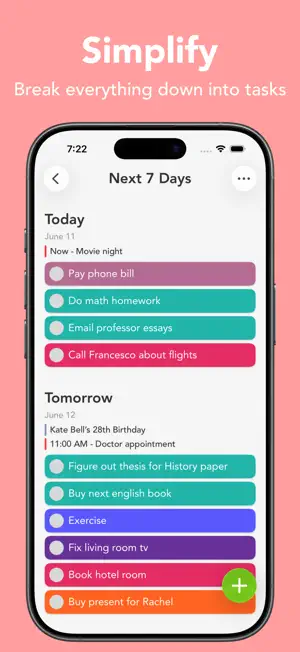


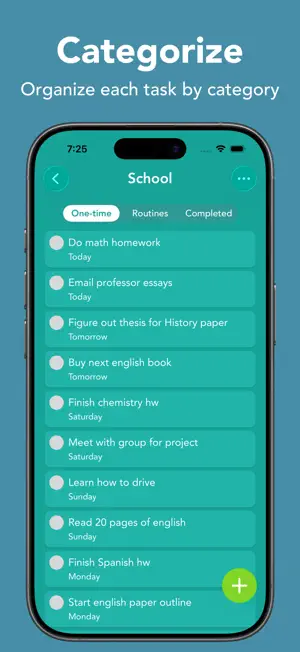
About Smart Tasks: Simple To Do List
Featured in App Store's "Hot This Week" for multiple weeks. Welcome to Smart Tasks: a simple, yet powerful way to get things done! See your whole week in a minimalistic and interactive design. Write down everything from your time-sensitive work to things you just don’t want to forget about. Keep yourself from worrying about what you have to do and start getting things done. Simple. Fast. Intuitive. Built for you! FEATURES • Simple and highly interactive design • Drag and drop to quickly add, reorder, delete, and import tasks • Swipe on any task, category, or date to access quick actions to get things done quicker • Choose between 42 aesthetically pleasing colors for categories • Home screen quick actions • Export/import tasks and categories APPLE SPECIFIC FEATURES • Widgets • Siri AI • Dark mode • Notification quick actions • Add, edit, delete, and view Apple Calendar events • Import reminders from the Apple Reminders app • Control Center and Action Button controls support • Device Handoff when adding tasks and categories • Full VoiceOver support • Smart Notifications • Dynamic font support • App Shortcuts PREMIUM FEATURES • iCloud sync • Reminders in tasks • Daily, weekly, monthly, and after completion routines • Notes in tasks • Week layout • Unlimited categories • Change app’s icon color • Special configuration options • Custom swipe actions • Duplicating tasks • Prioritize today • Link, email, and phone number detection in titles and notes iPad SPECIFIC FEATURES • Multiple window support for categories and tasks • Keyboard Shortcuts • Right-click for quick actions • Drag and drop task files for quick importing • Drag and drop multiple task files SUBSCRIPTION Smart Tasks has a subscription service for premium features. No sign-up needed. Upgrade anytime to Smart Tasks +. Without Smart Tasks +, users will only have access to a limited amount of features. Subscriptions from Smart Tasks + will be charged to your card connected to your iTunes account. Your subscription will automatically renew unless canceled at least 24 hours before the end of the current period. You can manage your subscription in your account settings after purchase. Any unused time left in a given free trial will be forfeited when purchasing a subscription. For more details please look at: Privacy Policy: https://smarttasksapp.com/privacy/ Terms of Service: https://smarttasksapp.com/terms/ Thank you for using Smart Tasks! I'm constantly updating the app to make it better.
Ratings & reviews
4.7
4.5K ratings
What’s new
Version 3.7.3 · Updated November 10, 2026
Thank you for using Smart Tasks! This update brings calendar layouts to your categories and makes it quicker to get a reminder at a task's time. *** What's New *** Calendar Layouts - Switch between Month, Week, and List with the layout button at the top of any category - Drag tasks between days in the week layout to reschedule them - Every category opens in the layout you picked last Reminders at Task Time - The bell sets an “At task time” reminder, which moves with the task if you change its date or time - Leave the bell on, and every task you give a time after that gets the reminder too - When Siri or Shortcuts give a task a time, it now comes with a reminder at that time - Tasks imported from the Reminders app automatically get a reminder at their due time too iPhone Duo and Landscape - Smart Tasks now supports iPhone Duo, closed or open - On iPhone Duo, the + button now joins the controls on the side of the screen - Turn your iPhone sideways to use Smart Tasks in landscape - Month and Week layouts in your categories now use the whole screen when your iPhone is sideways or your iPhone Duo is open General Improvements - Redesigned routine screen, with the whole schedule in one place - Buttons like Add, Save, and Continue now have a Liquid Glass look (iOS 26.1 or later) - In iPhone Mirroring on your Mac, Smart Tasks now adapts to any window size (iOS 27 and macOS 27 or later) - Reminders now clear from a task once they go off, except “At task time” reminders, which stay with the task - The iCloud screen in Options now shows a banner when your iCloud storage is full *** Bug Fixes *** - Fix the keyboard not coming up when you open New Task - Fix the app sometimes closing when you turn your iPhone sideways - Fix calendar events not showing after first turning them on in Options - Fix large widgets cutting off their header and last task on iPad or with larger text sizes - Fix the Add button needing a second tap on iPad while typing a task - Fix the keyboard popping up on iPhone when dragging down the date or routine picker in New Task - Fix VoiceOver labels for routine swipe actions and “View all routines” - Fixes related to drag-and-drop - General speed/performance improvements Learn about new features and tips on Instagram @smarttasks I'm always trying to make Smart Tasks better by updating regularly. Send any new feature suggestions or bugs you may find by going to "Help & Suggestions" in Settings. If you love Smart Tasks, please leave a 5-star rating and review! Every star really helps a lot! - Francesco
App privacy
The developer, Francesco Prospato, reported these privacy practices to Apple.
Data Linked to You
The following data, which may be collected and linked to your identity, may be used for the following purposes:
- Usage Data: Product Interaction
Used for: Analytics
Data Not Linked to You
The following data, which may be collected but is not linked to your identity, may be used for the following purposes:
- Purchases: Purchase History
- Diagnostics: Crash Data
Used for: Analytics, App Functionality
Alternatives to Smart Tasks: Simple To Do List
Looking for apps like Smart Tasks: Simple To Do List? Here are 6 similar apps on the App Store. The highest rated is To Do List MinimaList & Widget (4.8/5), and all 6 are free to download.
-
 Do! – Simple To Do List
4.7
-
 To Do List MinimaList & Widget
4.8
-
 To Do List - Reminders & Tasks
4.7
-
 Todo List & Reminder - Todoery
4.6
-
 Mindlist — To Do List & Tasks
4.7
-
 Planner Pro - Daily Planner
4.5
| App | Rating | Price | Last updated | Compare |
|---|---|---|---|---|
| Smart Tasks: Simple To Do List | 4.7 / 5 (4,527 ratings) | Free | November 10, 2026 | |
| Do! – Simple To Do List | 4.7 / 5 (26,205) | Free | Oct 22, 2026 | Compare |
| To Do List MinimaList & Widget | 4.8 / 5 (49,067) | Free | Oct 30, 2026 | Compare |
| To Do List - Reminders & Tasks | 4.7 / 5 (3,258) | Free | Oct 17, 2026 | Compare |
| Todo List & Reminder - Todoery | 4.6 / 5 (5,799) | Free | Nov 10, 2026 | Compare |
| Mindlist — To Do List & Tasks | 4.7 / 5 (1,626) | Free | Sep 29, 2026 | Compare |
| Planner Pro - Daily Planner | 4.5 / 5 (13,268) | Free | Dec 17, 2025 | Compare |