

GoodTask: To Do List & Planner
haha Interactive Productivity iPhoneiPadiPod touchApple Watch
GoodTask: To Do List & Planner is a free Productivity app for iPhone and iPad by haha Interactive. Rated 4.6/5 from 2,035 ratings. Requires iOS 17.0.
- Rating
- 4.6
- 2K ratings
- Price
- Free
- on the App Store
- Size
- 293 MB
- Age 4+
- Updated
- Oct 27
- 2026 · v8.6.1
Screenshots

About GoodTask: To Do List & Planner
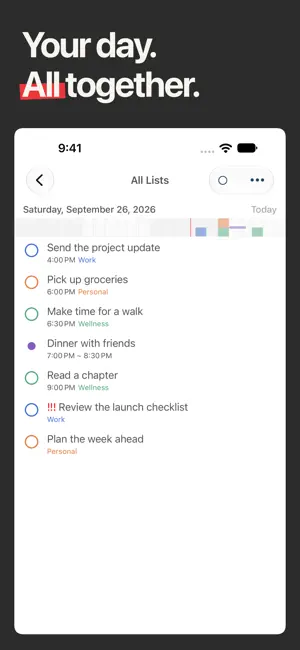
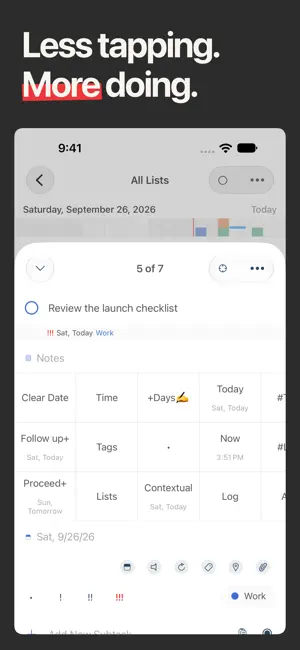
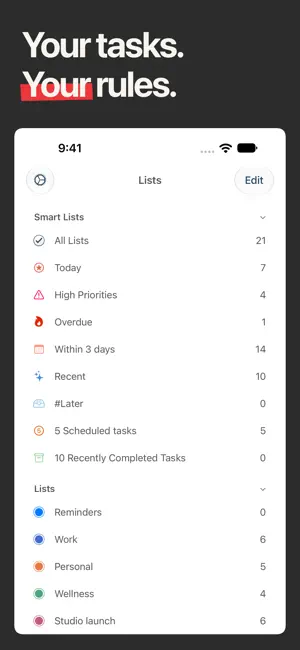
Plan your day with the reminders and calendars you already use. GoodTask builds on Apple Reminders and Calendar, bringing your to-do lists, schedule and projects together. "a masterful blend of power-user task management features and the inherent simplicity of Reminders." - Federico Viticci, MacStories, on GoodTask for iOS (2018) Start with a simple checklist. Add Smart Lists, flexible views and Quick Actions as your needs grow. Use iCloud to keep your reminders and calendar events in sync across devices. PLAN A DAY THAT WORKS Choose what to work on in Today Page without changing your tasks' due dates. See your calendar events alongside your plan, then use Next Page to focus on one task or subtask at a time. Set a focus timer and look back on completed work and daily notes in Reports. FIND WHAT NEEDS YOUR ATTENTION Create Smart Lists that bring together tasks from different lists. Filter by dates, priorities, tags and more to see what matters now: overdue work, errands or the next steps in a project. Update a task wherever you find it, and the change stays with the original reminder. SEE YOUR WORK YOUR WAY Switch between list, day, week and month views. Organize tasks in kanban-style boards by date, priority, list or tag. Use Matrix View to compare priorities in four customizable quadrants, or Project View to follow tasks and events across dates. SPEND LESS TIME ORGANIZING Capture tasks with presets and text snippets. Customize Quick Actions to reschedule work, change priorities, move tasks between lists or add tags. Make changes to several tasks at once with bulk actions. SIMPLIFY RECURRING WORK Break tasks into subtasks, set flexible repeating schedules and save reusable Templates for routines such as a weekly review or packing for a trip. KEEP YOUR PLAN CLOSE Personalize colors, fonts and task displays. On iPhone and iPad, use widgets to keep your lists in sight. On supported iPhones, follow a focus session with Live Activities on the Lock Screen and Dynamic Island. The Apple Watch companion lets you check tasks and add new ones from your wrist when used with an iPhone. RECOGNITION GoodTask for iOS was named Federico Viticci's App of the Year in MacStories Selects 2018 and featured in the App Store's Apps We Love. FULL ACCESS Try GoodTask for 14 days without starting a subscription. To continue afterward, choose the one-time Unlock Everything in-app purchase or the optional GoodTask Supporter subscription. The Mac app is sold separately. ABOUT SUBSCRIPTIONS - GoodTask Supporter is an optional auto-renewing subscription with a one-year term. It provides full access while active and supports continued development. - The subscription price is shown before purchase. Payment will be charged to your Apple Account at confirmation of purchase. - Your subscription automatically renews unless auto-renewal is turned off at least 24 hours before the end of the current subscription period. - Your account will be charged for renewal within 24 hours before the end of the current period, at the applicable annual subscription price. - You can manage your subscription and turn off auto-renewal in your App Store account settings after purchase. Learn more: https://goodtaskapp.com Support: [email protected] Terms of Use: https://hahaint.com/tos.html Privacy Policy: https://hahaint.com/privacy.html
Ratings & reviews
4.6
2K ratings
What’s new
Version 8.6.1 · Updated October 27, 2026
## Block Mode - See tasks and calendar events on a timeline in Today Page, Calendar Week View, Now View, and Project View. - Tap the current view's button in the View Bar again to toggle Block Mode. - You can also use the More menu in supported views, or the Block Mode button on Today Page. - Keep all-day items above the timeline and see overlapping schedules side by side. - Drag tasks and events to reschedule them. Choose Resize from an item's menu to adjust its start or end time when it has a time range. - Long press an empty time slot to add a task, calendar event, or template. - Pinch to adjust the timeline's scale. ## Block Mode Widget - View a timeline from one of your lists or Today Page. - Customize themes, font size, and which view opens. Choose how many days to show on supported widget sizes. ## Additional Support for iPhone Duo - More improvements and adjustments for better usability. - New Hide in Limited Space option under Settings > Favorites hides the Smart Button when folded or using Split View. - This option is on by default. Turn it off to keep the Smart Button visible. ## Other Improvements - Other fixes and stability improvements. Thanks!
App privacy
The developer, haha Interactive, reported these privacy practices to Apple.
Data Not Linked to You
The following data, which may be collected but is not linked to your identity, may be used for the following purposes:
- Purchases: Purchase History
- Identifiers: User ID, Device ID
- Usage Data: Product Interaction, Other Usage Data
- Diagnostics: Crash Data, Performance Data
Used for: Analytics, App Functionality
Alternatives to GoodTask: To Do List & Planner
Looking for apps like GoodTask: To Do List & Planner? Here are 6 similar apps on the App Store. The highest rated is Sorted³ - Calendar Notes Tasks (4.7/5), and all 6 are free to download.
-
 Actions: To Do List Organizer
4.6
Actions: To Do List Organizer
4.6
-
 NoteCircle: To-Do List
4.6
NoteCircle: To-Do List
4.6
-
 Sorted³ - Calendar Notes Tasks
4.7
Sorted³ - Calendar Notes Tasks
4.7
-
 Clear: To Dos & Reminders
4.6
Clear: To Dos & Reminders
4.6
-
 OmniFocus 4
4.0
OmniFocus 4
4.0
-
 Grocery - Smart Shopping List
4.5
Grocery - Smart Shopping List
4.5
| App | Rating | Price | Last updated | Compare |
|---|---|---|---|---|
| GoodTask: To Do List & Planner | 4.6 / 5 (2,035 ratings) | Free | October 27, 2026 | |
| Actions: To Do List Organizer | 4.6 / 5 (9,773) | Free | Oct 25, 2026 | Compare |
| NoteCircle: To-Do List | 4.6 / 5 (1,232) | Free | Oct 17, 2026 | Compare |
| Sorted³ - Calendar Notes Tasks | 4.7 / 5 (4,062) | Free | Oct 15, 2024 | Compare |
| Clear: To Dos & Reminders | 4.6 / 5 (5,212) | Free | Oct 25, 2026 | Compare |
| OmniFocus 4 | 4.0 / 5 (346) | Free | Oct 22, 2026 | Compare |
| Grocery - Smart Shopping List | 4.5 / 5 (4,747) | Free | Oct 23, 2026 | Compare |