

OmniFocus 4
The Omni Group Productivity iPhoneiPadiPod touchMacApple Watch
OmniFocus 4 is a free Productivity app for iPhone and iPad by The Omni Group. Rated 4.0/5 from 343 ratings. Requires iOS 18.2. Updated October 8, 2026.
- Rating
- 4.0
- 343 ratings
- Price
- Free
- on the App Store
- Size
- 138 MB
- Age 4+
- Updated
- Oct 8
- 2026 · v4.9.3
Screenshots


About OmniFocus 4
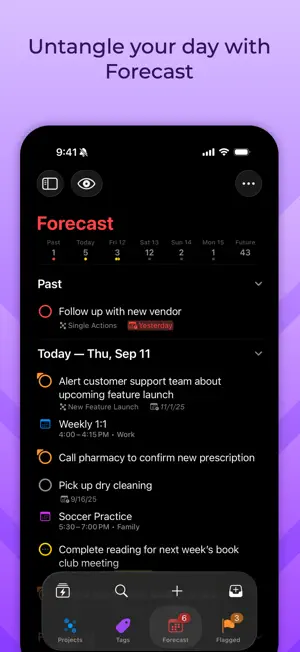
OmniFocus is powerful task management software for busy professionals. With tools to help tame the chaos, you can focus on the right tasks at the right time. Two-week free trial! OmniFocus 4 introduces a modernized, unified interface across Mac, iPhone, iPad, Apple Watch, and Apple Vision Pro. Centered around your task outline, OmniFocus 4 brings a consistent experience, optimized for each device type, to all of your Apple devices. Easily create tasks anytime–from anywhere–and organize them with projects, tags, and dates. Quickly navigate OmniFocus on any device using the Perspectives Bar, Quick Open, and Back and Forward history. With Pro, use Focus to help focus your attention on specific projects or folders, and customize OmniFocus to only display the information most relevant to you. New to OmniFocus? The simple, efficient OmniFocus 4 interface will help you discover and implement a trusted system that works and grows with you. Upgrading from a previous version of OmniFocus? In OmniFocus 4, discover enhanced versions of all the powerful task management features you already rely on, along with new features that will level-up your workflow. Omni offers a free and secure sync service, protected with end-to-end encryption, ensuring only devices you authorize can access your data. And now, for the first time ever, OmniFocus is available as a universal cross-platform purchase: get full access to OmniFocus 4 on your Mac, iPhone, iPad, Apple Watch, and Apple Vision Pro with a single license purchase. Accomplish more every day–anywhere you go–with OmniFocus 4.
Ratings & reviews
4.0
343 ratings
What’s new
Version 4.9.3 · Updated October 8, 2026
OmniFocus 4.9.3 is a minor update focused on bug fixes. View full release notes in-app or on our website: www.omnigroup.com/releasenotes/omnifocus. If you have any feedback or questions, we’d love to hear from you! The Omni Group offers free tech support; you can email [email protected] or call 1–206–523–4152. If OmniFocus empowers you, we would appreciate an App Store review. Your review will help other people find OmniFocus and make them more productive too.
App privacy
The developer, The Omni Group, reported these privacy practices to Apple.
Data Linked to You
The following data, which may be collected and linked to your identity, may be used for the following purposes:
- Purchases: Purchase History
- Identifiers: User ID
Used for: App Functionality
Alternatives to OmniFocus 4
Looking for apps like OmniFocus 4? Here are 6 similar apps on the App Store. The highest rated is Things 3 (4.8/5), and 5 of the 6 are free to download.
-
 Sofa: Downtime Organizer
4.7
-
 Task Flow: Tasks & Checklists
4.6
-
 Superlist: To Do List & Notes
4.5
-
 GoodTask: To Do List & Planner
4.6
-
 Things 3
4.8
-
 Focus - Deep Work Timer
4.4
| App | Rating | Price | Last updated | Compare |
|---|---|---|---|---|
| OmniFocus 4 | 4.0 / 5 (343 ratings) | Free | October 8, 2026 | |
| Sofa: Downtime Organizer | 4.7 / 5 (3,080) | Free | Sep 21, 2026 | Compare |
| Task Flow: Tasks & Checklists | 4.6 / 5 (333) | Free | Oct 8, 2026 | Compare |
| Superlist: To Do List & Notes | 4.5 / 5 (458) | Free | Oct 13, 2026 | Compare |
| GoodTask: To Do List & Planner | 4.6 / 5 (2,023) | Free | Oct 12, 2026 | Compare |
| Things 3 | 4.8 / 5 (28,007) | 9.99 USD | Sep 22, 2026 | Compare |
| Focus - Deep Work Timer | 4.4 / 5 (1,842) | Free | Oct 2, 2026 | Compare |
Compare OmniFocus 4 with the top alternatives: ratings, updates, ASO score and keyword gaps →