

Zeta Stitch - Long Screenshots
阳理 江 Utilities iPhoneiPadiPod touch
Zeta Stitch - Long Screenshots is a free Utilities app for iPhone and iPad by 阳理 江. Rated 4.7/5 from 371 ratings. Requires iOS 16. Updated October 10, 2026.
- Rating
- 4.7
- 371 ratings
- Price
- Free
- on the App Store
- Size
- 17 MB
- Age 12+
- Updated
- Oct 10
- 2026 · v2.3.0
Screenshots



About Zeta Stitch - Long Screenshots
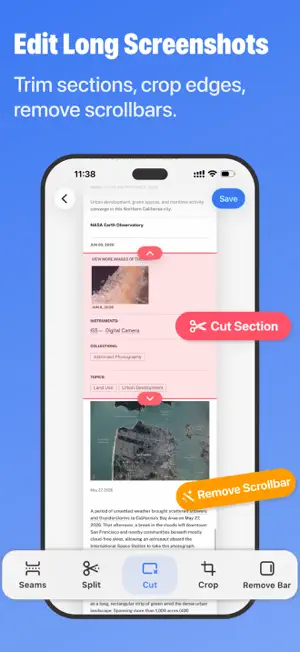
Need to send a whole chat, article, receipt, or set of steps? Zeta stitches your screenshots, or a screen recording, into one long image. Before you share, clean up the status bar, blur out names and numbers, and mark up what matters. Everything is processed on your device and never uploaded. Automatic stitching Select a series of screenshots. Zeta finds where they overlap, lines them up, and joins them into one long image, with clean seams and no repeated or missing content. Screen recording to long screenshot Record the page with the system Screen Recording as you scroll, then import the recording into Zeta. No need to take screenshots one by one. Clean up the status bar and scroll bars Replace the status bar with a clean one: the time is kept, and signal and battery are drawn full. Or crop it out or erase it. Scroll bars can be removed too. Turn on automatic cleanup in Settings if you want it every time. Mark up and redact Hide profile photos, names, and phone numbers with a brush or a box. Choose from 8 styles, including mosaic, blur, and black. Draw with a pen or highlighter, and add arrows, shapes, and text. Undo and redo are always there. Edit long screenshots Check seams, split the image, cut out sections, and crop the edges before you save. Save and export Save to Photos, share directly, or export as PDF or ZIP. After saving, you can delete the original screenshots to keep your library tidy. Make it yours Choose a theme color and app icon. Pricing Free to download. Automatic long screenshots and Scrollshot are free to use 5 times, and manual stitching is unlimited. Zeta Pro is a one-time purchase that unlocks unlimited use. It is not a subscription and never renews. Markup, redaction, and cleanup cost nothing extra. Privacy The screenshots and recordings you choose are processed only on your device and are never uploaded to a server. Zeta collects no data and shows no ads.
Ratings & reviews
4.7
371 ratings
What’s new
Version 2.3.0 · Updated October 10, 2026
Two new tools for the moment before you share. Markup and redaction • Hide profile photos, names, and phone numbers with a brush or a box. 8 styles, including mosaic, blur, and black • Draw with a pen or highlighter, and add arrows, shapes, and text • Undo and redo. Open it from the highlighter button at the top right of the editor Status bar cleanup • Replace the status bar with a clean one: the time is kept, signal and battery are drawn full • Or crop it out or erase it. Scroll bars can be removed too • Turn on automatic cleanup in Settings
App privacy
The developer, 阳理 江, reported these privacy practices to Apple.
Data Not Collected
The developer does not collect any data from this app.
Alternatives to Zeta Stitch - Long Screenshots
Looking for apps like Zeta Stitch - Long Screenshots? Here are 6 similar apps on the App Store. The highest rated is ByePhotos - Free Up Storage (4.9/5), and all 6 are free to download.
-
 StitchPics-Stitch Screenshots
4.8
StitchPics-Stitch Screenshots
4.8
-
 Stitch It: Long Screenshot
4.4
Stitch It: Long Screenshot
4.4
-
 pScanner:PDF Document Scanner
4.6
pScanner:PDF Document Scanner
4.6
-
 Auto Screenshots Stitch Tailor
3.6
Auto Screenshots Stitch Tailor
3.6
-
 SMSCat
4.4
SMSCat
4.4
-
 ByePhotos - Free Up Storage
4.9
ByePhotos - Free Up Storage
4.9
| App | Rating | Price | Last updated | Compare |
|---|---|---|---|---|
| Zeta Stitch - Long Screenshots | 4.7 / 5 (371 ratings) | Free | October 10, 2026 | |
| StitchPics-Stitch Screenshots | 4.8 / 5 (2,055) | Free | Dec 2, 2024 | Compare |
| Stitch It: Long Screenshot | 4.4 / 5 (2,702) | Free | Oct 15, 2026 | Compare |
| pScanner:PDF Document Scanner | 4.6 / 5 (148) | Free | Aug 14, 2026 | Compare |
| Auto Screenshots Stitch Tailor | 3.6 / 5 (143) | Free | Oct 15, 2026 | Compare |
| SMSCat | 4.4 / 5 (33) | Free | Oct 10, 2026 | Compare |
| ByePhotos - Free Up Storage | 4.9 / 5 (101) | Free | Oct 11, 2026 | Compare |