

pScanner:PDF Document Scanner
AGI Scanner Technology Co., Ltd. Utilities iPhoneiPadiPod touch
pScanner:PDF Document Scanner is a free Utilities app for iPhone and iPad by AGI Scanner Technology Co., Ltd. Rated 4.6/5 from 149 ratings.
- Rating
- 4.6
- 149 ratings
- Price
- Free
- on the App Store
- Size
- 390 MB
- Age 4+
- Updated
- Aug 14
- 2026 · v1.53
Screenshots


About pScanner:PDF Document Scanner
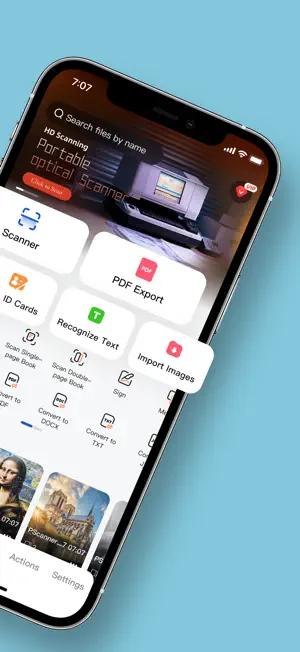
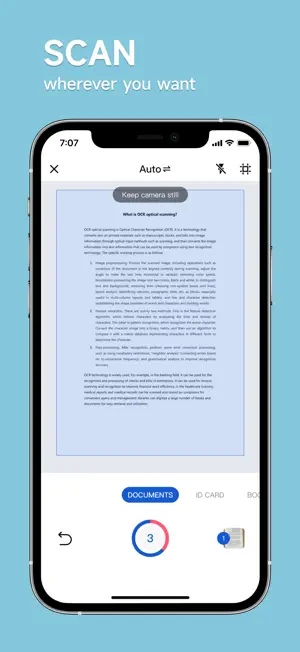
Turn Your Phone into a Powerful Scanner! Pocket Scanner transforms paper documents into high-quality digital files in seconds. Convert scans to PDF, JPG, Word, TXT, and more. Print directly or share via email, messaging apps, or cloud platforms with one tap. Key Features 1. Crisp Scanning & Smart Editing - HD scans with auto-edge cropping and customizable filters. 2. OCR Text Recognition - Accurate text extraction with intelligent OCR technology. 3. Smart PDF Tools - Generate PDFs instantly. Add signatures, watermarks, or password protection. 4. Multi-Format Conversion - Export to Word, PDF, TXT, JPG, etc. 5. Wireless Printing - Print documents directly from your phone to compatible printers. 6. ID & Card Scanning - Scan IDs, licenses, or cards with 1:1 precision. Auto-align to A4/Letter size. 7. High-level Security - Secure file encryption & password-protected sharing. 8. Bulk Processing - Handle large files and image batches effortlessly. 9. Smart Organization - Categorize documents with custom folders and tags. Use Cases 1. Document Scanning & Management - Scan Anything, Anytime Contracts, notes, books, receipts, posters—scan multi-page docs in seconds. - Auto-Crop & Enhance Remove clutter and optimize scans with brightness/color adjustments. - Professional PDFs Create print-ready PDFs in A4, Letter, or custom sizes. - Cloud Sync & Share Save to Photos, email PDFs, or share via AirDrop. 2. Text Extraction & Editing - Scan-to-Text Convert printed/handwritten text to editable content (supports 15+ languages). - Boost Productivity Copy text from IDs, invoices, or business cards into apps instantly. 3. ID & Document Scanning - Digitize Critical Info Scan IDs, passports, or insurance cards. Print duplicates at 1:1 scale. 4. Study & Education - Paperless Learning Scan textbooks, notes, or exams to create digital study guides. - Smart Flashcards Turn scanned quizzes into shareable digital flashcards. 5. Business & Productivity - On-the-Go Office Scan contracts, whiteboards, or receipts during meetings or travel. - Team Collaboration Share annotated PDFs via Slack, Teams, or email in one click. 6. Everyday Convenience - Preserve Memories Digitize photos, recipes, or travel souvenirs. - Travel Ready Store scanned itineraries, tickets, and maps offline. Why Professionals & Students Love It - Time-Saving – Ditch manual typing with instant OCR. - Pro-Quality Scans – Crisp results rivaling desktop scanners. - High-level Privacy – Your docs stay 100% secure. - Apple Ecosystem Ready – Works seamlessly with AirPrint, Files app, and iCloud. Download Now – Join 5M+ users who trust Pocket Scanner for work, school, and life! pScanner PRO -Subscribe to get Pro access to all features. You will be charged after the purchase confirmation. -Subscriptions to our scanner app auto-renew 24 hours before the expiration date. You can manage your subscriptions in account Settings on the App Store. Terms of Use of pScanner: Scanner App: https://www3.yunhu.net.cn/agreement/terms Privacy Policy of pScanner: Scanner App: https://www3.yunhu.net.cn/agreement/privacy We'd love to hear your feedback: [email protected]
Ratings & reviews
4.6
149 ratings
What’s new
Version 1.53 · Updated August 14, 2026
Thanks for using pScanner! In this version you can find: 1. Minor bug fixes and UI improvements We love getting feedback from all of you! Please leave your reviews so we can keep making the app even better.
App privacy
The developer, AGI Scanner Technology Co., Ltd., reported these privacy practices to Apple.
Data Used to Track You
The following data may be used to track you across apps and websites owned by other companies:
- Usage Data: Advertising Data
Data Linked to You
The following data, which may be collected and linked to your identity, may be used for the following purposes:
- Usage Data: Advertising Data
Used for: Analytics
Data Not Linked to You
The following data, which may be collected but is not linked to your identity, may be used for the following purposes:
- Identifiers: User ID, Device ID
- Purchases: Purchase History
- Usage Data: Product Interaction, Other Usage Data
- Diagnostics: Crash Data, Performance Data, Other Diagnostic Data
- Other Data: Other Data Types
Used for: Developer’s Advertising or Marketing, Analytics
Alternatives to pScanner:PDF Document Scanner
Looking for apps like pScanner:PDF Document Scanner? Here are 6 similar apps on the App Store. The highest rated is ScanBox:Fast find scanned docs (5.0/5), and all 6 are free to download.
-
 PDF Maker & Document Scanner
4.6
-
 QR Maker: QR Code Generator
4.5
-
 Liquid Remover - clear water
4.6
-
 Hidden Camera Detector - SpyFy
4.7
-
 WTMP | Who Touched My Phone?
4.5
-
 ScanBox:Fast find scanned docs
5.0
| App | Rating | Price | Last updated | Compare |
|---|---|---|---|---|
| pScanner:PDF Document Scanner | 4.6 / 5 (149 ratings) | Free | August 14, 2026 | |
| PDF Maker & Document Scanner | 4.6 / 5 (113) | Free | Jun 26, 2026 | Compare |
| QR Maker: QR Code Generator | 4.5 / 5 (153) | Free | Oct 17, 2026 | Compare |
| Liquid Remover - clear water | 4.6 / 5 (134) | Free | Sep 29, 2025 | Compare |
| Hidden Camera Detector - SpyFy | 4.7 / 5 (267) | Free | Jul 17, 2026 | Compare |
| WTMP | Who Touched My Phone? | 4.5 / 5 (458) | Free | Nov 5, 2025 | Compare |
| ScanBox:Fast find scanned docs | 5.0 / 5 (4) | Free | Apr 2, 2026 | Compare |