

Stitch It: Long Screenshot
Thirty Seven Inc. Utilities iPhoneiPadiPod touchMac
Stitch It: Long Screenshot is a free Utilities app for iPhone and iPad by Thirty Seven Inc. Rated 4.4/5 from 2,724 ratings. Requires iOS 15.0.
- Rating
- 4.4
- 2.7K ratings
- Price
- Free
- on the App Store
- Size
- 56 MB
- Age 4+
- Updated
- Nov 13
- 2026 · v3.4.4
Screenshots



About Stitch It: Long Screenshot
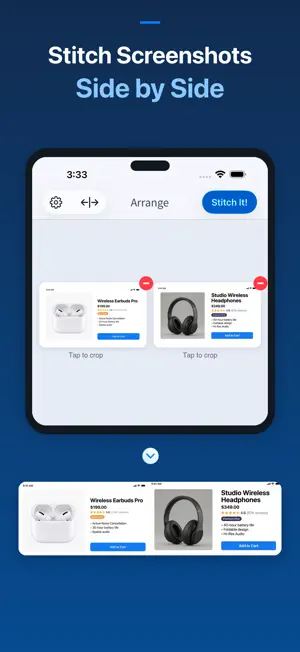
Stitch screenshots and photos into one long image—or join them side by side. Create long screenshots from conversations, receipts, instructions, and social posts. Align overlaps, crop precisely, and hide private details before sharing. COMBINE SCREENSHOTS AND PHOTOS Import images from your Photo Library and arrange them in the order you want. Stitch vertically to keep a conversation together, or horizontally for a side-by-side comparison. CROP PRECISELY Choose where each image begins and ends. Align overlapping content and remove repeated sections to make the result easier to read. HIDE PRIVATE DETAILS Cover names, addresses, and other sensitive information with solid-color freehand or straight-line redaction before you share. Image editing is processed on your device. SAVE AND SHARE Export the finished image as PNG or JPG, or save it as a PDF. Share through compatible messaging, email, and other apps. Siri Shortcuts and the share extension offer more ways to start. HOW IT WORKS 1. Import screenshots or photos. 2. Arrange them vertically or horizontally. 3. Align overlaps and crop each image. 4. Hide any private details. 5. Save or share your finished result. FREE AND PRO Stitch It is free to use with a small watermark. Upgrade to Pro for unlimited images per stitch, no watermark on final images, and an ad-free experience. Privacy Policy: https://37.technology/legal/privacy Terms of Service: https://37.technology/legal/terms Support: [email protected]
Ratings & reviews
4.4
2.7K ratings
What’s new
Version 3.4.4 · Updated November 13, 2026
Bug fixes and improvements.
App privacy
The developer, Thirty Seven Inc., reported these privacy practices to Apple.
Data Used to Track You
The following data may be used to track you across apps and websites owned by other companies:
- Identifiers: Device ID
Data Not Linked to You
The following data, which may be collected but is not linked to your identity, may be used for the following purposes:
- Identifiers: User ID, Device ID
- Usage Data: Product Interaction
- Purchases: Purchase History
- Diagnostics: Crash Data, Performance Data
Used for: Third-Party Advertising, Developer’s Advertising or Marketing, Analytics, App Functionality
Alternatives to Stitch It: Long Screenshot
Looking for apps like Stitch It: Long Screenshot? Here are 6 similar apps on the App Store. The highest rated is StitchPics-Stitch Screenshots (4.8/5), and all 6 are free to download.
-
 StitchPics-Stitch Screenshots
4.8
-
 Zeta Stitch - Long Screenshots
4.7
-
 StitchShot - ScreenShotCapture
4.4
-
 Screenshot PRO Screenshots App
4.1
-
 Messages and Chat Export PDF
4.5
-
 Auto Screenshots Stitch Tailor
3.6
| App | Rating | Price | Last updated | Compare |
|---|---|---|---|---|
| Stitch It: Long Screenshot | 4.4 / 5 (2,724 ratings) | Free | November 13, 2026 | |
| StitchPics-Stitch Screenshots | 4.8 / 5 (2,060) | Free | Dec 2, 2024 | Compare |
| Zeta Stitch - Long Screenshots | 4.7 / 5 (377) | Free | Nov 13, 2026 | Compare |
| StitchShot - ScreenShotCapture | 4.4 / 5 (387) | Free | May 29, 2026 | Compare |
| Screenshot PRO Screenshots App | 4.1 / 5 (899) | Free | Oct 15, 2026 | Compare |
| Messages and Chat Export PDF | 4.5 / 5 (4,199) | Free | Feb 18, 2026 | Compare |
| Auto Screenshots Stitch Tailor | 3.6 / 5 (144) | Free | Nov 12, 2026 | Compare |