

Tasks - To Do Lists & Reminder
Msquare Labs Technologies Private Limited Productivity iPhoneiPadiPod touchMacApple Watch
Tasks - To Do Lists & Reminder is a free Productivity app for iPhone and iPad by Msquare Labs Technologies Private Limited. Rated 4.6/5 from 1,912 ratings.
- Rating
- 4.6
- 1.9K ratings
- Price
- Free
- on the App Store
- Size
- 132 MB
- Age 4+
- Updated
- Oct 29
- 2026 · v5.3
Screenshots


About Tasks - To Do Lists & Reminder
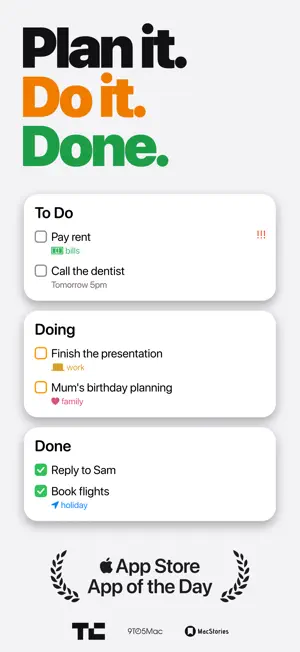
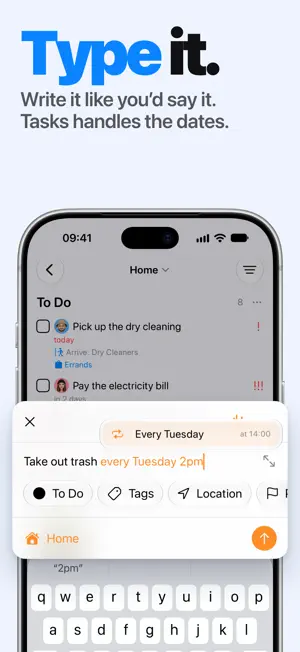
Keep your day clear and your projects moving. Tasks brings your to-dos, reminders, and shared projects together in one place. Plan a busy week, organize a trip, or take a project from first idea to finished. Start with a simple list and add the structure you need as you go. CAPTURE IT WHILE IT'S ON YOUR MIND Type “Send the report tomorrow at 3pm” and accept the suggested date and time. Tasks recognizes dates, repeats, priorities, and locations as you type. Add tasks with Siri, save something from another app, or turn an email into a task with the original message attached. SEE WHAT'S NEXT, AND WHAT'S MOVING Switch between lists and Kanban boards. Give each project its own stages, such as Planned, In Progress, and Waiting, so you can see where things stand. Break bigger tasks into subtasks, add tags and priorities, and use Smart Lists to bring the right work together across projects. KEEP THE DETAILS WITH THE TASK Add notes, links, images, PDFs, and emails so you have what you need when it's time to act. Customize each project's fields and keep conversations in comments. A task can hold the whole story, from the first brief to the final decision. MAKE TIME FOR FOCUSED WORK Start a timer on a task and see where your time goes. On iPhone and iPad, block distracting apps while you work. Follow your session from a Live Activity on the Lock Screen and, on supported iPhones, the Dynamic Island. REMINDERS THAT FIT REAL LIFE Set reminders for a date, a time, or when you arrive at or leave a place. Repeat tasks on a schedule or a set time after you finish them, ideal for routines that don't always happen on the same day. Connect Apple Reminders to keep your existing lists in sync. SHARE THE WORK, KEEP EVERYONE IN THE LOOP Plan with your partner, family, or team. Share a project, assign tasks, and use comments and @mentions to keep decisions with the work. Only the person sharing needs Tasks Plus; the people you invite can collaborate for free. You can bring your AI assistant into the project too. Connect a compatible assistant through MCP to help create and update tasks, leave comments, and track time. You choose which projects it can access and can revoke access at any time. FEEL AT HOME ON YOUR APPLE DEVICES Use Tasks on iPhone, iPad, Mac, Apple Watch, and Apple Vision Pro. Keep tasks close with widgets, capture ideas from your wrist, and build everyday automations with Siri and Shortcuts. Sync lets you pick up where you left off on another device. Make Tasks feel like yours with Classic, Mono, and Paper themes, your choice of heading and body fonts, and light or dark mode. Dynamic Type and VoiceOver support help you work comfortably. START WITH YOUR NEXT TASK Download Tasks for free. Tasks Plus adds unlimited projects, custom workflows and fields, sharing, attachments, Smart Lists, sync, and more. Choose a subscription or a lifetime purchase in the app. Made by an independent developer who cares about the details. Questions or ideas? Write to [email protected]. Privacy Policy: https://thetasks.app/legal/privacy/ Terms of Use: https://thetasks.app/legal/terms/
Ratings & reviews
4.6
1.9K ratings
What’s new
Version 5.3 · Updated October 29, 2026
Tasks now comes in themes. Give the app a new look and new fonts, drop emails straight onto your board, and mention people in comments. New in Tasks 5.3: - Pick a theme in Settings: Classic, Mono with true black on OLED screens, or Paper with handwritten headings, paper grain and hand-drawn checkboxes. Each comes in light and dark. - Choose fonts for headings and body text: Rounded, Sans, Serif, Mono, or the theme's own - Drop emails, images and PDFs onto a card to attach them, or between cards to create a new task - Read attached emails right inside Tasks - Take a photo with the camera and attach it to a task - Mention people in comments with @ so they get notified - Repeat tasks every few minutes or hours, and see the next due date when you complete a repeating task, with its subtasks reset - Rely on reminders that arrive on time, even with many repeating tasks - Choose how long voice input waits through a pause in Accessibility settings, or keep it listening until you tap - Use Apple Watch with iCloud projects without signing in, and add tasks from the complication again - See why a card can't be dropped where you're dragging it, and why a board is empty, and show columns again when they're all hidden - Enjoy tag colors that are more distinct and easier to read in light and dark mode - Get started with a new personalized setup that builds a board like your own - Download a smaller app, about a quarter lighter on iPhone - Get fixes for the Mac window remembering its size and position, the Mac app jumping to the front when syncing, attachment names after syncing, tags and attachments on moved tasks, Live Activity clipping, and line breaks in card titles If you're enjoying Tasks, leaving a review would mean the world to me and help more people discover the app. If you have any feedback or run into any issues, please write to me at [email protected]. I'd love to hear what you think. Stay productive, and thanks for reading! Mustafa
App privacy
The developer, Msquare Labs Technologies Private Limited, reported these privacy practices to Apple.
Data Linked to You
The following data, which may be collected and linked to your identity, may be used for the following purposes:
- Contact Info: Email Address, Name
Used for: App Functionality
Alternatives to Tasks - To Do Lists & Reminder
Looking for apps like Tasks - To Do Lists & Reminder? Here are 6 similar apps on the App Store. The highest rated is Kanban Board App (4.8/5), and all 6 are free to download.
-
 Kanban - Doneit
4.5
-
 Task Flow: Tasks & Checklists
4.6
-
 GoodTask: To Do List & Planner
4.6
-
 Kanban Board App
4.8
-
 OmniFocus 4
4.0
-
 Sorted³ - Calendar Notes Tasks
4.7
| App | Rating | Price | Last updated | Compare |
|---|---|---|---|---|
| Tasks - To Do Lists & Reminder | 4.6 / 5 (1,912 ratings) | Free | October 29, 2026 | |
| Kanban - Doneit | 4.5 / 5 (280) | Free | Oct 19, 2026 | Compare |
| Task Flow: Tasks & Checklists | 4.6 / 5 (337) | Free | Oct 8, 2026 | Compare |
| GoodTask: To Do List & Planner | 4.6 / 5 (2,035) | Free | Oct 27, 2026 | Compare |
| Kanban Board App | 4.8 / 5 (43) | Free | Oct 29, 2026 | Compare |
| OmniFocus 4 | 4.0 / 5 (346) | Free | Oct 22, 2026 | Compare |
| Sorted³ - Calendar Notes Tasks | 4.7 / 5 (4,062) | Free | Oct 15, 2024 | Compare |