

Kanban - Doneit
DesignTech SIA Productivity iPhoneiPadiPod touchMacApple Watch
Kanban - Doneit is a free Productivity app for iPhone and iPad by DesignTech SIA. Rated 4.5/5 from 280 ratings. Requires iOS 26.0. Updated October 19, 2026.
- Rating
- 4.5
- 280 ratings
- Price
- Free
- on the App Store
- Size
- 202 MB
- Age 4+
- Updated
- Oct 19
- 2026 · v3.2.2
Screenshots

About Kanban - Doneit
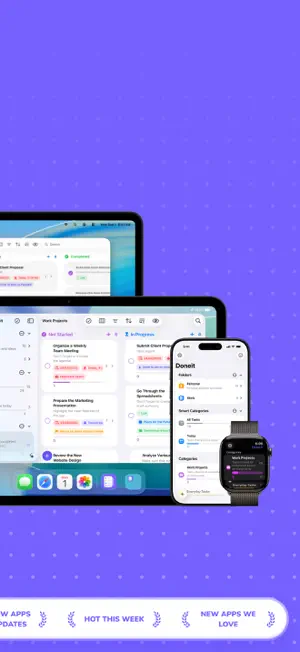
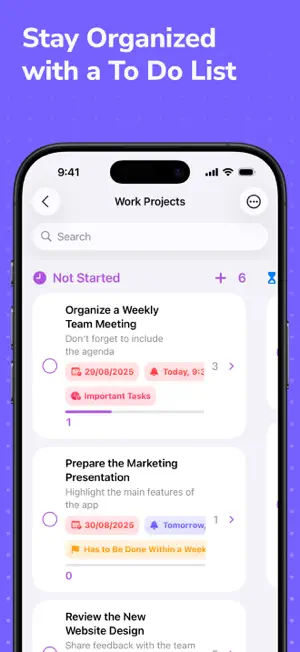
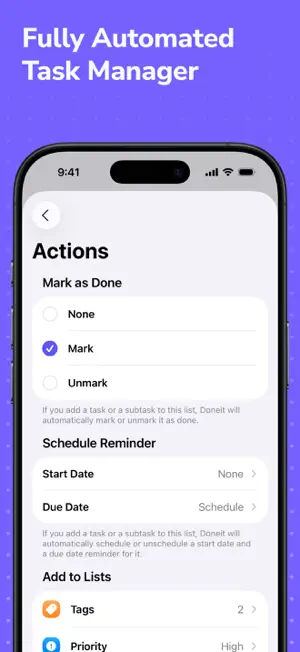
Meet Doneit, a feature-packed projects and tasks manager that focuses on simplicity and organization. With Doneit, you don't need to worry about your tasks lists ever being messy because we have designed the app to help you better organize all of your daily to-do's, work projects, and more, and its main goal is to help you become more efficient and start accomplishing all of your tasks and goals quicker, no matter how small or big they are, because Doneit will definitely help you see the full picture of what should be done now and what can wait until the later day. Doneit offers a delightful user interface that will feel right at home on your Apple devices. It's simple and intuitive, and it will let you start using Doneit at its full potential with no introduction needed and in just a matter of time. The app offers an extensive variety of different features that are designed to help you become more organized and efficient. Doneit features folders, smart categories, categories, tags, priorities, statuses, attributes, tasks, and subtasks. There are various tasks organization options available throughout the app, as well as quite a few customization options that will give you an incredible opportunity of making the app feel more unique to you. KEY FEATURES: - Up to 2 categories to help you better organize your tasks - 3 different tasks views that include list, grid, and board views - Unlimited number of tasks - Unlimited number of subtasks that can be added to help you accomplish your main tasks quicker - Sync across multiple devices connected to a single iCloud account - Sync with the system's Reminders app - Ability to schedule a reminder that will send you a notification when the task is due - Support for all-day reminders - Ability to add your tasks and subtasks as events in the system's Calendar app - Huge variety of tasks sorting options - Different filters for your tasks lists - Ability to import all of your reminders from the system's Reminders app - Ability to import all of your calendar events from the system's Calendar app - Ability to add notes to each of the tasks and subtasks, as well as to the tasks lists - Ability to add links to your tasks and subtasks - Just archive or hide unnecessary tasks that you don't want to delete yet - Various Home Screen customization options that will let you quickly hide sections that you are not interested in at all - Fully customizable screens for adding and editing the tasks & subtasks - Home Screen quick actions - Multiple swipe actions - Ability to pin important tasks and subtasks - Fully native design - Beautiful dark mode - Standalone watchOS app - Support for Siri shortcuts - Support for app shortcuts on iOS 18 and iPadOS 18 - Support for focus filters - More than 5 Home and Lock Screen widgets for you to view all of your tasks - Available on iOS, iPadOS, watchOS, and macOS PREMIUM FEATURES: - Add an unlimited number of categories - Advanced board view - Timeline view for your tasks - List actions - Advanced tasks filters - Securely share and collaborate on your categories with others via iCloud - Get access to folders, smart categories, tags, priorities, statuses, and custom task & subtask attributes - Ability to add different attachments to tasks and subtasks, such as files, photos, scanned documents, and drawings - Schedule recurring reminders with custom repeat intervals - Ability to edit items in bulk - 10 different app icons for you to choose the one that you prefer the most - 15 amazing tint colors for the app's user interface - Ability to set a custom appearance (Dark, light or system) If you have any questions or concerns regarding our app, we are always here to help you! Just reach out to us at [email protected]. Privacy policy: https://designtech.notion.site/DesignTech-Privacy-Policy-18bc124eba40809eba48e6af249ebd2c. Terms of service: https://designtech.notion.site/DesignTech-Terms-of-Service-18cc124eba4080c58316f2ed81f84bff.
Ratings & reviews
4.5
280 ratings
What’s new
Version 3.2.2 · Updated October 19, 2026
Thank you for downloading Doneit! We have been working really hard on this update and it’s finally here! This update brings a lot of exciting new features and improvements, including the reimagined Doneit Assist, as well as support for the latest versions of iOS, iPadOS, and watchOS. What is New: - Doneit is ready for the new iPhone Duo - Improved the grid view - Fixed an issue where text in the shortcuts wouldn’t be translated Doneit 3.2: - Enhanced Doneit Assist planning feature with support for multimodal prompts in the latest versions of iOS and iPadOS allowing you to attach photos when planning your tasks in Doneit to easily turn a handwritten list, whiteboard or a document into tasks, or simply plan tasks around what is visible in a photo - Doneit Assist now offers even more customization options when planning tasks, such as the ability to include additional details to make tasks more accurate, an option to suggest reminders and attributes, as well as an option to break tasks into subtasks, that you can use to plan your tasks even more efficiently - Doneit Assist can now create a brief summary of a task list, highlight its key tasks for you to focus on, as well as show the upcoming tasks in this list - Task lists and tasks that are displayed in Doneit are now accessible to the new Siri AI for onscreen awareness - You can now effortlessly add tasks in Doneit using the new Siri AI - Shortcut for adding a new task now has even more parameters that can be configured when adding a new task using Siri - List widget now supports the new extra large portrait option in the latest version of iOS - You can now delete the sample data added during onboarding in the settings of the app by selecting the Advanced option - Various other improvements and bug fixes If you have a feature request or if you have found any bugs or things that are behaving weirdly, we would highly appreciate it if you could let us know by getting in touch with us at [email protected]. Thank you for using Doneit, we are extremely grateful that you have chosen our app! If you are enjoying it, please consider leaving a positive review since it helps us a lot.
App privacy
The developer, DesignTech SIA, reported these privacy practices to Apple.
Data Not Linked to You
The following data, which may be collected but is not linked to your identity, may be used for the following purposes:
- Purchases: Purchase History
- Identifiers: Device ID
- Usage Data: Product Interaction
- Diagnostics: Crash Data
Used for: Analytics, App Functionality
Alternatives to Kanban - Doneit
Looking for apps like Kanban - Doneit? Here are 6 similar apps on the App Store. The highest rated is Routine Planner - Todotics Pro (5.0/5), and 5 of the 6 are free to download.
-
 Tasks - To Do Lists & Reminder
4.6
Tasks - To Do Lists & Reminder
4.6
-
 bypassgpt and humanizer
4.6
bypassgpt and humanizer
4.6
-
 Kanban Board App
4.8
Kanban Board App
4.8
-
 UltraNotes - Note Taking & PDF
4.6
UltraNotes - Note Taking & PDF
4.6
-
 Routine Planner - Todotics Pro
5.0
Routine Planner - Todotics Pro
5.0
-
 Dumb Phone Launcher
4.7
Dumb Phone Launcher
4.7
| App | Rating | Price | Last updated | Compare |
|---|---|---|---|---|
| Kanban - Doneit | 4.5 / 5 (280 ratings) | Free | October 19, 2026 | |
| Tasks - To Do Lists & Reminder | 4.6 / 5 (1,912) | Free | Oct 29, 2026 | Compare |
| bypassgpt and humanizer | 4.6 / 5 (175) | Free | Sep 16, 2026 | Compare |
| Kanban Board App | 4.8 / 5 (43) | Free | Oct 29, 2026 | Compare |
| UltraNotes - Note Taking & PDF | 4.6 / 5 (187) | Free | Oct 15, 2026 | Compare |
| Routine Planner - Todotics Pro | 5.0 / 5 (10) | 9.99 USD | Feb 16, 2026 | Compare |
| Dumb Phone Launcher | 4.7 / 5 (35) | Free | May 22, 2025 | Compare |
Compare Kanban - Doneit with the top alternatives: ratings, updates, ASO score and keyword gaps →