

Sprite Pencil
256 Arts Graphics & Design iPhoneiPadiPod touchMac
Sprite Pencil is a free Graphics & Design app for iPhone and iPad by 256 Arts. Rated 4.6/5 from 61 ratings. Requires iOS 27.0. Updated October 28, 2026.
- Rating
- 4.6
- 61 ratings
- Price
- Free
- on the App Store
- Size
- 12 MB
- Age 4+
- Updated
- Oct 28
- 2026 · v5.0
Screenshots


About Sprite Pencil
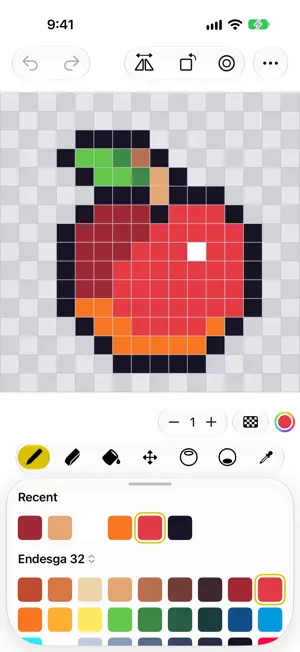
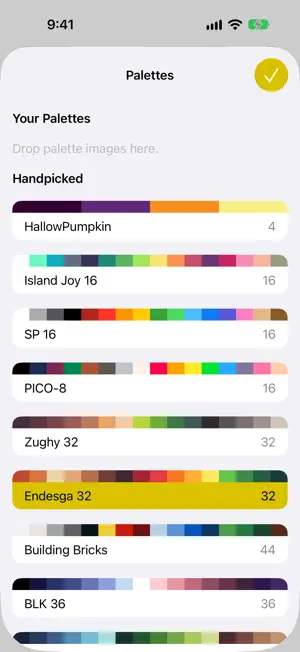
Pixel art, made simple and made to feel great. Sprite Pencil is a focused pixel-art editor for sprites, icons, and game assets. A small set of carefully chosen tools and a drawing engine built exclusively for Apple devices make every pixel land exactly where you meant it, whether you draw with a finger or with Apple Pencil. Draw • Pencil, eraser, and fill tools • Highlight and shadow brushes that shade automatically • Symmetry mode to mirror strokes as you draw • Dithering for classic checkered patterns • Flip, rotate, and outline a whole sprite in a tap • Full undo and redo Color • Handpicked palettes, plus seasonal picks • Building Bricks colors • Import any palette from Lospec Your Files, Your Way • Sprites are plain PNG files, so any app can open them • Edit images in place wherever they live, including iCloud Drive • Share your art scaled up so it stays crisp Show It Off • Pin a favorite sprite to your Home Screen with a widget • Draw and send pixel-art stickers right in Messages
Ratings & reviews
4.6
61 ratings
What’s new
Version 5.0 · Updated October 28, 2026
This update brings smarter tools and a more polished Mac experience. • New: a bucket fill toggle to recolor every pixel of a tapped color at once, plus Remap to Palette to snap your whole image to your palette's nearest colors • New: Tiled Preview shows your sprite repeated around the canvas, perfect for seamless tiles • New: import a reference image behind the canvas, and an Autosave setting for more control over when your work is saved • Refined Mac and visionOS toolbars, plus new languages: Simplified Chinese, Japanese, German, French, and Spanish • Bug fixes and improvements
App privacy
The developer, 256 Arts, reported these privacy practices to Apple.
Data Used to Track You
The following data may be used to track you across apps and websites owned by other companies:
- Identifiers: Device ID
Data Linked to You
The following data, which may be collected and linked to your identity, may be used for the following purposes:
- Location: Coarse Location
- Identifiers: Device ID
- Usage Data: Product Interaction, Advertising Data
Used for: Third-Party Advertising, Analytics, App Functionality
Data Not Linked to You
The following data, which may be collected but is not linked to your identity, may be used for the following purposes:
- Diagnostics: Performance Data, Other Diagnostic Data, Crash Data
Used for: Third-Party Advertising, Analytics, App Functionality
Alternatives to Sprite Pencil
Looking for apps like Sprite Pencil? Here are 6 similar apps on the App Store. The highest rated is Screenshot Editor - SnapIt (4.7/5), and 5 of the 6 are free to download.
-
 DS Card - Markdown text card
4.0
DS Card - Markdown text card
4.0
-
 Pixel art maker - Inktica
4.6
Pixel art maker - Inktica
4.6
-
 Screenshot Editor - SnapIt
4.7
Screenshot Editor - SnapIt
4.7
-
 Pixen - pixel art editor
4.7
Pixen - pixel art editor
4.7
-
 Coverpad
4.6
Coverpad
4.6
-
 Litur - Color Library
4.5
Litur - Color Library
4.5
| App | Rating | Price | Last updated | Compare |
|---|---|---|---|---|
| Sprite Pencil | 4.6 / 5 (61 ratings) | Free | October 28, 2026 | |
| DS Card - Markdown text card | 4.0 / 5 (8) | Free | Dec 15, 2025 | Compare |
| Pixel art maker - Inktica | 4.6 / 5 (24) | Free | Oct 25, 2026 | Compare |
| Screenshot Editor - SnapIt | 4.7 / 5 (90) | Free | Apr 5, 2025 | Compare |
| Pixen - pixel art editor | 4.7 / 5 (178) | Free | Sep 6, 2026 | Compare |
| Coverpad | 4.6 / 5 (334) | Free | Oct 26, 2026 | Compare |
| Litur - Color Library | 4.5 / 5 (25) | 2.99 USD | Sep 28, 2026 | Compare |
Compare Sprite Pencil with the top alternatives: ratings, updates, ASO score and keyword gaps →