

Pixen - pixel art editor
Furnace Creek Software LLC Graphics & Design iPhoneiPadiPod touch
Pixen - pixel art editor is a free Graphics & Design app for iPhone and iPad by Furnace Creek Software LLC. Rated 4.7/5 from 178 ratings. Requires iOS 18.0.
- Rating
- 4.7
- 178 ratings
- Price
- Free
- on the App Store
- Size
- 9 MB
- Age 4+
- Updated
- Sep 6
- 2026 · v4.0.6
Screenshots


About Pixen - pixel art editor
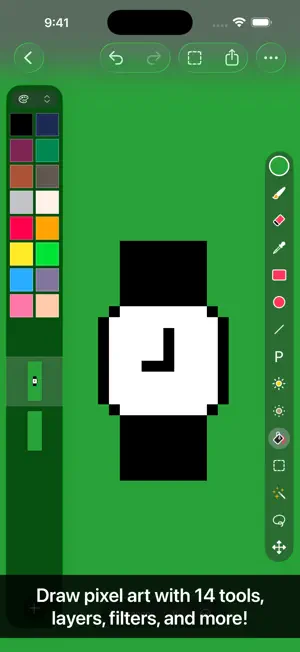
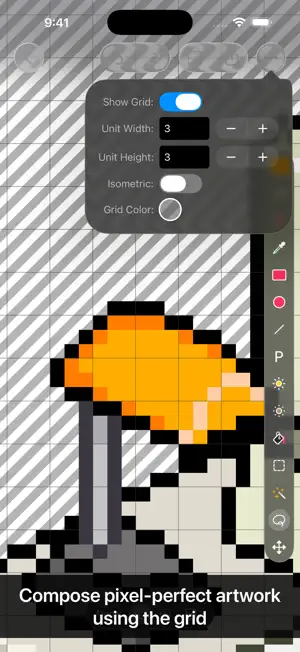
Pixen is a native pixel art editor for iOS and macOS, designed for working with low-resolution raster art such as those 8-bit sprites found in old-school video games. Pixen packs all the tools pixel artists need in an intuitive, native interface including support for high zoom levels, animation editing, color palettes, and a lot more. PROJECTS GALLERY The Pixen experience starts in the projects gallery, which allows you to manage all of your creations in one place. You can import and export files in various file formats including PNG, JPEG, GIF, ICO, BMP, TIFF, SVG, and PSD. Files can be imported from your Photos library, the Files app, or the clipboard. Pixen for macOS users can take advantage of seamless iCloud sync. When you're ready, you can share your creations with friends. TOOLS AND APPLE PENCIL Leverage Pixen's wide array of tools when composing pixel art: Pencil, Eraser, Brightness, Text, Eyedropper, Zoom, Rectangular Selection, Magic Wand, Lasso, Move, Fill, Line, Rectangle, and Ellipse. All of Pixen's tools are fully compatible with Apple Pencil on iPad. You can take advantage of the double-tap gesture on Apple Pencil 2 to quickly switch to your last tool, switch to the eraser, or bring up the color picker. Pixen even has hover support when using Apple Pencil Pro, so you can see a preview of what you're about to draw before your Apple Pencil touches the screen. COLOR PALETTES With Pixen, you can add and organize commonly-used colors into palettes. Pixen can also import and export color palettes in the Adobe Color Table, Microsoft Palette, JASC Palette, and GIMP Palette formats. You can even perform palette operations such as sorting colors and removing duplicate colors directly in the app. ANIMATIONS Create and arrange image frames in the filmstrip view to piece together animations. Pixen can import animated PNGs, animated GIFs, and sprite sheets. It can export animations as animated GIFs, animated PNGs, movies, image sequences, and sprite sheets! GRID Take advantage of Pixen's grid and alignment tools and create pixel-perfect artwork. PATTERNS Define custom patterns to use while drawing with the Pencil, Line, or Eraser tool (instead of a single pixel). You can even import patterns from 1-bit images. PREVIEW While editing at high zoom levels, use the Preview feature to view the canvas scaled out. You can play back animations and tile small images, useful when working on repeated patterns. AND A LOT MORE... - Sync your creations with Pixen for Mac over iCloud and resume your work right where you left off, regardless of device. - Take advantage of the flexibility of layers and change opacities, blend modes, and more to compose creative effects. - Invert colors, convert to grayscale, apply sepia tone, remove alpha components, palettize, pixellate, adjust hue, exposure, brightness, contrast, and more. - Pixel Perfect mode removes extra pixels while drawing such that any drawn paths are at most 1 pixel in width. In other words, it removes the middle pixel of an L shape. - Pick a flat, striped, or checkered background to be drawn beneath the canvas, or set a reference image. - If you use your iPad with a keyboard, increase productivity with Pixen's wide array of keyboard shortcuts. - Export your artwork in PNG, JPEG, GIF, ICO, BMP, TIFF, SVG, and PSD file formats. - Share your creations quickly and easily via AirDrop, Messages, email, and more! - Adjust the size and position of Pixen's sidebars, customize the Apple Pencil 2 double-tap gesture, and more. Pixen is also available for macOS and is the only pixel art maker of its class that syncs projects with iCloud!
Ratings & reviews
4.7
178 ratings
What’s new
Version 4.0.6 · Updated September 6, 2026
- Copying layers is more reliable - Performance improvements
App privacy
The developer, Furnace Creek Software LLC, reported these privacy practices to Apple.
Data Not Linked to You
The following data, which may be collected but is not linked to your identity, may be used for the following purposes:
- Usage Data: Product Interaction
- Diagnostics: Crash Data
Used for: App Functionality
Alternatives to Pixen - pixel art editor
Looking for apps like Pixen - pixel art editor? Here are 6 similar apps on the App Store. The highest rated is Pixquare - Pixel Art Studio (4.8/5), and all 6 are free to download.
-
 Pixaki 4 Intro
3.7
Pixaki 4 Intro
3.7
-
 Resprite: pixel art studio
4.7
Resprite: pixel art studio
4.7
-
 PixelPencil - Pixel art editor
4.6
PixelPencil - Pixel art editor
4.6
-
 Pixquare - Pixel Art Studio
4.8
Pixquare - Pixel Art Studio
4.8
-
 Pixel art maker - Inktica
4.6
Pixel art maker - Inktica
4.6
-
 Pixel Studio for pixel art
4.7
Pixel Studio for pixel art
4.7
| App | Rating | Price | Last updated | Compare |
|---|---|---|---|---|
| Pixen - pixel art editor | 4.7 / 5 (178 ratings) | Free | September 6, 2026 | |
| Pixaki 4 Intro | 3.7 / 5 (34) | Free | Apr 28, 2025 | Compare |
| Resprite: pixel art studio | 4.7 / 5 (1,473) | Free | Oct 11, 2026 | Compare |
| PixelPencil - Pixel art editor | 4.6 / 5 (110) | Free | Aug 9, 2024 | Compare |
| Pixquare - Pixel Art Studio | 4.8 / 5 (3,284) | Free | Oct 26, 2026 | Compare |
| Pixel art maker - Inktica | 4.6 / 5 (24) | Free | Oct 25, 2026 | Compare |
| Pixel Studio for pixel art | 4.7 / 5 (6,068) | Free | Jul 31, 2026 | Compare |