

Pixel art maker - Inktica
Robert Filip Odrowaz-Sypniewski Graphics & Design iPhoneiPadiPod touch
Pixel art maker - Inktica is a free Graphics & Design app for iPhone and iPad by Robert Filip Odrowaz-Sypniewski. Rated 4.6/5 from 24 ratings.
- Rating
- 4.6
- 24 ratings
- Price
- Free
- on the App Store
- Size
- 41 MB
- Age 4+
- Updated
- Oct 25
- 2026 · v1.59.160
Screenshots


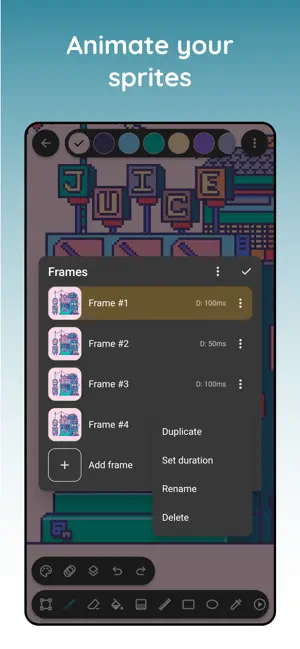

About Pixel art maker - Inktica
Inktica is a powerful and easy-to-use pixel art maker and texture maker, perfect for creating retro-style pixel art and game textures. Whether you're designing sprites, game assets, or detailed textures, Inktica provides the tools you need. Aseprite File Support Seamlessly edit your Aseprite (.aseprite, .ase) files on the go! Inktica allows both importing and exporting Aseprite files, so you can work across multiple platforms. (Note: Some Aseprite features may not be available.) Pixel-Perfect Tools for Pixel Art & Texture Editing · Inktica offers an extensive toolset tailored for pixel art and texture creation, including: · Brush (Pixel-Perfect Mode) – Draw clean, single-pixel-wide lines. · Eraser, Flood-Fill, Gradient, Line, Rectangle, Ellipse, Pipette – All designed for pixel precision. · Selection Tool – Copy, cut, move, rotate, and flip parts of your pixel art. Layers & Animation Features · Organize your pixel art using layers for better editing control. · Create animations with onion skinning, making frame-by-frame pixel animations easier. Color Palettes & References · Use color palettes from retro consoles like the Atari 2600, NES, and Game Boy. · Import Lospec palettes for even more color variety. · Open a reference image from your gallery to compare while drawing. Export & Share Your Pixel Art · Save in PNG, JPEG, GIF, MP4, Aseprite, Sprite sheet and more. · Upscale images to maintain clarity on modern displays. · Share your pixel art directly on social media. With Inktica, your pixel art and texture making process becomes smooth, efficient, and fun! Art in screenshots by Pikurā Privacy policy: https://inktica.com/privacy-policy.html Terms of use: https://inktica.com/terms-of-use.html
Ratings & reviews
4.6
24 ratings
What’s new
Version 1.59.160 · Updated October 25, 2026
- Added pointer position and selection size info - Added ellipse, lasso and magic wand selection with add and subtract modes
App privacy
The developer, Robert Filip Odrowaz-Sypniewski, reported these privacy practices to Apple.
Data Linked to You
The following data, which may be collected and linked to your identity, may be used for the following purposes:
- Location: Coarse Location
- Identifiers: Device ID, User ID
- Usage Data: Product Interaction
- Contact Info: Email Address
- Diagnostics: Crash Data
Used for: Analytics, App Functionality
Data Not Linked to You
The following data, which may be collected but is not linked to your identity, may be used for the following purposes:
- Diagnostics: Performance Data, Other Diagnostic Data
Used for: App Functionality
Alternatives to Pixel art maker - Inktica
Looking for apps like Pixel art maker - Inktica? Here are 6 similar apps on the App Store. The highest rated is Sprite Tight (5.0/5), and all 6 are free to download.
-
 Sprite Catalog
4.8
Sprite Catalog
4.8
-
 Sprite Tight
5.0
Sprite Tight
5.0
-
 Sprite Pencil
4.6
Sprite Pencil
4.6
-
 PixelPencil - Pixel art editor
4.6
PixelPencil - Pixel art editor
4.6
-
 Sprite Artisan Pixel Art
-
 Pixel Art Kit
5.0
Pixel Art Kit
5.0
| App | Rating | Price | Last updated | Compare |
|---|---|---|---|---|
| Pixel art maker - Inktica | 4.6 / 5 (24 ratings) | Free | October 25, 2026 | |
| Sprite Catalog | 4.8 / 5 (41) | Free | Oct 28, 2026 | Compare |
| Sprite Tight | 5.0 / 5 (2) | Free | Nov 22, 2023 | Compare |
| Sprite Pencil | 4.6 / 5 (61) | Free | Oct 28, 2026 | Compare |
| PixelPencil - Pixel art editor | 4.6 / 5 (110) | Free | Aug 9, 2024 | Compare |
| Sprite Artisan Pixel Art | – | Free | Jul 8, 2024 | Compare |
| Pixel Art Kit | 5.0 / 5 (4) | Free | Jan 31, 2025 | Compare |