
Image Pixelator: Pixel Art
Photography In-app purchases
Turn photos into pixel art, mosaics and ASCII, or pixelate faces in one drag.
- Downloads
- 243+
- on Google Play
- Price
- Free
- In-app purchases
- Updated
- Sep 14
- 2026 · v1.0
Screenshots


About Image Pixelator: Pixel Art
A free, offline multi-language app to pixelate any photo: retro palettes, dithering, ASCII art and face censoring.
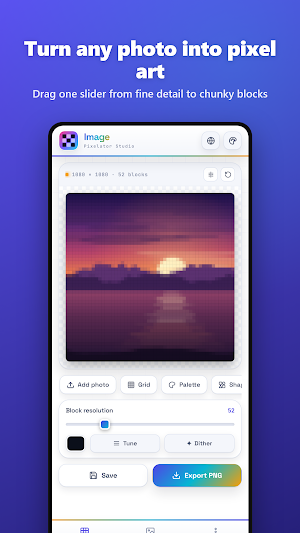
Turn any photo into pixel art. Pick a picture, drag one slider, and watch it rebuild itself block by block, from fine detail to big chunky pixels.
Image Pixelator is a small pixel art studio for your phone. Make retro game art, mosaic tiles, dot-matrix posters and ASCII art from your own photos, or pixelate the parts of a photo you'd rather not share.
ONE SLIDER, LIVE PREVIEW
• Block resolution from 6 to 220 blocks across
• Every change redraws instantly on your photo
• Tap Compare to flip back to the original, and Reset to start over
12 ONE-TAP LOOKS
Classic, Dots, Tiles, Soft focus, Mono grain and Censor, plus Game Boy, 1-Bit print, Newsprint, ASCII, Vapor and Stitch. Every look is previewed live on your own photo, and you can fine-tune anything after picking one.
BLOCK SHAPES
• Square, Dot and Tile
• Diamond, Triangle, Cross and Ring
• Characters: draw your photo in ASCII, block, dot, binary or star characters, in the photo's own colours or a single ink colour
RETRO PALETTES AND DITHERING
• Original, Mono and Sepia
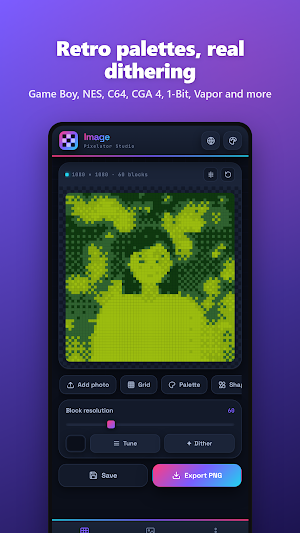
• 1-Bit, Game Boy, CGA 4, NES, C64, Vapor, Ember, Ice and Pastel
• Colour depth from 2 to 32 shades per channel
• Ordered 2×2, 4×4 and 8×8, Diffusion and Atkinson dithering, with adjustable strength
GRID AND TONE
• Gaps between blocks, rounded corners and block outlines
• Choose the outline and gap colours, or export with transparent gaps
• Brightness, contrast and saturation
• Photo blend fades the original back in over the pixels
• Average colours for softer blocks, or switch it off for hard sampling
PIXELATE JUST PART OF A PHOTO
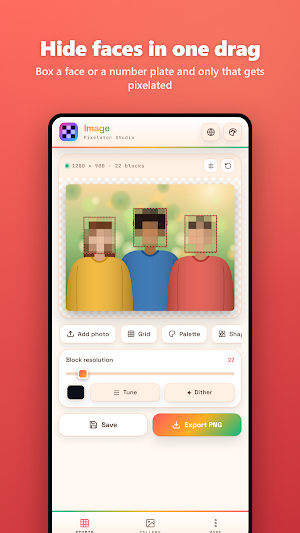
• Drag a box over a face, a number plate or a screen, and only that area gets pixelated
• Tap a box to remove it
• As many boxes as you need, to cover every face in a group shot
• Outside mode keeps your subject sharp and pixelates everything around it
SAVE AND EXPORT
• Save to the in-app gallery. Each save keeps the photo and every setting, so you can reopen it and keep tweaking (your 14 most recent saves are kept)
• Export a PNG straight to your phone
• Free exports are 1080 px
• PRO exports at full resolution, up to 4096 px
MAKE IT YOURS
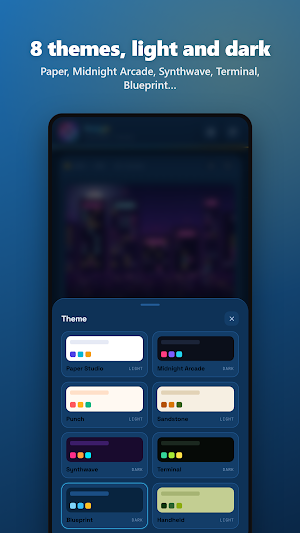
8 themes, light and dark: Paper Studio, Midnight Arcade, Punch and Sandstone, plus Synthwave, Terminal, Blueprint and Handheld.
PRIVATE BY DESIGN
Your photos are processed on your device. No account, no uploads.
Pick a photo. Drag the slider. Pixel art.
Turn any photo into pixel art. Pick a picture, drag one slider, and watch it rebuild itself block by block, from fine detail to big chunky pixels.
Image Pixelator is a small pixel art studio for your phone. Make retro game art, mosaic tiles, dot-matrix posters and ASCII art from your own photos, or pixelate the parts of a photo you'd rather not share.
ONE SLIDER, LIVE PREVIEW
• Block resolution from 6 to 220 blocks across
• Every change redraws instantly on your photo
• Tap Compare to flip back to the original, and Reset to start over
12 ONE-TAP LOOKS
Classic, Dots, Tiles, Soft focus, Mono grain and Censor, plus Game Boy, 1-Bit print, Newsprint, ASCII, Vapor and Stitch. Every look is previewed live on your own photo, and you can fine-tune anything after picking one.
BLOCK SHAPES
• Square, Dot and Tile
• Diamond, Triangle, Cross and Ring
• Characters: draw your photo in ASCII, block, dot, binary or star characters, in the photo's own colours or a single ink colour
RETRO PALETTES AND DITHERING
• Original, Mono and Sepia
• 1-Bit, Game Boy, CGA 4, NES, C64, Vapor, Ember, Ice and Pastel
• Colour depth from 2 to 32 shades per channel
• Ordered 2×2, 4×4 and 8×8, Diffusion and Atkinson dithering, with adjustable strength
GRID AND TONE
• Gaps between blocks, rounded corners and block outlines
• Choose the outline and gap colours, or export with transparent gaps
• Brightness, contrast and saturation
• Photo blend fades the original back in over the pixels
• Average colours for softer blocks, or switch it off for hard sampling
PIXELATE JUST PART OF A PHOTO
• Drag a box over a face, a number plate or a screen, and only that area gets pixelated
• Tap a box to remove it
• As many boxes as you need, to cover every face in a group shot
• Outside mode keeps your subject sharp and pixelates everything around it
SAVE AND EXPORT
• Save to the in-app gallery. Each save keeps the photo and every setting, so you can reopen it and keep tweaking (your 14 most recent saves are kept)
• Export a PNG straight to your phone
• Free exports are 1080 px
• PRO exports at full resolution, up to 4096 px
MAKE IT YOURS
8 themes, light and dark: Paper Studio, Midnight Arcade, Punch and Sandstone, plus Synthwave, Terminal, Blueprint and Handheld.
PRIVATE BY DESIGN
Your photos are processed on your device. No account, no uploads.
Pick a photo. Drag the slider. Pixel art.
What’s new
Version 1.0 · Updated September 14, 2026
First release. • Turn any photo into pixel art with one slider and a live preview • 12 one-tap looks, 8 block shapes and ASCII characters • Retro palettes: Game Boy, NES, C64, CGA and more, with 5 dither modes • Pixelate just the faces or plates you box, or everything around your subject • Gallery that keeps every photo and setting • PNG export up to 4096 px • 8 light and dark themes
Alternatives to Image Pixelator: Pixel Art
Looking for apps like Image Pixelator: Pixel Art? Here are 6 similar Android apps on Google Play. All of them are free to download.
-
Screenshot Annotation Studio
-
Sliding Puzzle Studio
-
Hidden Picture Game Maker
-
Jigsaw Puzzle Studio
-
Sticker Sheet Studio
-
Seating Plan Studio
| App | Rating | Price | Installs | Last updated | Compare |
|---|---|---|---|---|---|
| Image Pixelator: Pixel Art | – | Free | 100+ | Sep 14, 2026 | |
| Screenshot Annotation Studio | – | Free | 50+ | Sep 14, 2026 | Compare |
| Sliding Puzzle Studio | – | Free | 5+ | Sep 12, 2026 | Compare |
| Hidden Picture Game Maker | – | Free | 10+ | Sep 12, 2026 | Compare |
| Jigsaw Puzzle Studio | – | Free | 10+ | Sep 11, 2026 | Compare |
| Sticker Sheet Studio | – | Free | 50+ | Sep 11, 2026 | Compare |
| Seating Plan Studio | – | Free | 50+ | Sep 10, 2026 | Compare |