
Curved Text Studio
Art & Design In-app purchases
Bend text into arcs, circles, waves and spirals. Export PNG, JPG or SVG— Offline
- Downloads
- 354+
- on Google Play
- Price
- Free
- In-app purchases
- Updated
- Sep 7
- 2026 · v1.0
Screenshots


About Curved Text Studio
A free, offline, multi-language app for creating curved texts.
Straight text is easy. Curved text is where a design starts to look designed.
Curved Text Studio bends any words along a path you control — an arch over a logo, a ring around a badge, a wave across a banner, a spiral that winds into the middle of the canvas. Drag one slider and the type follows, live, on the canvas.
BEND IT ANY WAY YOU LIKE
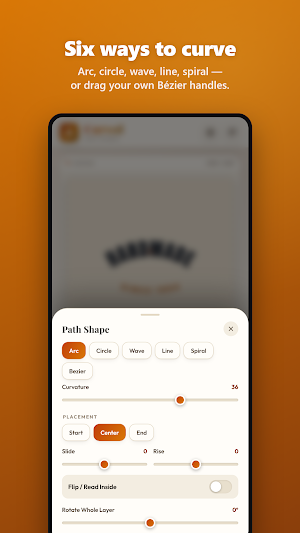
• Arc — one curvature slider, from a gentle rise to a full rainbow
• Circle — wrap a full ring, and flip the lower half so it reads the right way up
• Wave — set amplitude, frequency and width
• Line — clean, tracked-out horizontal type
• Spiral — set the turns, outer and inner radius, and start angle
• Bézier — drag four handles directly on the canvas and draw your own path
Then place the text along it: start, centre or end, slide it, raise it off the
path, flip it inside, and rotate the whole layer.
TYPOGRAPHY THAT EARNS ITS PLACE
16 display fonts — script, serif, condensed, heavy and monospace — with regular, bold and black weights, italics, caps, letter tracking, opacity and rotation set independently on every layer.
COLOUR AND EFFECTS
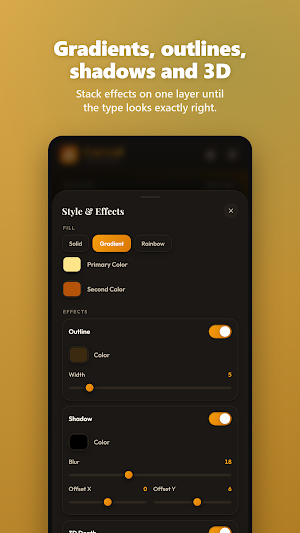
• Solid, two-colour gradient or rainbow fill with adjustable hue start and span
• Outline in any colour and width
• Drop shadow with blur and X/Y offset
• 3D extruded depth with its own colour, depth and light angle
BACKGROUNDS
Solid colour, two-colour gradient at any angle, or your own photo with cover,
contain and stretch fitting — plus brightness, contrast, saturation, blur and
grayscale filters. Or keep it fully transparent and export a PNG that drops
straight onto anything.
BUILT FOR WHEREVER IT'S GOING
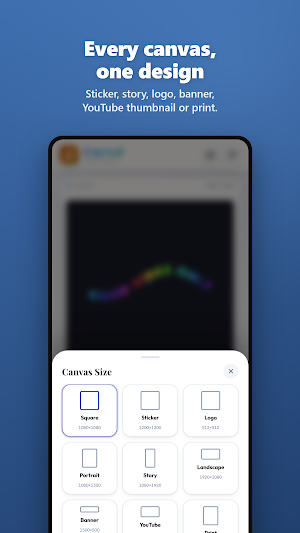
Nine canvas presets: Square (1080), Sticker (1200), Logo (512), Portrait
(1080×1350), Story (1080×1920), Landscape (1920×1080), Banner (1500×500),
YouTube (1280×720) and Print (2400×3000).
FOURTEEN TEMPLATES TO START FROM
Classic arches, coffee-shop badge seals, vinyl labels, wedding monograms, team crests, gold-foil logotypes, retro roadtrip lettering, neon spirals and more — every one opens straight into the editor, fully editable.
EXPORT
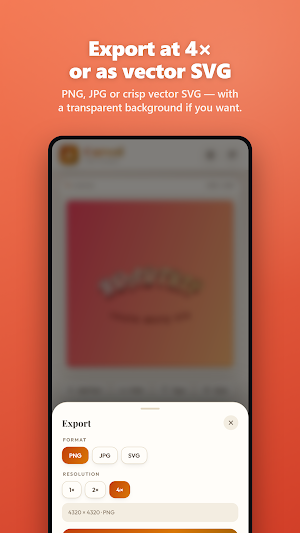
PNG or JPG, or a true vector SVG that scales forever. Render at 1×, 2× or 4× — a 1080 square becomes a 4320×4320 file.
MADE TO LIVE ON YOUR PHONE
• Save up to 40 designs on the device — no account, no sign-up, no cloud
• Multiple text layers, reordered, hidden, duplicated or deleted from one panel
• Drag on the canvas to reposition, with snap-to-centre and on-screen path guides
• Eight studio themes — four light, four dark
• 13 languages: English, Português, Español, Deutsch, Français, Italiano,
Nederlands, Polski, 한국어, 日本語, Русский, Türkçe and 中文
Perfect for logos, stickers, badges, monograms, T-shirt art, album covers, club crests, sale banners, YouTube thumbnails and anything that deserves better than a straight line.
Straight text is easy. Curved text is where a design starts to look designed.
Curved Text Studio bends any words along a path you control — an arch over a logo, a ring around a badge, a wave across a banner, a spiral that winds into the middle of the canvas. Drag one slider and the type follows, live, on the canvas.
BEND IT ANY WAY YOU LIKE
• Arc — one curvature slider, from a gentle rise to a full rainbow
• Circle — wrap a full ring, and flip the lower half so it reads the right way up
• Wave — set amplitude, frequency and width
• Line — clean, tracked-out horizontal type
• Spiral — set the turns, outer and inner radius, and start angle
• Bézier — drag four handles directly on the canvas and draw your own path
Then place the text along it: start, centre or end, slide it, raise it off the
path, flip it inside, and rotate the whole layer.
TYPOGRAPHY THAT EARNS ITS PLACE
16 display fonts — script, serif, condensed, heavy and monospace — with regular, bold and black weights, italics, caps, letter tracking, opacity and rotation set independently on every layer.
COLOUR AND EFFECTS
• Solid, two-colour gradient or rainbow fill with adjustable hue start and span
• Outline in any colour and width
• Drop shadow with blur and X/Y offset
• 3D extruded depth with its own colour, depth and light angle
BACKGROUNDS
Solid colour, two-colour gradient at any angle, or your own photo with cover,
contain and stretch fitting — plus brightness, contrast, saturation, blur and
grayscale filters. Or keep it fully transparent and export a PNG that drops
straight onto anything.
BUILT FOR WHEREVER IT'S GOING
Nine canvas presets: Square (1080), Sticker (1200), Logo (512), Portrait
(1080×1350), Story (1080×1920), Landscape (1920×1080), Banner (1500×500),
YouTube (1280×720) and Print (2400×3000).
FOURTEEN TEMPLATES TO START FROM
Classic arches, coffee-shop badge seals, vinyl labels, wedding monograms, team crests, gold-foil logotypes, retro roadtrip lettering, neon spirals and more — every one opens straight into the editor, fully editable.
EXPORT
PNG or JPG, or a true vector SVG that scales forever. Render at 1×, 2× or 4× — a 1080 square becomes a 4320×4320 file.
MADE TO LIVE ON YOUR PHONE
• Save up to 40 designs on the device — no account, no sign-up, no cloud
• Multiple text layers, reordered, hidden, duplicated or deleted from one panel
• Drag on the canvas to reposition, with snap-to-centre and on-screen path guides
• Eight studio themes — four light, four dark
• 13 languages: English, Português, Español, Deutsch, Français, Italiano,
Nederlands, Polski, 한국어, 日本語, Русский, Türkçe and 中文
Perfect for logos, stickers, badges, monograms, T-shirt art, album covers, club crests, sale banners, YouTube thumbnails and anything that deserves better than a straight line.
What’s new
Version 1.0 · Updated September 7, 2026
Bend text into arcs, circles, waves and spirals. Export PNG, JPG or SVG. Free, offline, multi-language app.
Alternatives to Curved Text Studio
Looking for apps like Curved Text Studio? Here are 6 similar Android apps on Google Play. All of them are free to download.
-
Sliding Puzzle Studio
-
Hidden Picture Game Maker
-
Jigsaw Puzzle Studio
-
Sticker Sheet Studio
-
Seating Plan Studio
-
Poster Studio
| App | Rating | Price | Installs | Last updated | Compare |
|---|---|---|---|---|---|
| Curved Text Studio | – | Free | 100+ | Sep 7, 2026 | |
| Sliding Puzzle Studio | – | Free | 5+ | Sep 12, 2026 | Compare |
| Hidden Picture Game Maker | – | Free | 10+ | Sep 12, 2026 | Compare |
| Jigsaw Puzzle Studio | – | Free | 10+ | Sep 11, 2026 | Compare |
| Sticker Sheet Studio | – | Free | 50+ | Sep 11, 2026 | Compare |
| Seating Plan Studio | – | Free | 50+ | Sep 10, 2026 | Compare |
| Poster Studio | – | Free | 100+ | Sep 10, 2026 | Compare |
Compare Curved Text Studio with the top alternatives: ratings, updates, ASO score and keyword gaps →