
Sliding Puzzle Studio
Entertainment In-app purchases
Turn any photo into a sliding puzzle. 3×3 to 8×8, four modes, smart hints.
- Downloads
- 7+
- on Google Play
- Price
- Free
- In-app purchases
- Updated
- Sep 12
- 2026 · v1.0
Screenshots


About Sliding Puzzle Studio
A free, offline, multi-language app that let's you create sliding puzzles from your own pictures.
Most sliding puzzles give you numbered squares. This one slides your own pictures.
Pick a photo from your gallery, take a new one with the camera, or start from one of the built-in art packs. Drag and pinch to frame it, choose a grid, and the picture is cut into tiles and shuffled. Your job is to slide it back together.
PLAY YOUR WAY
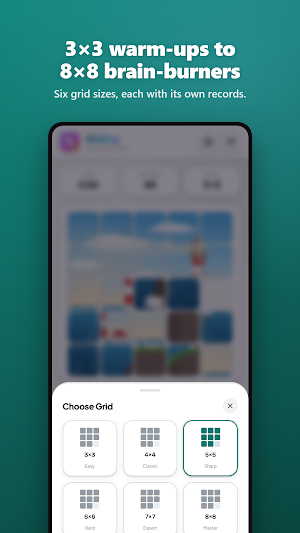
• Six grid sizes: 3×3 Easy, 4×4 Classic, 5×5 Sharp, 6×6 Hard, 7×7 Expert and 8×8 Master
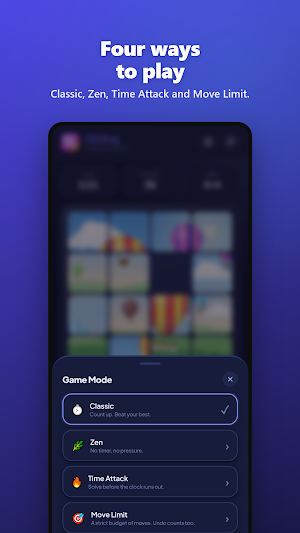
• Classic: the clock counts up, beat your best
• Zen: no timer, no pressure
• Time Attack: solve it before the clock runs out
• Move Limit: a strict budget of moves, and undo counts too
• Tap or swipe. Tap any tile in line with the gap to slide the whole row or column at once
• Every shuffle can be solved
HELP WHEN YOU WANT IT
• Smart hints light up the next tile to move, and following them always gets you closer to the solution
• Peek: hold the button to see the finished picture
• Ghost guide: a faint copy of the picture sits behind the tiles
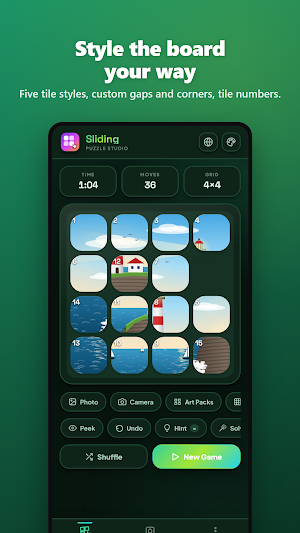
• Tile numbers, for when half the picture is blue sky
• Undo any move
• Solve it for me: watch the solver finish the puzzle one move at a time (assisted solves don't count as records)
KEEP SCORE
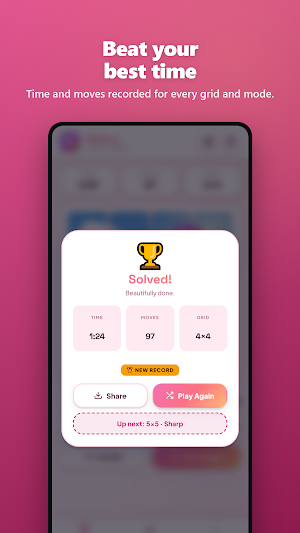
• Time and moves as you play
• Best time and fewest moves for every grid in every mode
• Total puzzles solved and your best winning streak
• The finish screen tells you when you set a new record
• Share a card of your finished picture with your time and moves
SAVE AND COME BACK
• Your current game is saved automatically
• Save any puzzle to the Puzzle Vault mid-game and pick it up later, right where you left off
MAKE IT YOURS
• 12 art packs, drawn on your device: Aurora, Bauhaus, Lagoon, Terrazzo, Topography, Bloom, Nebula, Kaleido, Circuit, Sunburst, Confetti and Dunes
• 10 themes, light and dark: Orchid, Arcade, Paper, Tide, Citrus, Midnight, Ember, Sakura, Forest and Mono
• 5 tile styles (Classic, Snug, Cards, Seamless and Pill), plus sliders for the gap and corner rounding
• Haptic feedback on every slide, which you can switch off
Pick a picture. Shuffle it. Slide it home.
Most sliding puzzles give you numbered squares. This one slides your own pictures.
Pick a photo from your gallery, take a new one with the camera, or start from one of the built-in art packs. Drag and pinch to frame it, choose a grid, and the picture is cut into tiles and shuffled. Your job is to slide it back together.
PLAY YOUR WAY
• Six grid sizes: 3×3 Easy, 4×4 Classic, 5×5 Sharp, 6×6 Hard, 7×7 Expert and 8×8 Master
• Classic: the clock counts up, beat your best
• Zen: no timer, no pressure
• Time Attack: solve it before the clock runs out
• Move Limit: a strict budget of moves, and undo counts too
• Tap or swipe. Tap any tile in line with the gap to slide the whole row or column at once
• Every shuffle can be solved
HELP WHEN YOU WANT IT
• Smart hints light up the next tile to move, and following them always gets you closer to the solution
• Peek: hold the button to see the finished picture
• Ghost guide: a faint copy of the picture sits behind the tiles
• Tile numbers, for when half the picture is blue sky
• Undo any move
• Solve it for me: watch the solver finish the puzzle one move at a time (assisted solves don't count as records)
KEEP SCORE
• Time and moves as you play
• Best time and fewest moves for every grid in every mode
• Total puzzles solved and your best winning streak
• The finish screen tells you when you set a new record
• Share a card of your finished picture with your time and moves
SAVE AND COME BACK
• Your current game is saved automatically
• Save any puzzle to the Puzzle Vault mid-game and pick it up later, right where you left off
MAKE IT YOURS
• 12 art packs, drawn on your device: Aurora, Bauhaus, Lagoon, Terrazzo, Topography, Bloom, Nebula, Kaleido, Circuit, Sunburst, Confetti and Dunes
• 10 themes, light and dark: Orchid, Arcade, Paper, Tide, Citrus, Midnight, Ember, Sakura, Forest and Mono
• 5 tile styles (Classic, Snug, Cards, Seamless and Pill), plus sliders for the gap and corner rounding
• Haptic feedback on every slide, which you can switch off
Pick a picture. Shuffle it. Slide it home.
What’s new
Version 1.0 · Updated September 12, 2026
First release. • Turn any photo, or one of 12 art packs, into a sliding puzzle • Grids from 3×3 to 8×8 • Classic, Zen, Time Attack and Move Limit modes • Smart hints, peek, ghost guide, undo and solve-for-me • Puzzle Vault, plus records for every grid and mode • 10 light and dark themes and 5 tile styles
Alternatives to Sliding Puzzle Studio
Looking for apps like Sliding Puzzle Studio? Here are 6 similar Android apps on Google Play. All of them are free to download.
-
Hidden Picture Game Maker
-
Jigsaw Puzzle Studio
-
Sticker Sheet Studio
-
Seating Plan Studio
-
Poster Studio
-
Curved Text Studio
| App | Rating | Price | Installs | Last updated | Compare |
|---|---|---|---|---|---|
| Sliding Puzzle Studio | – | Free | 5+ | Sep 12, 2026 | |
| Hidden Picture Game Maker | – | Free | 10+ | Sep 12, 2026 | Compare |
| Jigsaw Puzzle Studio | – | Free | 10+ | Sep 11, 2026 | Compare |
| Sticker Sheet Studio | – | Free | 50+ | Sep 11, 2026 | Compare |
| Seating Plan Studio | – | Free | 50+ | Sep 10, 2026 | Compare |
| Poster Studio | – | Free | 100+ | Sep 10, 2026 | Compare |
| Curved Text Studio | – | Free | 100+ | Sep 7, 2026 | Compare |