
Secret Notes – Private Notepad
A. Grauf Productivity In-app purchases
Secure notes with PIN & fingerprint — easy import from other apps.
- Downloads
- 3.2K+
- on Google Play
- Price
- Free
- In-app purchases
- Updated
- Sep 26
- 2026 · v1.24
Screenshots

About Secret Notes – Private Notepad
✔ Free core version – try all Pro features free for 7 days, then a single one-time purchase, no subscription
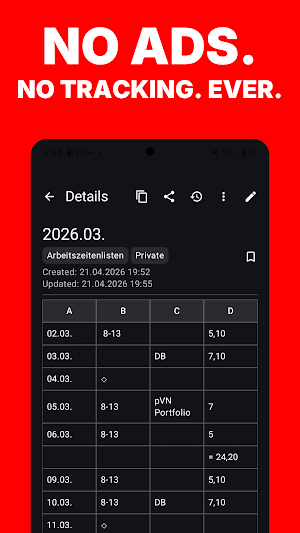
✔ No ads, no tracking – works 100% offline
✔ Cloud is optional: sync & backup go only to YOUR own cloud, end-to-end encrypted
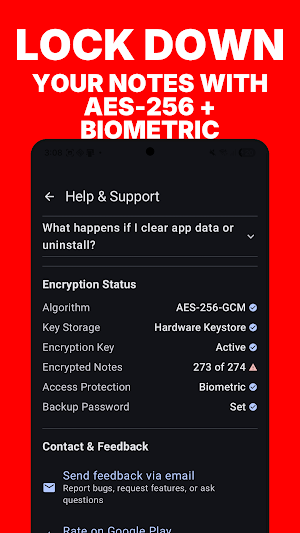
✔ Secure with PIN protection and AES-GCM encryption
✔ Switching made easy: import from Google Keep (Takeout), CSV or JSON – in seconds
Secret Notes is your personal, secure and easy-to-use digital notebook. Whether it's an idea, a diary entry, a checklist or passwords – your notes are encrypted and accessible only to you.
Main features:
🔒 Maximum security – PIN protection and biometric unlock, AES-GCM encryption.
🔏 Per-note lock – Require fingerprint, face or PIN to open a single note.
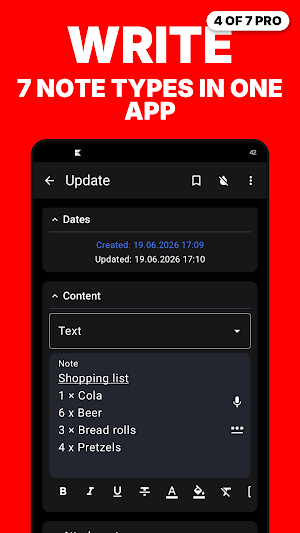
✍️ Seven note types – Three free: text notes with rich-text formatting, checklists and tally notes. Four more with Pro (Table, Markdown, Audio, Video).
🔗 Note links – Connect notes with [[links]] and see on every note which other notes link back to it.
🔍 Powerful search – Search titles, content, checklist items and even table cells. Filter by category, folder or note type.
🎤 Voice input – Dictate your notes hands-free with your voice.
🔊 Read aloud – Let the app read your notes to you. Offline, free.
⏰ Reminders – One-time or recurring, with snooze. Reminders survive restarts.
🗂️ Categories & pins – Organize your notes with categories and pin important ones.
🗑️ Trash & archive – Restore deleted notes from the trash (optional auto-cleanup) or archive notes for later.
🎨 Color themes – 8 color themes or your system's dynamic colors. Dark and light mode.
🌐 App language – German or English inside the app, independent of the system language.
🔑 Password generator – Generate strong passwords right in your notes.
📤 Import & export – Google Keep import; JSON/CSV round-trip; Markdown export as an Obsidian-ready vault.
⭐ Ratings & sorting – Sort by rating, name, date or category – or arrange manually by drag & drop.
🚫 Screenshot protection – Optionally block screenshots and hide the app in recents.
📱 Tablet & landscape support – Multi-column layout on larger screens.
🔐 Per-category auto-lock – Individual lock timeouts for different categories.
Pro features:
🎁 Try before you buy – everything below is free for 7 days: a one-time trial, started right in the app, no payment details needed. Whatever you create stays yours afterwards.
📲 Multi-device sync – Keep your notes in sync across phones and tablets via your own cloud, end-to-end encrypted – manually or automatically.
📊 Table notes – Tabular notes with rows and columns for structured data.
📝 Markdown notes – Headings, bold, links, lists and code blocks.
🎙️ Audio notes – Record audio in your notes, with playback and on-device transcription.
🎥 Video notes – Record videos directly in your notes and play them back.
📌 Pin to notification bar – Keep important notes visible as a persistent notification.
☁️ Cloud backup – Encrypted, versioned backups to Google Drive, Dropbox, Nextcloud or any WebDAV server – restore anytime, even on a new phone.
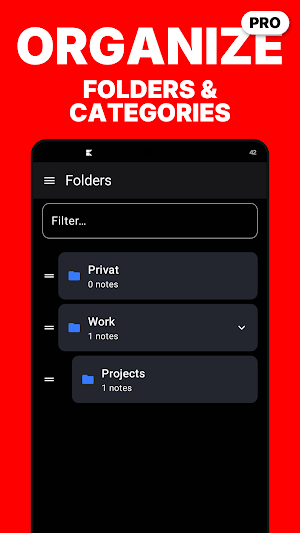
📁 Folders – Nested folder structure with colored folders.
📎 File attachments – Images, PDFs, videos, audio and documents – or capture photos and video right from the note.
🕓 Note history – Track changes over time and restore earlier versions.
📄 PDF export – Beautifully formatted PDFs, including rich-text formatting.
💾 Backup & restore – Password-protected full backups, automatic daily or weekly.
📋 Note templates – Built-in templates with date/time placeholders, or save your own.
✅ Bulk operations – Select multiple notes; move, archive or delete in one step.
📱 Home screen widgets – Widgets for recent notes, single notes and checklists.
🔄 Device-to-device sync – Sync between devices on the same network, no cloud, no server.
What’s new
Version 1.24 · Updated September 26, 2026
Every password and PIN field now has an eye button: unlocking the app, opening a locked note, setting or changing your PIN, connecting Nextcloud or WebDAV, restoring from the cloud. No more typing blind. The help also answers a question that kept coming up: two installations that keep different notes cannot share one cloud account. Sync merges them, and they share one backup limit. It now explains how to keep them apart.
User reviews

good
Alternatives to Secret Notes – Private Notepad
Looking for apps like Secret Notes – Private Notepad? Here are 6 similar Android apps on Google Play. The highest rated is Image Toolbox - Edit & Convert (4.7/5), and all 6 are free to download.
-
Image Toolbox - Edit & Convert 4.7
-
KiWi Vault: Hide Photos, Video
-
Flow Queen
-
touchnotes 3.5
-
Daypad - Simple Time Tracker 4.2
-
Wondr Note: Fun Notes & Tools 4.6
| App | Rating | Price | Installs | Last updated | Compare |
|---|---|---|---|---|---|
| Secret Notes – Private Notepad | – | Free | 1,000+ | Sep 26, 2026 | |
| Image Toolbox - Edit & Convert | 4.7 / 5 | Free | 500,000+ | Sep 4, 2026 | Compare |
| KiWi Vault: Hide Photos, Video | – | Free | 10,000+ | Sep 28, 2026 | Compare |
| Flow Queen | – | Free | 1,000+ | Aug 28, 2026 | Compare |
| touchnotes | 3.5 / 5 | Free | 1,000,000+ | Oct 24, 2026 | Compare |
| Daypad - Simple Time Tracker | 4.2 / 5 | Free | 5,000+ | May 26, 2026 | Compare |
| Wondr Note: Fun Notes & Tools | 4.6 / 5 | Free | 100,000+ | Apr 14, 2026 | Compare |
Similar apps on Google Play
- Image Toolbox - Edit & Convert
- KiWi Vault: Hide Photos, Video
- Flow Queen
- touchnotes
- Daypad - Simple Time Tracker
- Wondr Note: Fun Notes & Tools
- Listok: To do list & Notes
- BlackNote: Dark Notes, Notepad
- LiveIt Journal, Planner, Notes
- May: Beautiful Bullet Journal
- Nested Folder Notes - Folino
- Motiv - Motivational Quotes
- UpNote - notes, diary, journal
- To-Do List & Planner: Taskito
- Inoreader: News & RSS reader
- PenCake: Minimal Writing App
- Geulgram - Text on Photo
- Rocketbook
- Notepad - Notes and Tasks
- QuickEdit Text Editor Pro
- Posters: Flyer Template maker
- Your Diary: Journal with Lock
- Jump Rope Training App
- Motivated: Habit Tracker
- SCRIBZEE®
- Engross: ADHD Focus Timer
- Notes : Color Folders & To-dos
- JotterPad - Writer, Screenplay
- DrawNote: Drawing Notepad Memo
- Easy Diary
- Journi Blog - Travel Diary
- My Best Colors
- Huion Note : Easy note-taking
- DayDew - Daily Journal, Diary
- MakerFlo
- Vivisticker: Carousel & Story