
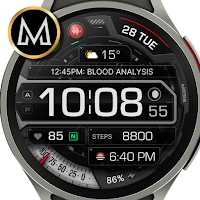
MD316 Digital Watch Face
Personalization
Modern digital watch face fully customizable for Wear OS devices.
- Rating
- 4.2
- 259 ratings
- Downloads
- 7.5K+
- on Google Play
- Price
- $1.99
- No in-app purchases
- Updated
- Jul 25
- 2025
Screenshots


About MD316 Digital Watch Face
The MD316 is a Digital watch face for Wear OS.
It contains 3 Preset App shortcuts, 2 customizable shortcuts, steps (changeable), heart rate*, 4 customizable complications where you can have the data you prefer like weather, barometer, uv index, chanche of rain etc..
WATCH FACE INSTALLATION NOTES:
Please check this link for installation and troubleshooting guide:
https://www.matteodinimd.com/watchface-installation/
This watch face supports all Wear OS devices with API Level 28+ like Samsung Galaxy Watch 4, Galaxy Watch 5, Pixel Watch etc.
Watch face features:
- 12/24hr based on phone settings
- Date
- Day
- Battery
- Heart rate*
- Steps (changeable)
- 3 Preset app shortcuts
- 2 customizable shortcuts
- 4 customizable complications
- Always ON Display
- Changeable backgrounds, second hands, time colors, foreground styles, battery styles, battery text, date colors, custom shortcuts and AOD styles.
Watch face customization:
1 - Touch and hold display
2 - Tap on customize option
Preset APP Shortcuts:
- Calendar
- Battery
- Measure HR
Watch face complications:
you can customize the watch face with the any data you want.
For example, you can select weather, barometer etc.
*Heart Rate notes:
The watch face does not automatically measure and does not automatically display the HR result when installed.
To view your current heart rate data on the watch faces, you’ll need to take a manual measurement. To do this, tap on the heart rate display area. Wait a few seconds. The watch face will take a measurement and display the current result.
Make sure you have allowed the use of the sensors when installed the watch face otherwise swap with another watch face and then come back to this to enable the sensors.
After the first manual measurement, the watch face can automatically measure your heart rate every 10 minutes. Manual measurement will also be possible.
**some features may not be available on some watches.
Let's keep in touch !
Matteo Dini MD ® is a well-known and ultra-awarded brand in the watch faces world!
Some references:
Best of Galaxy Store Awards 2019 Winner:
https://developer.samsung.com/sdp/blog/en-us/2020/05/26/best-of-galaxy-store-awards-2019-winner-matteo-dini-on-building-a-successful-brand
Samsung mobile press:
https://www.samsungmobilepress.com/feature-stories/samsung-celebrates-best-of-galaxy-store-awards-at-sdc-2019
Matteo Dini MD ® is also a registered trademark in the United States and Europe.
Newsletter:
Sign up to stay updated with new watchfaces and promotions!
http://eepurl.com/hlRcvf
FACEBOOK:
https://www.facebook.com/matteodiniwatchfaces
INSTAGRAM:
https://www.instagram.com/mdwatchfaces/
TELEGRAM:
https://t.me/mdwatchfaces
WEB:
https://www.matteodinimd.com
Thank you!
It contains 3 Preset App shortcuts, 2 customizable shortcuts, steps (changeable), heart rate*, 4 customizable complications where you can have the data you prefer like weather, barometer, uv index, chanche of rain etc..
WATCH FACE INSTALLATION NOTES:
Please check this link for installation and troubleshooting guide:
https://www.matteodinimd.com/watchface-installation/
This watch face supports all Wear OS devices with API Level 28+ like Samsung Galaxy Watch 4, Galaxy Watch 5, Pixel Watch etc.
Watch face features:
- 12/24hr based on phone settings
- Date
- Day
- Battery
- Heart rate*
- Steps (changeable)
- 3 Preset app shortcuts
- 2 customizable shortcuts
- 4 customizable complications
- Always ON Display
- Changeable backgrounds, second hands, time colors, foreground styles, battery styles, battery text, date colors, custom shortcuts and AOD styles.
Watch face customization:
1 - Touch and hold display
2 - Tap on customize option
Preset APP Shortcuts:
- Calendar
- Battery
- Measure HR
Watch face complications:
you can customize the watch face with the any data you want.
For example, you can select weather, barometer etc.
*Heart Rate notes:
The watch face does not automatically measure and does not automatically display the HR result when installed.
To view your current heart rate data on the watch faces, you’ll need to take a manual measurement. To do this, tap on the heart rate display area. Wait a few seconds. The watch face will take a measurement and display the current result.
Make sure you have allowed the use of the sensors when installed the watch face otherwise swap with another watch face and then come back to this to enable the sensors.
After the first manual measurement, the watch face can automatically measure your heart rate every 10 minutes. Manual measurement will also be possible.
**some features may not be available on some watches.
Let's keep in touch !
Matteo Dini MD ® is a well-known and ultra-awarded brand in the watch faces world!
Some references:
Best of Galaxy Store Awards 2019 Winner:
https://developer.samsung.com/sdp/blog/en-us/2020/05/26/best-of-galaxy-store-awards-2019-winner-matteo-dini-on-building-a-successful-brand
Samsung mobile press:
https://www.samsungmobilepress.com/feature-stories/samsung-celebrates-best-of-galaxy-store-awards-at-sdc-2019
Matteo Dini MD ® is also a registered trademark in the United States and Europe.
Newsletter:
Sign up to stay updated with new watchfaces and promotions!
http://eepurl.com/hlRcvf
FACEBOOK:
https://www.facebook.com/matteodiniwatchfaces
INSTAGRAM:
https://www.instagram.com/mdwatchfaces/
TELEGRAM:
https://t.me/mdwatchfaces
WEB:
https://www.matteodinimd.com
Thank you!
What’s new
Updated July 25, 2025
Companion App updated with target SDK 35.
User reviews

Great watch face! Really recommend this watch face for your watch! It does its job!!

Great watch face. Easy to change appearance

Beautiful looking face, allows my favorite apps on the dial.

Clear, crisp and elegant design with lots of features... best watch face I got so far...

Battery txt information sometimes disappears.

Very cool digital face. I like the icons for the app shortcuts and how you can customize the look of the battery meter.
Alternatives to MD316 Digital Watch Face
Looking for apps like MD316 Digital Watch Face? Here are 6 similar Android apps on Google Play. The highest rated is MD317 Digital Watch Face (4.9/5).
-
MD320 Digital Watch Face 4.7
-
MD319 Analog watch face 4.6
-
MD318 Digital Watch Face 4.4
-
MD317 Digital Watch Face 4.9
-
MD315 Analog Watch Face 4.8
-
MD214 Digital Watch Face 4.4
| App | Rating | Price | Installs | Last updated | Compare |
|---|---|---|---|---|---|
| MD316 Digital Watch Face | 4.2 / 5 | $1.99 | 5,000+ | Jul 25, 2025 | |
| MD320 Digital Watch Face | 4.7 / 5 | 0.99 USD | 1,000+ | Oct 26, 2026 | Compare |
| MD319 Analog watch face | 4.6 / 5 | 0.99 USD | 5,000+ | Jul 25, 2025 | Compare |
| MD318 Digital Watch Face | 4.4 / 5 | 0.99 USD | 10,000+ | Oct 26, 2026 | Compare |
| MD317 Digital Watch Face | 4.9 / 5 | 0.99 USD | 5,000+ | Jul 25, 2025 | Compare |
| MD315 Analog Watch Face | 4.8 / 5 | 0.99 USD | 1,000+ | Jul 25, 2025 | Compare |
| MD214 Digital Watch Face | 4.4 / 5 | 0.99 USD | 5,000+ | Mar 2, 2026 | Compare |
Similar apps on Google Play
- MD320 Digital Watch Face
- MD319 Analog watch face
- MD318 Digital Watch Face
- MD317 Digital Watch Face
- MD316 Digital Watch Face
- MD315 Analog Watch Face
- MD214 Digital Watch Face
- MD314 Digital Watch Face
- MD313 Digital Watch Face
- MD312 Analog watch face
- MD221B Digital watch face
- MD311 Analog watch face
- MD310 Digital watch face
- MD309 Digital watchface
- MD233B Digital watch face
- MD260 Digital watch face
- MD308 Digital watch face
- MD258 Digital watch face
- MD237 Digital watch face
- MD307 Digital Watch Face
- MD306 Minimal watch face
- MD305 Analog watch face
- MD304 Digital watch face
- MD303 Digital watch face
- MD302: Analog watch face
- MD301: Analog watch face
- MD300 Digital watch face
- MD112B: Digital watch face
- MD242: Analog watch face
- MD254B: Digital watch face
- MD299 Analog watch face
- MD298B: Digital watch face
- MD297B: Digital watch face
- MD298: Digital watch face
- MD249: Digital watch face
- MD297: Digital watch face
- MD296B Analog watch face
- MD296 Analog watch face
- MD219: Minimal watch face
- MD294: Analog watch face
- MD295: Analog watch face
- MD244 LCD: Digital watch face
- MD244: Digital watch face
- MD199: Analog watch face
- MD293: Digital watch face
- MD89 Minimal Digital watchface
- MD241: Digital watch face
- MD292: Digital watch face
- MD291: Analog watch face
- MD290: Digital watch face
- MD170B: Digital watch face
- MD289: Digital watch face
- MD288: Digital watch face
- MD287: Analog watch face
- MD228: Digital watch face
- MD286: Digital watch face
- MD285: Digital watch face
- MD205: Digital watch face
- MD229: Digital watch face
- MD284: Analog watch face
- MD167: Digital watch face
- MD235: Digital watch face
- MD283: Digital watch face
- MD268: Digital watch face
- MD282: Digital watch face
- MD281: Analog watch face
- MD280: Analog watch face
- MD279: Digital watch face
- MD203 - Analog watch face
- MD278 - Analog watch face
- MD277 - Digital watch face
- MD238 - Digital watch face
- MD276 - Analog watch face
- MD111 - digital watch face
- MD275 - Digital watch face
- MD188 - Digital watch face
- MD216 - Analog watch face
- MD202 - Hybrid watch face
- MD217 - Digital watch face
- MD274 - Analog watch face
- MD112: Digital watch face
- MD206 - Analog watch face
- MD247 - Digital watch face
- MD201 - Digital watch face
- MD236D - Digital watch face
- MD226 - Analog watch face
- MD204 - Digital watch face
- MD209: Analog watch face
- MD225 - Digital watch face
- MD131 - Digital watch face
- MD221 - Digital watch face
- MD257 - Digital watch face
- MD234 - Analog watch face
- MD198: Digital watch face
- MD252: Digital watch face
- MD273 - Digital watch face
- MD271: Digital watch face
- MD259 - Digital watch face
- MD240 - Analog watch face
- MD255 - Digital watch face
- MD272 - Analog watch face
- MD254: Digital watch face
- MD207 - Digital watch face
- MD256 - Classic watch face
- MD176 - Hybrid watch face