
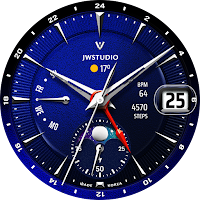
JW089 jwstudio watchface
Personalization
High-quality watchfaces for Wear OS 2.0 of higher
- Downloads
- 69+
- on Google Play
- Price
- $1.49
- No in-app purchases
- Updated
- Jul 29
- 2025
Screenshots


About JW089 jwstudio watchface
[INSTALLATION NOTES]
Make sure the watch is properly connected to the phone, open Companion App on phone and tap on "INSTALL APP ON WEAR DEVICE" and follow instructions on watch.
After a few minutes the watch face will transferred on watch : check the watch faces installed by the Wearable app on the phone.
Note: If you stuck at payment loop, DON'T WORRY, only one charge will be made even if you are asked to pay a second time. Wait 5 minutes or restart your watch and try again.
It could be a synchronization problem between your device and Google servers.
[설치 참고 사항]
시계가 휴대폰에 제대로 연결되어 있는지 확인하고 휴대폰에서 컴패니언 앱을 열고 "착용 장치에 앱 설치"를 탭한 다음 시계의 지침을 따릅니다.
몇 분 후 시계 화면이 시계로 전송됩니다. 휴대전화의 웨어러블 앱에서 설치한 시계 화면을 확인하세요.
참고: 결제 루프에 갇힌 경우 걱정하지 마십시오. 두 번째 결제를 요청하더라도 한 번만 청구됩니다. 5분을 기다리거나 시계를 다시 시작하고 다시 시도하십시오.
기기와 Google 서버 간의 동기화 문제일 수 있습니다.
*****************************************************************
** information **
1. Various color combinations for each part can be changed.
2. Please check the screenshot for other information and features provided.
** How to set up a Customize **
1. Press and hold the watch face.
2. Press the Customize.
3. Set the Color or Complication.(Check the screenshot)
4. Press OK
** Get new news from my Instagram. **
https://www.instagram.com/jenniferwatches/
https://www.instagram.com/herawatchface/
** 설명 **
1. 꾸미기 기능으로 다양한 조합을 지원합니다.
2. 그 외 제공 정보 및 기능은 스크린샷을 확인해주세요.
** 꾸미기 설정 방법 **
1. 시계 화면을 길게 누르세요.
2. 꾸미기 버튼 클릭
3. 각 컴플리케이션 영역을 눌러서 해당 정보를 설정해 주세요. (스크린샷 확인)
4. 확인 클릭
Contact me at [email protected] for any bug reports, requests, or queries.
관련 문의는 아래메일로 연락 주세요. [email protected]
Make sure the watch is properly connected to the phone, open Companion App on phone and tap on "INSTALL APP ON WEAR DEVICE" and follow instructions on watch.
After a few minutes the watch face will transferred on watch : check the watch faces installed by the Wearable app on the phone.
Note: If you stuck at payment loop, DON'T WORRY, only one charge will be made even if you are asked to pay a second time. Wait 5 minutes or restart your watch and try again.
It could be a synchronization problem between your device and Google servers.
[설치 참고 사항]
시계가 휴대폰에 제대로 연결되어 있는지 확인하고 휴대폰에서 컴패니언 앱을 열고 "착용 장치에 앱 설치"를 탭한 다음 시계의 지침을 따릅니다.
몇 분 후 시계 화면이 시계로 전송됩니다. 휴대전화의 웨어러블 앱에서 설치한 시계 화면을 확인하세요.
참고: 결제 루프에 갇힌 경우 걱정하지 마십시오. 두 번째 결제를 요청하더라도 한 번만 청구됩니다. 5분을 기다리거나 시계를 다시 시작하고 다시 시도하십시오.
기기와 Google 서버 간의 동기화 문제일 수 있습니다.
*****************************************************************
** information **
1. Various color combinations for each part can be changed.
2. Please check the screenshot for other information and features provided.
** How to set up a Customize **
1. Press and hold the watch face.
2. Press the Customize.
3. Set the Color or Complication.(Check the screenshot)
4. Press OK
** Get new news from my Instagram. **
https://www.instagram.com/jenniferwatches/
https://www.instagram.com/herawatchface/
** 설명 **
1. 꾸미기 기능으로 다양한 조합을 지원합니다.
2. 그 외 제공 정보 및 기능은 스크린샷을 확인해주세요.
** 꾸미기 설정 방법 **
1. 시계 화면을 길게 누르세요.
2. 꾸미기 버튼 클릭
3. 각 컴플리케이션 영역을 눌러서 해당 정보를 설정해 주세요. (스크린샷 확인)
4. 확인 클릭
Contact me at [email protected] for any bug reports, requests, or queries.
관련 문의는 아래메일로 연락 주세요. [email protected]
What’s new
Updated July 29, 2025
v1.2 update - Support Android Target SDK 33 (Wear OS 5) - Support Companion app Target API level 35 - Automatic heart rate measurement
Alternatives to JW089 jwstudio watchface
Looking for apps like JW089 jwstudio watchface? Here are 6 similar Android apps on Google Play.
-
JW122 jwstudio watchface
-
JW121 jwstudio watchface
-
JW120 jwstudio watchface
-
JW119 jwstudio watchface
-
JW118 jwstudio watchface
-
JW117 jwstudio watchface
| App | Rating | Price | Installs | Last updated | Compare |
|---|---|---|---|---|---|
| JW089 jwstudio watchface | – | $1.49 | 50+ | Jul 29, 2025 | |
| JW122 jwstudio watchface | – | 1.49 USD | 100+ | – | Compare |
| JW121 jwstudio watchface | – | 0.99 USD | 100+ | Jul 28, 2025 | Compare |
| JW120 jwstudio watchface | – | 1.49 USD | 500+ | Jul 28, 2025 | Compare |
| JW119 jwstudio watchface | – | 1.49 USD | 100+ | Jul 29, 2025 | Compare |
| JW118 jwstudio watchface | – | 1.49 USD | 100+ | Jul 29, 2025 | Compare |
| JW117 jwstudio watchface | – | 1.49 USD | 100+ | Jul 29, 2025 | Compare |
Similar apps on Google Play
- JW122 jwstudio watchface
- JW121 jwstudio watchface
- JW120 jwstudio watchface
- JW119 jwstudio watchface
- JW118 jwstudio watchface
- JW117 jwstudio watchface
- JW116 jwstudio watchface
- JW115 jwstudio watchface
- JW114 jwstudio watchface
- JW113 jwstudio watchface
- JW112 jwstudio watchface
- JW111 jwstudio watchface
- JW110 jwstudio watchface
- JW109 jwstudio watchface
- JW108 jwstudio watchface
- JW107 jwstudio watchface
- JW106 jwstudio watchface
- JW105 jwstudio watchface
- JW104 jwstudio watchface
- JW103 jwstudio watchface
- JW102 jwstudio watchface
- JW101 jwstudio watchface
- JW100 jwstudio watchface
- JW099 jwstudio watchface
- JW098 jwstudio watchface
- JW097 jwstudio watchface
- JW096 jwstudio watchface
- JW095 jwstudio watchface
- JW094 jwstudio watchface
- JW093 jwstudio watchface
- JW092 jwstudio watchface
- JW091 jwstudio watchface
- JW090 jwstudio watchface
- JW089 jwstudio watchface
- JW088 jwstudio watchface
- JW087 jwstudio watchface
- JW086 jwstudio watchface
- JW085 jwstudio watchface
- JW084 jwstudio watchface
- JW083 jwstudio watchface
- JW082 jwstudio watchface
- JW081 jwstudio watchface
- JW080 jwstudio watchface
- JW079 jwstudio watchface
- JW078 jwstudio watchface
- JW077 jwstudio watchface
- JW076 jwstudio watchface
- JW075 jwstudio watchface
- JW074 jwstudio watchface
- JW073 jwstudio watchface
- JW072 jwstudio watchface
- JW071 jwstudio watchface
- JW070 jwstudio watchface
- JW069 jwstudio watchface
- JW068 jwstudio watchface
- JW067 jwstudio watchface
- JW065_KR jwstudio watchface
- JW066 jwstudio watchface
- JW065 jwstudio watchface
- JW064 jwstudio watchface
- JW063 jwstudio watchface
- JW062 jwstudio watchface
- JW061 jwstudio watchface
- JW060 jwstudio watchface
- JW059 jwstudio watchface
- JW058 jwstudio watchface
- JW057 jwstudio watchface
- JW056 jwstudio watchface
- JW055 jwstudio watchface
- JW054 jwstudio watchface
- JW053 jwstudio watchface
- JW052 jwstudio watchface
- JW051 jwstudio watchface
- JW050 jwstudio watchface
- JW049 jwstudio watchface
- JW048 jwstudio watchface
- JW047 jwstudio watchface
- JW046 jwstudio watchface
- JW045 jwstudio watchface
- JW044 jwstudio watchface
- JW043 jwstudio watchface
- JW042 jwstudio watchface
- JW041 jwstudio watchface
- JW040 jwstudio watchface
- JW039 jwstudio watchface
- JW038 jwstudio watchface
- JW037 jwstudio watchface
- JW036 jwstudio watchface
- JW035 jwstudio watchface
- JW034 jwstudio watchface
- JW033 jwstudio watchface
- JW032 jwstudio watchface
- JW031 jwstudio watchface
- JW030 jwstudio watchface
- JW029 jwstudio watchface
- JW028 jwstudio watchface
- JW027 jwstudio watchface
- JW026 jwstudio watchface
- JWSTUDIO_A_025 watchface
- JWSTUDIO_A_023 watchface
- JWSTUDIO_A_020 watchface
- JWSTUDIO_A_019 watchface
- JWSTUDIO_A_018 watchface
- JWSTUDIO_A_017 watchface
- JW016 jwstudio watchface
- JWSTUDIO_A_012 watchface
- JWSTUDIO_A_011 watchface
- JWSTUDIO_A_010 watchface
- JWSTUDIO_A_009 watchface
- JWSTUDIO_A_008 watchface
- JWSTUDIO_A_007 watchface
- JWSTUDIO_A_006 watchface
- JWSTUDIO_A_005 watchface
- JWSTUDIO_A_004 watchface
- JWSTUDIO_A_002 watchface
- JWSTUDIO_ROYAL01 watchface
- JWSTUDIO_LUXURY01 watchface