
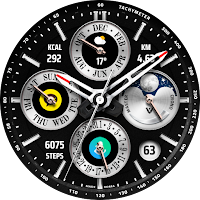
JW056 jwstudio watchface
Personalization
High-quality watchfaces for Wear OS 2.0 of higher
- Downloads
- 198+
- on Google Play
- Price
- $1.49
- No in-app purchases
- Updated
- Jul 31
- 2025
Screenshots


About JW056 jwstudio watchface
[How to install]
1. Play Store app > Payment and installation on your smartphone
2. Run Play Store on Watch > Apps on your phone > Watchface name > Install
[설치 방법]
1. 스마트폰에서 플레이스토어앱 > 결제 및 설치
2. 워치에서 플레이스토어앱 실행 > 휴대전화의 앱 > 해당 워치페이스 > 설치
[Notes on compatibility]
if you see message "Your devices are not compatible", use Play Store on WEB browser from PC / Laptop instead of app on phone.
[호환관련 주의사항]
"귀하의 장치가 호환되지 않습니다"라는 메시지가 표시되면 휴대폰의 앱 대신 PC/노트북의 웹 브라우저에서 Play 스토어를 사용하십시오.
* In order to use all functions, consent to use the sensor is required.
* This watch face was developed with Samsung's new "Watch Face Studio" tool for devices based on the new Wear Os Google / One UI Samsung operating system like Samsung Galaxy Watch 4.
* some features may not be available on some watches.
* 모든 기능을 사용하기 위해서는 센서 사용 동의가 필요합니다.
* 이 시계 모드는 Samsung Galaxy Watch 4와 같은 새로운 Wear Os Google / One UI Samsung 운영 체제 기반 장치용 Samsung의 새로운 "Watch Face Studio" 도구로 개발되었습니다.
support to 60 BG style
(5 BG color * 6 Sub dial color * 2 Index style)
- Date info
- Battery %
- Step count
- Heart rate
- Burned calorie
- Moved distance
- Moon phase
- Always ON Display supported
[Customization]
- Touch and hold display
- Tap on customize option
Get new news from my Instagram.
https://www.instagram.com/jenniferwatches/
https://www.instagram.com/herawatchface/
Contact me at [email protected] for any bug reports, requests, or queries.
Have a nice day.
1. Play Store app > Payment and installation on your smartphone
2. Run Play Store on Watch > Apps on your phone > Watchface name > Install
[설치 방법]
1. 스마트폰에서 플레이스토어앱 > 결제 및 설치
2. 워치에서 플레이스토어앱 실행 > 휴대전화의 앱 > 해당 워치페이스 > 설치
[Notes on compatibility]
if you see message "Your devices are not compatible", use Play Store on WEB browser from PC / Laptop instead of app on phone.
[호환관련 주의사항]
"귀하의 장치가 호환되지 않습니다"라는 메시지가 표시되면 휴대폰의 앱 대신 PC/노트북의 웹 브라우저에서 Play 스토어를 사용하십시오.
* In order to use all functions, consent to use the sensor is required.
* This watch face was developed with Samsung's new "Watch Face Studio" tool for devices based on the new Wear Os Google / One UI Samsung operating system like Samsung Galaxy Watch 4.
* some features may not be available on some watches.
* 모든 기능을 사용하기 위해서는 센서 사용 동의가 필요합니다.
* 이 시계 모드는 Samsung Galaxy Watch 4와 같은 새로운 Wear Os Google / One UI Samsung 운영 체제 기반 장치용 Samsung의 새로운 "Watch Face Studio" 도구로 개발되었습니다.
support to 60 BG style
(5 BG color * 6 Sub dial color * 2 Index style)
- Date info
- Battery %
- Step count
- Heart rate
- Burned calorie
- Moved distance
- Moon phase
- Always ON Display supported
[Customization]
- Touch and hold display
- Tap on customize option
Get new news from my Instagram.
https://www.instagram.com/jenniferwatches/
https://www.instagram.com/herawatchface/
Contact me at [email protected] for any bug reports, requests, or queries.
Have a nice day.
What’s new
Updated July 31, 2025
v1.3 update - Support Android Target SDK 33 (Wear OS 5) - Support Companion app Target API level 35
Alternatives to JW056 jwstudio watchface
Looking for apps like JW056 jwstudio watchface? Here are 4 similar Android apps on Google Play. The highest rated is Modul Class digital watch face (4.8/5).
-
샘워치 한글 심플 R 2021
-
Modul Class digital watch face 4.8
-
샘워치 Point color 13 2021
-
Watt Key — For your Tesla 3.8
| App | Rating | Price | Installs | Last updated | Compare |
|---|---|---|---|---|---|
| JW056 jwstudio watchface | – | $1.49 | 100+ | Jul 31, 2025 | |
| 샘워치 한글 심플 R 2021 | – | 1 USD | 1,000+ | Aug 18, 2026 | Compare |
| Modul Class digital watch face | 4.8 / 5 | 1.49 USD | 10,000+ | Aug 10, 2026 | Compare |
| 샘워치 Point color 13 2021 | – | 1.5 USD | 1,000+ | May 16, 2022 | Compare |
| Watt Key — For your Tesla | 3.8 / 5 | 7.49 USD | 5,000+ | Nov 4, 2026 | Compare |