
CELEST5658 Sport Watch
Personalization Contains ads
Minimalist face featuring 4 optional complications and 30 color palettes.
- Downloads
- 280+
- on Google Play
- Price
- $1.99
- No in-app purchases
- Updated
- Aug 5
- 2026
Screenshots


About CELEST5658 Sport Watch
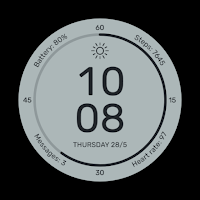
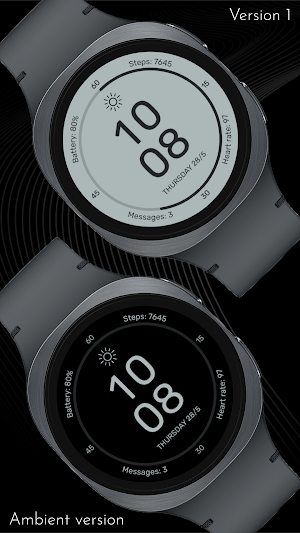
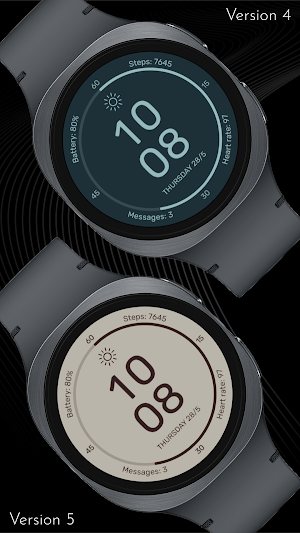
This watch face features a structured, legible layout designed for efficient daily use. The central digital display is framed by peripheral data points, including battery status, step tracking, heart rate monitoring, and message alerts. By balancing these metrics around the circular dial, the design maintains a clear hierarchy that allows for immediate data recognition without unnecessary visual distraction.
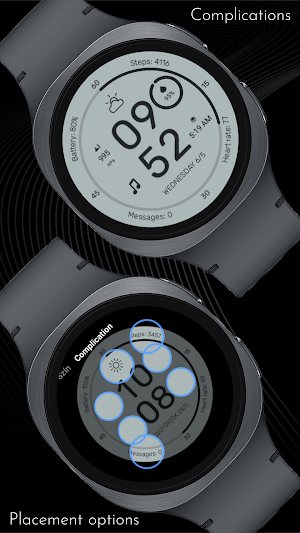
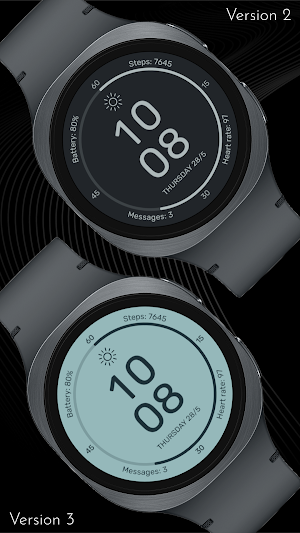
Functionality is extended through a variety of customization options. Users can select from 30 different color variations to suit their preference, ensuring the interface remains legible in diverse lighting conditions. Additionally, the face includes four optional circular complications, providing the utility to integrate extra data streams into the minimalist framework.
🎨 PERSONALIZATION OPTIONS
· 30 color variations
· 4 optional color-matched circular complications
· 3 additional invisible complication spots above weather, steps and messages, so you can set shortcuts to these functions to any app on your watch. (The reason is that these apps have different app IDs on different watch models. Can't hard-code them like battery)
📱 COMPATIBILITY
✅ Wear OS 5+ required (for weather functions)
✅ Works with Galaxy Watch, Pixel Watch, and all Wear OS 5+ devices
🔧 INSTALLATION HELP
Having trouble? We've got you covered:
- Use the dropdown menu next to "Install" on your phone to select your watch model or install directly from your watch's Play Store app
- Updating weather data may take time after installation but switching to another watch face and switching back or restarting both the watch and phone usually helps
- Check out our installation and troubleshooting guide: https://celest-watches.com/installation-troubleshooting/
- Contact us at [email protected] for quick support
🏪 DISCOVER MORE
Browse our full collection of premium Wear OS watch faces:
🔗 https://celest-watches.com
💰 Exclusive discounts available
📞 SUPPORT & COMMUNITY
📧 Support: [email protected]
📱 Follow @celestwatches on Instagram or sign up to our newsletter!
Functionality is extended through a variety of customization options. Users can select from 30 different color variations to suit their preference, ensuring the interface remains legible in diverse lighting conditions. Additionally, the face includes four optional circular complications, providing the utility to integrate extra data streams into the minimalist framework.
🎨 PERSONALIZATION OPTIONS
· 30 color variations
· 4 optional color-matched circular complications
· 3 additional invisible complication spots above weather, steps and messages, so you can set shortcuts to these functions to any app on your watch. (The reason is that these apps have different app IDs on different watch models. Can't hard-code them like battery)
📱 COMPATIBILITY
✅ Wear OS 5+ required (for weather functions)
✅ Works with Galaxy Watch, Pixel Watch, and all Wear OS 5+ devices
🔧 INSTALLATION HELP
Having trouble? We've got you covered:
- Use the dropdown menu next to "Install" on your phone to select your watch model or install directly from your watch's Play Store app
- Updating weather data may take time after installation but switching to another watch face and switching back or restarting both the watch and phone usually helps
- Check out our installation and troubleshooting guide: https://celest-watches.com/installation-troubleshooting/
- Contact us at [email protected] for quick support
🏪 DISCOVER MORE
Browse our full collection of premium Wear OS watch faces:
🔗 https://celest-watches.com
💰 Exclusive discounts available
📞 SUPPORT & COMMUNITY
📧 Support: [email protected]
📱 Follow @celestwatches on Instagram or sign up to our newsletter!
What’s new
Updated August 5, 2026
Updated to target Android 16 (API 36).
User reviews

simple and clean 👌
Alternatives to CELEST5658 Sport Watch
Looking for apps like CELEST5658 Sport Watch? Here are 6 similar Android apps on Google Play. 4 of the 6 are free to download.
-
Calculator Complication
-
Counter Widget
-
Wireless Debugging Widget
-
CELEST Catalog
-
RideLog – Live Dash & Log
-
CELEST5659 Retro Digital Watch
| App | Rating | Price | Installs | Last updated | Compare |
|---|---|---|---|---|---|
| CELEST5658 Sport Watch | – | $1.99 | 100+ | Aug 5, 2026 | |
| Calculator Complication | – | Free | 100+ | Jul 31, 2026 | Compare |
| Counter Widget | – | Free | 1,000+ | Jul 20, 2026 | Compare |
| Wireless Debugging Widget | – | Free | 1,000+ | – | Compare |
| CELEST Catalog | – | Free | 100+ | – | Compare |
| RideLog – Live Dash & Log | – | 0.49 USD | 10+ | Aug 28, 2026 | Compare |
| CELEST5659 Retro Digital Watch | – | 1.49 USD | 100+ | Aug 5, 2026 | Compare |