
Counter Widget
Tools Contains ads
Minimal tap counter widget for your home screen. Count reps, tasks, pages...
- Downloads
- 2.4K+
- on Google Play
- Price
- Free
- No in-app purchases
- Updated
- Jul 20
- 2026 · v1.5.0
Screenshots
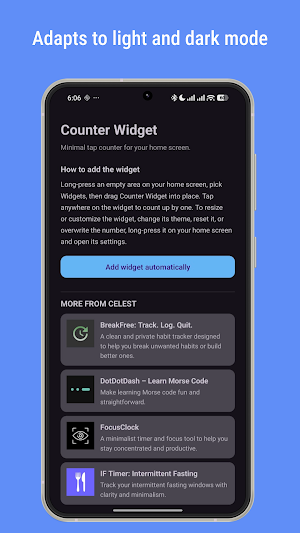

About Counter Widget
Counter Widget — a minimal tap counter for your home screen.
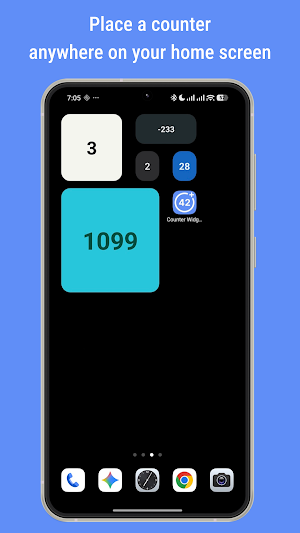
A home screen widget that counts. One tap increments the number by one. Place the widget anywhere on your home screen and tap it to count whatever you need to track.
** What you can count **
Counter Widget works for any kind of tally:
- Reps, sets, and laps during workouts
- Daily habits and streaks
- Pages read or chapters finished
- Cups of water, coffee, or other daily intake
- Inventory counts and tallies
- Anything else you want to track with a single tap
Each widget you place is independent, so you can track multiple things in parallel.
** How it works **
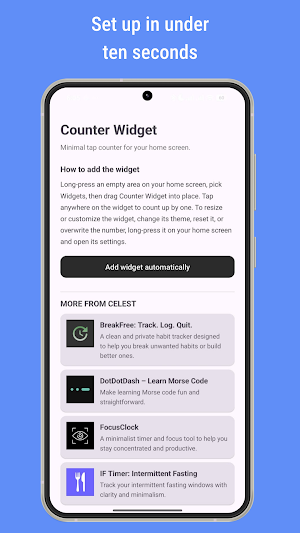
Long-press an empty area on your home screen, select Counter Widget from the widget picker, and drag it into place. Tap the widget anywhere on its surface to count up by one.
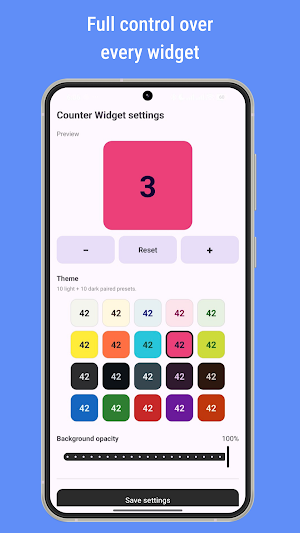
To change the number, reset it, or customize the appearance, long-press the widget and open its settings. From there you can:
- Adjust the number with + and − buttons, including press-and-hold for fast changes
- Reset the counter to zero with confirmation
- Choose from 20 color themes: 5 muted light, 5 vibrant light, 5 muted dark, 5 vibrant dark
- Adjust background opacity from 0 % (fully transparent) to 100 %, in 5 % steps
The widget is resizable from 1×1 up to 4×4 cells. The number automatically scales to fit the size you choose.
** Privacy **
All data is stored locally on your device. No accounts, no cloud sync, no tracking, no analytics.
** Accessibility **
Counter Widget supports TalkBack, including spoken counter values and accessible labels on every interactive element. Theme names are announced during selection.
** About pricing **
Counter Widget has no in-app purchases and no subscriptions. The app includes a "More from CELEST" section showing other apps from CELEST Watches. If you find Counter Widget useful and want to explore the other apps, the option is there — it is not required.
** About the developer **
Counter Widget is developed by CELEST Watches, an independent developer publishing minimal Android apps and Wear OS watch faces.
A home screen widget that counts. One tap increments the number by one. Place the widget anywhere on your home screen and tap it to count whatever you need to track.
** What you can count **
Counter Widget works for any kind of tally:
- Reps, sets, and laps during workouts
- Daily habits and streaks
- Pages read or chapters finished
- Cups of water, coffee, or other daily intake
- Inventory counts and tallies
- Anything else you want to track with a single tap
Each widget you place is independent, so you can track multiple things in parallel.
** How it works **
Long-press an empty area on your home screen, select Counter Widget from the widget picker, and drag it into place. Tap the widget anywhere on its surface to count up by one.
To change the number, reset it, or customize the appearance, long-press the widget and open its settings. From there you can:
- Adjust the number with + and − buttons, including press-and-hold for fast changes
- Reset the counter to zero with confirmation
- Choose from 20 color themes: 5 muted light, 5 vibrant light, 5 muted dark, 5 vibrant dark
- Adjust background opacity from 0 % (fully transparent) to 100 %, in 5 % steps
The widget is resizable from 1×1 up to 4×4 cells. The number automatically scales to fit the size you choose.
** Privacy **
All data is stored locally on your device. No accounts, no cloud sync, no tracking, no analytics.
** Accessibility **
Counter Widget supports TalkBack, including spoken counter values and accessible labels on every interactive element. Theme names are announced during selection.
** About pricing **
Counter Widget has no in-app purchases and no subscriptions. The app includes a "More from CELEST" section showing other apps from CELEST Watches. If you find Counter Widget useful and want to explore the other apps, the option is there — it is not required.
** About the developer **
Counter Widget is developed by CELEST Watches, an independent developer publishing minimal Android apps and Wear OS watch faces.
What’s new
Version 1.5.0 · Updated July 20, 2026
The main app lists the added widgets for easy editing
User reviews

Light weight and up to the point app.... the Widget is real handy and provide many options to customise the look.... edit : thanks for the reply and helping with the doubt
Alternatives to Counter Widget
Looking for apps like Counter Widget? Here are 6 similar Android apps on Google Play. 2 of the 6 are free to download.
-
CELEST Catalog
-
CELEST5658 Sport Watch
-
Compass Complication
-
CELEST5656 Minimalist Watch
-
Wireless Debugging Widget
-
DotDotDash - Learn Morse Code
| App | Rating | Price | Installs | Last updated | Compare |
|---|---|---|---|---|---|
| Counter Widget | – | Free | 1,000+ | Jul 20, 2026 | |
| CELEST Catalog | – | Free | 100+ | Jun 21, 2026 | Compare |
| CELEST5658 Sport Watch | – | 0.49 USD | 100+ | Aug 5, 2026 | Compare |
| Compass Complication | – | 0.49 USD | 100+ | Aug 12, 2026 | Compare |
| CELEST5656 Minimalist Watch | – | 1.49 USD | 100+ | Aug 5, 2026 | Compare |
| Wireless Debugging Widget | – | Free | 1,000+ | May 31, 2026 | Compare |
| DotDotDash - Learn Morse Code | – | 0.49 USD | 100+ | Aug 3, 2026 | Compare |
Compare Counter Widget with the top alternatives: ratings, updates, ASO score and keyword gaps →