
Calculator Complication
Tools Contains ads
A working calculator complication for compatible Wear OS watch faces.
- Downloads
- 276+
- on Google Play
- Price
- Free
- No in-app purchases
- Updated
- Jul 31
- 2026
Screenshots


About Calculator Complication
A real four-function calculator that lives inside your watch face.This is the brain. The buttons live on a watch face that knows how to talk to it. Together they give you something most "calculator watch faces" only pretend to be: a calculator that actually works.
** What it does **
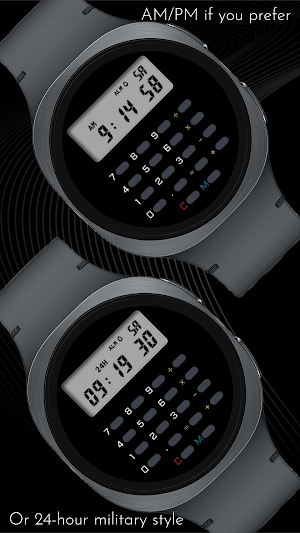
When idle, the complication shows the time — 12-hour or 24-hour, matching whatever your phone is set to. Tap any digit on a compatible watch face and it switches to calculator mode, where it behaves exactly like a vintage 8-digit pocket calculator should:
- Add, subtract, multiply, divide
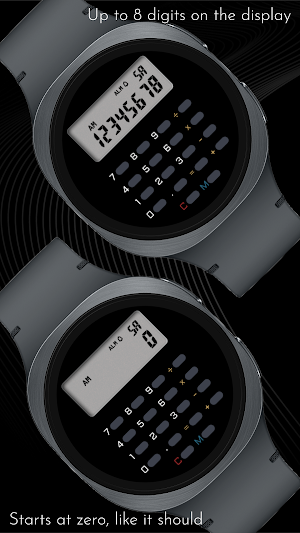
- Decimal entry with up to 8 digits on screen
- Repeat operations (press = again to apply the last calculation)
- Power calculations via double-operator (3 × × = gives 9, again = gives 27, again = 81)
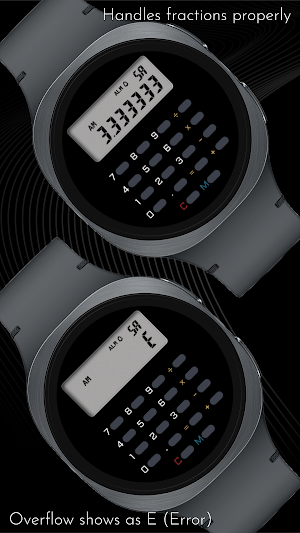
- Honest error handling — divide by zero, overflow past 8 digits, underflow toward zero all show "E" until you press C
State survives screen-off, watch reboot, even uninstalling the watch face. Pick up where you left off.
** You need a compatible watch face**
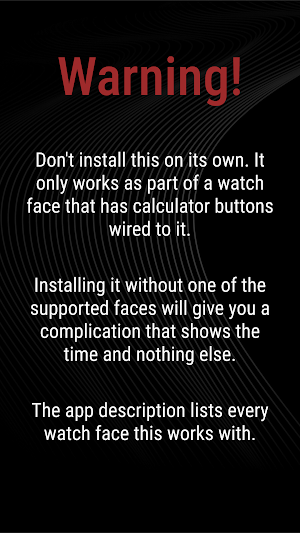
Important: this app does nothing on its own. It needs a watch face designed to drive it — one that has calculator buttons drawn around the complication slot, each wired to send taps to this app. Generic watch faces with a complication slot will not work. Without a compatible face, the complication will just show the time and nothing else.If you install this app and add it to a regular watch face, you'll see the time tick by and wonder where the calculator went. The calculator is in the buttons. The buttons are on the watch face. Both have to be in place.
** Compatible watch faces**
CELEST5659 Retro Digital Watch
https://play.google.com/store/apps/details?id=com.watchfacestudio.celest5659
More compatible faces will be added here as they're released.
** Why this exists **
Plenty of "calculator" watch faces look the part — buttons drawn on, numbers on the display — but tap a button and nothing happens. They're decorations. This is the working version. The math is real, the precision is real, the buttons actually compute.
It's a small app doing one thing carefully. Install it, pair it with a face that supports it, and you have a calculator on your wrist that doesn't lie about what it is.
** About CELEST Watches **
CELEST Watches is an independent studio designing premium watch faces and apps for Wear OS, Huawei and Apple Watch via Facer. The Calculator Complication is part of a small line of focused utility apps that pair with CELEST watch face designs.
** Installation Help & Troubleshooting **
- Pair this app with one of the supported watch faces above. The complication needs both halves to function.
- Check out our installation and troubleshooting guide: https://celest-watches.com/installation-troubleshooting/
- Contact us at [email protected] for quick support
** Discover More **
Browse our full collection of premium watch faces and utility apps:
🔗 https://celest-watches.com
💰 Exclusive discounts available
** Support & Community **
📧 Support: [email protected]
📱 Follow @celestwatches on Instagram or sign up to our newsletter!
** What it does **
When idle, the complication shows the time — 12-hour or 24-hour, matching whatever your phone is set to. Tap any digit on a compatible watch face and it switches to calculator mode, where it behaves exactly like a vintage 8-digit pocket calculator should:
- Add, subtract, multiply, divide
- Decimal entry with up to 8 digits on screen
- Repeat operations (press = again to apply the last calculation)
- Power calculations via double-operator (3 × × = gives 9, again = gives 27, again = 81)
- Honest error handling — divide by zero, overflow past 8 digits, underflow toward zero all show "E" until you press C
State survives screen-off, watch reboot, even uninstalling the watch face. Pick up where you left off.
** You need a compatible watch face**
Important: this app does nothing on its own. It needs a watch face designed to drive it — one that has calculator buttons drawn around the complication slot, each wired to send taps to this app. Generic watch faces with a complication slot will not work. Without a compatible face, the complication will just show the time and nothing else.If you install this app and add it to a regular watch face, you'll see the time tick by and wonder where the calculator went. The calculator is in the buttons. The buttons are on the watch face. Both have to be in place.
** Compatible watch faces**
CELEST5659 Retro Digital Watch
https://play.google.com/store/apps/details?id=com.watchfacestudio.celest5659
More compatible faces will be added here as they're released.
** Why this exists **
Plenty of "calculator" watch faces look the part — buttons drawn on, numbers on the display — but tap a button and nothing happens. They're decorations. This is the working version. The math is real, the precision is real, the buttons actually compute.
It's a small app doing one thing carefully. Install it, pair it with a face that supports it, and you have a calculator on your wrist that doesn't lie about what it is.
** About CELEST Watches **
CELEST Watches is an independent studio designing premium watch faces and apps for Wear OS, Huawei and Apple Watch via Facer. The Calculator Complication is part of a small line of focused utility apps that pair with CELEST watch face designs.
** Installation Help & Troubleshooting **
- Pair this app with one of the supported watch faces above. The complication needs both halves to function.
- Check out our installation and troubleshooting guide: https://celest-watches.com/installation-troubleshooting/
- Contact us at [email protected] for quick support
** Discover More **
Browse our full collection of premium watch faces and utility apps:
🔗 https://celest-watches.com
💰 Exclusive discounts available
** Support & Community **
📧 Support: [email protected]
📱 Follow @celestwatches on Instagram or sign up to our newsletter!
What’s new
Updated July 31, 2026
Updated to target Android 16 (API 36).
Alternatives to Calculator Complication
Looking for apps like Calculator Complication? Here are 6 similar Android apps on Google Play. 2 of the 6 are free to download.
-
Counter Widget
-
CELEST Catalog
-
Fit Data Complication
-
RideLog – Live Dash & Log
-
CELEST5659 Retro Digital Watch
-
CELEST5658 Sport Watch
| App | Rating | Price | Installs | Last updated | Compare |
|---|---|---|---|---|---|
| Calculator Complication | – | Free | 100+ | Jul 31, 2026 | |
| Counter Widget | – | Free | 1,000+ | Jul 20, 2026 | Compare |
| CELEST Catalog | – | Free | 100+ | – | Compare |
| Fit Data Complication | – | 0.49 USD | 100+ | Jul 31, 2026 | Compare |
| RideLog – Live Dash & Log | – | 0.49 USD | 10+ | Aug 28, 2026 | Compare |
| CELEST5659 Retro Digital Watch | – | 0.75 USD | 100+ | Aug 5, 2026 | Compare |
| CELEST5658 Sport Watch | – | 0.75 USD | 100+ | Aug 5, 2026 | Compare |