
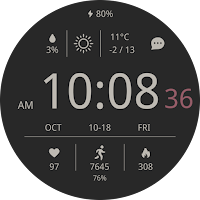
CELEST5568 Sport Watch
Personalization Contains ads
Sleek and elegant classic watch face from CELEST Watches
- Downloads
- 951+
- on Google Play
- Price
- $1.99
- No in-app purchases
- Updated
- Aug 5
- 2026
Screenshots


About CELEST5568 Sport Watch
A watch face from CELEST Watches to transform your Wear OS device with a stylish design that's a pleasure to wear.
ABOUT THIS DESIGN ↴
Stay on top of your day with this clean and informative watch face. See the time, date, weather forecast, battery level, heart rate, step count, and calories burned all at a quick glance. The clear layout ensures you have all the essential information you need right on your wrist.
Personalize your look with a wide array of color options. This watch face offers 30 unique color variations, allowing you to easily match your style or mood. You can further customize your experience with 3 optional circular complications to display the information you need at a glance. From vibrant and bold to subtle and sophisticated, find the perfect hue to complement your daily wear.
INSTALLATION GUIDE ↴
Having trouble installing your watch face from the Google Play Store? Follow these steps for a smooth setup:
✅ Watch Face Installed on Your Phone but Not on Your Watch?
This happens because the Play Store may install a companion app instead. To install directly on your watch:
1. Use the Play Store on Your Watch – Open Google Play on your smartwatch, search for the watch face name, and install it directly.
2. Use the Play Store Dropdown Menu – On your phone, tap the small triangular icon next to the "Install" button (https://i.imgur.com/boSIZ5k.png). Then, select your watch as the target device (https://i.imgur.com/HsZD0Xo.jpeg).
3. Try a Web Browser – Open the Play Store in a web browser on your PC, Mac, or laptop to manually select your watch (https://i.imgur.com/Rq6NGAC.png).
✅ Still Not Showing?
If the watch face doesn’t appear on your watch, open your watch's companion app on your phone (for Samsung devices, this is the Galaxy Wearable app):
- Navigate to the Downloaded section under watch faces.
- Find the watch face and tap to install it (https://i.imgur.com/Zi79PFr.png).
✅ Need More Help?
If you're still experiencing issues, contact us at [email protected], and we'll help you resolve it quickly.
CUSTOMIZATION OPTIONS ↴
Option #1: 30 color combinations
Option #2: Option to hide default data in bottom left position
Option #3: Option to hide default data in bottom center position
Option #4: Option to hide default data in bottom right position
Option #5: 3 optional circular complications
⚠ Please note, that calorie estimation is based on step count, as other data for a more accurate calculation is unavailable. ⚠
⚠ Please note, that to display the optional circular complications it is advised to hide the default data displayed with customization options 2-3-4. Also be advised that complications will not be clearly visible on AOD if you choose a light background in option 1. ⚠
EXPLORE MORE & GET DISCOUNTS ↴
📌 Full Catalog: https://celest-watches.com/product-category/compatibility/wear-os/
📌 Exclusive Discounts for Wear OS: https://celest-watches.com/product-category/availability/on-sale-on-google-play/
STAY CONNECTED ↴
📸 Instagram: https://www.instagram.com/celestwatches/
📘 Facebook: https://www.facebook.com/celeswatchfaces
🐦 Twitter/X: https://twitter.com/CelestWatches
🎭 Threads: https://www.threads.net/@celestwatches
📌 Pinterest: https://pinterest.com/celestwatches/
🎵 TikTok: https://www.tiktok.com/@celestwatches
📝 Tumblr: https://www.tumblr.com/blog/celestwatches
📢 Telegram: https://t.me/celestwatcheswearos
🎁 Donate: https://buymeacoffee.com/celestwatches
ABOUT THIS DESIGN ↴
Stay on top of your day with this clean and informative watch face. See the time, date, weather forecast, battery level, heart rate, step count, and calories burned all at a quick glance. The clear layout ensures you have all the essential information you need right on your wrist.
Personalize your look with a wide array of color options. This watch face offers 30 unique color variations, allowing you to easily match your style or mood. You can further customize your experience with 3 optional circular complications to display the information you need at a glance. From vibrant and bold to subtle and sophisticated, find the perfect hue to complement your daily wear.
INSTALLATION GUIDE ↴
Having trouble installing your watch face from the Google Play Store? Follow these steps for a smooth setup:
✅ Watch Face Installed on Your Phone but Not on Your Watch?
This happens because the Play Store may install a companion app instead. To install directly on your watch:
1. Use the Play Store on Your Watch – Open Google Play on your smartwatch, search for the watch face name, and install it directly.
2. Use the Play Store Dropdown Menu – On your phone, tap the small triangular icon next to the "Install" button (https://i.imgur.com/boSIZ5k.png). Then, select your watch as the target device (https://i.imgur.com/HsZD0Xo.jpeg).
3. Try a Web Browser – Open the Play Store in a web browser on your PC, Mac, or laptop to manually select your watch (https://i.imgur.com/Rq6NGAC.png).
✅ Still Not Showing?
If the watch face doesn’t appear on your watch, open your watch's companion app on your phone (for Samsung devices, this is the Galaxy Wearable app):
- Navigate to the Downloaded section under watch faces.
- Find the watch face and tap to install it (https://i.imgur.com/Zi79PFr.png).
✅ Need More Help?
If you're still experiencing issues, contact us at [email protected], and we'll help you resolve it quickly.
CUSTOMIZATION OPTIONS ↴
Option #1: 30 color combinations
Option #2: Option to hide default data in bottom left position
Option #3: Option to hide default data in bottom center position
Option #4: Option to hide default data in bottom right position
Option #5: 3 optional circular complications
⚠ Please note, that calorie estimation is based on step count, as other data for a more accurate calculation is unavailable. ⚠
⚠ Please note, that to display the optional circular complications it is advised to hide the default data displayed with customization options 2-3-4. Also be advised that complications will not be clearly visible on AOD if you choose a light background in option 1. ⚠
EXPLORE MORE & GET DISCOUNTS ↴
📌 Full Catalog: https://celest-watches.com/product-category/compatibility/wear-os/
📌 Exclusive Discounts for Wear OS: https://celest-watches.com/product-category/availability/on-sale-on-google-play/
STAY CONNECTED ↴
📸 Instagram: https://www.instagram.com/celestwatches/
📘 Facebook: https://www.facebook.com/celeswatchfaces
🐦 Twitter/X: https://twitter.com/CelestWatches
🎭 Threads: https://www.threads.net/@celestwatches
📌 Pinterest: https://pinterest.com/celestwatches/
🎵 TikTok: https://www.tiktok.com/@celestwatches
📝 Tumblr: https://www.tumblr.com/blog/celestwatches
📢 Telegram: https://t.me/celestwatcheswearos
🎁 Donate: https://buymeacoffee.com/celestwatches
What’s new
Updated August 5, 2026
Updated to target Android 16 (API 36).
User reviews

I just love clean look of this watch
Alternatives to CELEST5568 Sport Watch
Looking for apps like CELEST5568 Sport Watch? Here are 6 similar Android apps on Google Play.
-
CELEST5561 Minimalist Watch
-
CELEST5579 Minimalist Watch
-
CELEST5578 Minimalist Watch
-
CELEST5577 Animated Watch
-
CELEST5576 Retro Digital Watch
-
CELEST5575 Retro Digital Watch
| App | Rating | Price | Installs | Last updated | Compare |
|---|---|---|---|---|---|
| CELEST5568 Sport Watch | – | $1.99 | 500+ | Aug 5, 2026 | |
| CELEST5561 Minimalist Watch | – | 0.49 USD | 500+ | Aug 5, 2026 | Compare |
| CELEST5579 Minimalist Watch | – | 1.99 USD | 500+ | Aug 5, 2026 | Compare |
| CELEST5578 Minimalist Watch | – | 1.99 USD | 500+ | Aug 5, 2026 | Compare |
| CELEST5577 Animated Watch | – | 1.99 USD | 100+ | Aug 5, 2026 | Compare |
| CELEST5576 Retro Digital Watch | – | 1.99 USD | 500+ | Aug 5, 2026 | Compare |
| CELEST5575 Retro Digital Watch | – | 1.99 USD | 500+ | Aug 5, 2026 | Compare |
Similar apps on Google Play
- CELEST5561 Minimalist Watch
- CELEST5579 Minimalist Watch
- CELEST5578 Minimalist Watch
- CELEST5577 Animated Watch
- CELEST5576 Retro Digital Watch
- CELEST5575 Retro Digital Watch
- CELEST5574 Retro Digital Watch
- CELEST5573 Minimalist Watch
- CELEST5572 Minimalist Watch
- CELEST5571 Minimalist Watch
- CELEST5570 Retro Digital Watch
- CELEST5569 Minimalist Watch
- CELEST5568 Sport Watch
- CELEST5567 Minimalist Watch
- CELEST5566 Gamer Watch
- CELEST5565 Minimalist Watch
- CELEST5491 Legacy Version
- CELEST5564 Aviator Watch
- CELEST5563 Analog Watch
- CELEST5562 Retro Digital Watch
- CELEST5559 Minimalist Watch
- CELEST5550 Minimalist Watch
- CELEST5557 Analog Watch
- CELEST5560 Retro Digital Watch
- CELEST5556 Retro digital Watch
- CELEST5558 Artistic Watch
- CELEST5555 Vintage Watch
- CELEST5554 Animated Watch
- CELEST5547 Analog Watch
- CELEST5553 Animated Watch Face
- CELEST5552 Analog Watch
- CELEST5551 Digital Watch
- CELEST5549 Minimalist Watch
- CELEST5548 Smart Watch
- CELEST5545 Minimalist Watch
- CELEST5546 Minimalist Watch
- CELEST5542 Minimalist Watch
- CELEST5543 Halloween Watch
- CELEST5544 Minimalist Watch
- CELEST5541 Diver Watch
- CELEST5540 Aviator Watch
- CELEST5539 Sport Watch
- CELEST5538 Sport Watch
- CELEST5537 Retro Digital Watch
- CELEST5536 Retro Digital Watch
- CELEST5535 Retro Digital Watch
- CELEST5534 Sport Watch
- CELEST5533 Retro Digital Watch
- CELEST5532 Retro Digital Watch
- CELEST5531 Retro Digital Watch
- CELEST5530 Retro Digital Watch
- CELEST5529 Retro Digital Watch
- CELEST5528 Retro Digital Watch
- CELEST5527 Sport Watch
- CELEST5526 Minimalist Watch
- CELEST5525 Retro Digital Watch
- CELEST5524 Minimalist Watch
- CELEST5523 Retro Digital Watch
- CELEST5522 Minimalist Watch
- CELEST5521 Analog Watch
- CELEST5520 Retro Digital Watch
- CELEST5519 Vintage Watch
- CELEST5518 Retro Digital Watch
- CELEST5517 Retro Digital Watch
- CELEST5516 Sport Watch
- CELEST5515 Artistic Watch
- CELEST5514 Analog Watch
- CELEST5513 Artistic Watch
- CELEST5512 Military Watch
- CELEST5511 Minimalist Watch
- CELEST5510 Minimalist Watch
- CELEST5509 Artistic Watch
- CELEST5508 Cyber Watch
- CELEST5507 Cyber Watch
- CELEST5506 Dress Watch
- CELEST5505 Military Watch
- CELEST5504 Diver Watch
- CELEST5503 Analog Watch
- CELEST5502 Artistic Watch
- CELEST5501 Anime Watch
- CELEST5500 Artistic Watch
- CELEST5499 Artistic Watch
- CELEST5498 Artistic Watch
- CELEST5497 Animated Watch
- CELEST1100 Minimalist Watch
- CELEST1000 Military Watch
- CELEST5496 Smart Watch
- CELEST5495 Artistic Watch
- CELEST5494 Artistic Watch
- CELEST5493 Artistic Watch
- CELEST5492 Retro Digital Watch
- CELEST5491 Sport Watch
- CELEST5490 Artistic Watch
- CELEST5489 Fun Watch
- CELEST5488 Cyber Watch
- CELEST5487 Aviator Watch
- CELEST5486 Smart Analog Watch
- CELEST5484 Christmas Watch
- CELEST5483 Santa Claus Watch
- CELEST5481 Smart Analog Watch
- CELEST5480 Retro Digital Watch
- CELEST5479 Aviator Watch
- CELEST5478 Aviator Watch
- CELEST5477 Halloween Watch
- CELEST5476 Minimalist Watch
- CELEST5475 Retro Digital Watch
- CELEST5474 Halloween Watch
- CELEST5473 Dress Watch
- CELEST5471 Cyber Watch
- CELEST5470 Analog Watch
- CELEST5469 Halloween Watch
- CELEST5468 Artistic Watch
- CELEST5467 Analog Watch
- CELEST5466 Minimalist Watch
- CELEST5465 Smart Watch
- CELEST5464 Analog Watch
- CELEST5463 Analog Watch
- CELEST5462 Analog Watch
- CELEST5461 Military Watch
- CELEST5460 Analog Watch
- CELEST5459 Analog Watch
- CELEST5458 Analog Watch
- CELEST5457 Dress Watch
- CELEST5456 Diver Watch
- CELEST5453 Military Watch
- CELEST5452 Diver Watch
- CELEST5451 Sport Watch
- CELEST5450 Smart Analog Watch
- CELEST5449 Cyber Watch
- CELEST5448 Minimalist Watch
- CELEST5447 Analog Watch
- CELEST5446 Analog Watch
- CELEST5445 Smart Analog Watch
- CELEST5444 Minimalist Watch
- CELEST5443 Minimalist Watch
- CELEST5442 Analog Watch
- CELEST5441 Sport Watch
- CELEST5440 Smart Analog Watch
- CELEST Watches Catalog
- CELEST5438 Ana-digi Watch
- CELEST5439 Cyber Watch
- CELEST5437 Military Watch
- CELEST5436 Analog Watch
- CELEST5435 Military Watch
- CELEST5434 Analog Watch
- CELEST5432 Retro Digital Watch
- CELEST5431 Diver Watch
- CELEST5429 Smart analog Watch
- CELEST5428 Dress Watch
- CELEST5427 Diver Watch