
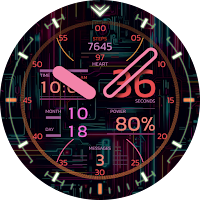
CELEST5471 Cyber Watch
Personalization
Sleek and elegant classic watch face from CELEST Watches
- Downloads
- 10+
- on Google Play
- Price
- $0.49
- No in-app purchases
- Updated
- Sep 24
- 2023
Screenshots
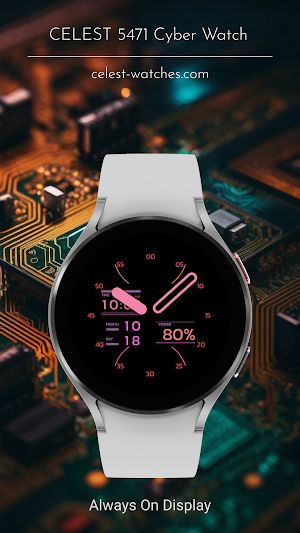
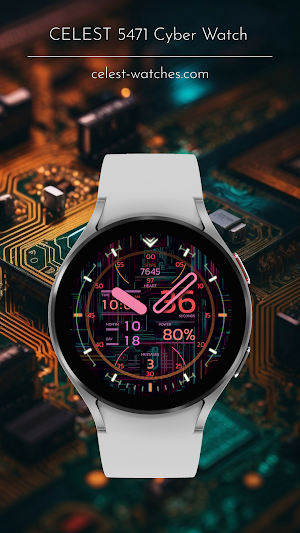
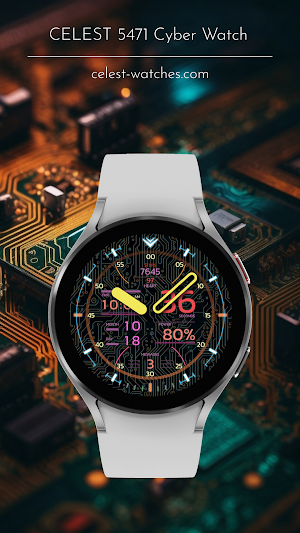
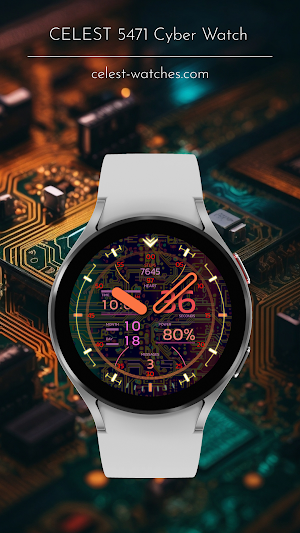


About CELEST5471 Cyber Watch
With a CELEST Watches watch face, you can show off your unique style and taste.
INSTALLATION GUIDE ↴
When attempting to install a watch face from the official Google Play Android app, you may encounter several issues.
In cases where the watch face is installed on your phone but not on your watch, the developer has included a companion app to enhance visibility on the Play Store. You can uninstall the companion app from your phone and look for a triangular symbol next to the Install button in the Play Store app (https://i.imgur.com/OqWHNYf.png). This symbol indicates a dropdown menu, where you can pick your watch as the target for installation.
Alternatively you can try to open the Play Store in a web browser on your laptop, Mac or PC. This will enable you to visually select the correct device for installation (https://i.imgur.com/Rq6NGAC.png).
[Samsung] If you followed the aforementioned instructions and the watch face still doesn't appear on your watch, open the Galaxy Wearable app. Navigate to the Downloaded section within the app, and you'll find the watch face there (https://i.imgur.com/mmNusLy.png). Simply click on it to initiate the installation.
WATCH FACE DETAILS ↴
Complications:
- Steps
- Heart rate
- Date
- Battery percentage
- Message count
Shortcuts
- Steps links to Samsung Health
- Heart rate links to Heart rate app
- Digital time display links to Alarm app
- Battery percentage links to Battery app
- Messages links to default messages app
Customization
- 8 color variations for the hands
- 4 background variants
- 4 AOD background variants (no preview when changing)
CATALOG & DISCOUNTS↴
Our online catalog: https://celest-watches.com/product-category/compatibility/wear-os/
Wear OS discounts: https://celest-watches.com/product-category/availability/on-sale-on-google-play/
FOLLOW US ↴
Instagram: https://www.instagram.com/celestwatches/
Facebook: https://www.facebook.com/celeswatchfaces
Twitter: https://twitter.com/CelestWatches
Telegram: https://t.me/celestwatcheswearos
INSTALLATION GUIDE ↴
When attempting to install a watch face from the official Google Play Android app, you may encounter several issues.
In cases where the watch face is installed on your phone but not on your watch, the developer has included a companion app to enhance visibility on the Play Store. You can uninstall the companion app from your phone and look for a triangular symbol next to the Install button in the Play Store app (https://i.imgur.com/OqWHNYf.png). This symbol indicates a dropdown menu, where you can pick your watch as the target for installation.
Alternatively you can try to open the Play Store in a web browser on your laptop, Mac or PC. This will enable you to visually select the correct device for installation (https://i.imgur.com/Rq6NGAC.png).
[Samsung] If you followed the aforementioned instructions and the watch face still doesn't appear on your watch, open the Galaxy Wearable app. Navigate to the Downloaded section within the app, and you'll find the watch face there (https://i.imgur.com/mmNusLy.png). Simply click on it to initiate the installation.
WATCH FACE DETAILS ↴
Complications:
- Steps
- Heart rate
- Date
- Battery percentage
- Message count
Shortcuts
- Steps links to Samsung Health
- Heart rate links to Heart rate app
- Digital time display links to Alarm app
- Battery percentage links to Battery app
- Messages links to default messages app
Customization
- 8 color variations for the hands
- 4 background variants
- 4 AOD background variants (no preview when changing)
CATALOG & DISCOUNTS↴
Our online catalog: https://celest-watches.com/product-category/compatibility/wear-os/
Wear OS discounts: https://celest-watches.com/product-category/availability/on-sale-on-google-play/
FOLLOW US ↴
Instagram: https://www.instagram.com/celestwatches/
Facebook: https://www.facebook.com/celeswatchfaces
Twitter: https://twitter.com/CelestWatches
Telegram: https://t.me/celestwatcheswearos
What’s new
Updated September 24, 2023
Fixed the battery percentage indicator
User reviews

Awesome developer. Never afraid to make big creative chanves.very cool futuristic style. Very cyberpunk
Alternatives to CELEST5471 Cyber Watch
Looking for apps like CELEST5471 Cyber Watch? Here are 6 similar Android apps on Google Play. 3 of the 6 are free to download.
-
CELEST1100 Minimalist Watch
-
CELEST Watches Catalog
-
CELEST1000 Military Watch
-
CELEST5472 Artistic Watch
-
CELEST5470 Analog Watch
-
CELEST5469 Fun Watch
| App | Rating | Price | Installs | Last updated | Compare |
|---|---|---|---|---|---|
| CELEST5471 Cyber Watch | – | $0.49 | 10+ | Sep 24, 2023 | |
| CELEST1100 Minimalist Watch | – | Free | 50+ | Jun 20, 2022 | Compare |
| CELEST Watches Catalog | – | Free | 100+ | Aug 26, 2023 | Compare |
| CELEST1000 Military Watch | – | Free | 100+ | Jun 20, 2022 | Compare |
| CELEST5472 Artistic Watch | – | 0.49 USD | 1+ | Sep 24, 2023 | Compare |
| CELEST5470 Analog Watch | – | 0.49 USD | 10+ | Sep 16, 2023 | Compare |
| CELEST5469 Fun Watch | – | 0.49 USD | 100+ | Aug 5, 2026 | Compare |
Similar apps on Google Play
- CELEST1100 Minimalist Watch
- CELEST Watches Catalog
- CELEST1000 Military Watch
- CELEST5472 Artistic Watch
- CELEST5471 Cyber Watch
- CELEST5470 Analog Watch
- CELEST5469 Fun Watch
- CELEST5468 Artistic Watch
- CELEST5467 Analog Watch
- CELEST5466 Minimalist Watch
- CELEST5465 Minimalist Watch
- CELEST5464 Analog Watch
- CELEST5463 Analog Watch
- CELEST5462 Analog Watch
- CELEST5461 Hybrid Watch
- CELEST5460 Analog Watch
- CELEST5459 Analog Watch
- CELEST5458 Analog Watch
- CELEST5457 Dress Watch
- CELEST5456 Diver Watch
- CELEST5455 Hybrid Watch
- CELEST5453 Military Watch
- CELEST5454 Military Watch
- CELEST5452 Diver Watch
- CELEST5451 Smart Watch
- CELEST5450 Smart Analog Watch
- CELEST5449 Cyber Watch
- CELEST5448 Minimalist Watch
- CELEST5447 Analog Watch
- CELEST5446 Analog Watch
- CELEST5445 Smart Analog Watch
- CELEST5444 Minimalist Watch
- CELEST5443 Minimalist Watch
- CELEST5442 Analog Watch
- CELEST5441 Smart Watch
- CELEST5440 Smart Analog Watch
- CELEST5438 Ana-digi Watch
- CELEST5439 Cyber Watch
- CELEST5437 Military Watch
- CELEST5436 Analog Watch
- CELEST5435 Military Watch
- CELEST5434 Minimalist Watch
- CELEST5433 Analog Watch
- CELEST5432 Digital Watch
- CELEST5431 Diver Watch
- CELEST5430 Military Watch
- CELEST5429 Smart analog Watch
- CELEST5428 Dress Watch
- CELEST5427 Diver Watch
- CELEST5414 Amart analog Watch
- CELEST5426 Fun Watch
- CELEST5425 Analog Watch
- CELEST5423 Retro Digital Watch
- CELEST5424 Minimalist Watch
- CELEST5422 Minimalist Watch
- CELEST5419 Military Watch
- CELEST5421 Smart Watch
- CELEST5418 Military Watch
- CELEST5417 Smart Analog Watch
- CELEST5415 Digital Watch
- CELEST5405 Mirrored Watch
- CELEST5413 Analog Watch
- CELEST5412 Analog Watch
- CELEST5411 Analog Watch
- CELEST5410 Diver Watch
- CELEST5409 Military Watch
- CELEST5408 Smart Analog Watch
- CELEST5406 Minimalist Watch
- CELEST5404 Retro Digital Watch
- CELEST5403 Smart Watch
- CELEST5402 Retro Digital Watch
- CELEST5401 Minimalist Watch
- CELEST2380 Vintage Watch
- CELEST1330 Minimalist Watch
- CELEST1860 Aviator Watch
- CELEST1771 Smart Analog Watch
- CELEST1760 Analog Watch
- CELEST1320 Minimalist Watch
- CELEST1961 Military Watch
- CELEST3020 Digital Watch
- CELEST1530 Zodiac Watch Face
- CELEST1515 Analog Watch
- CELEST1310 Minimalist Watch
- CELEST2370 Dress Watch
- CELEST1960 Military Watch
- CELEST2360 Dress Watch
- CELEST1910 Military Watch
- CELEST1850 Aviator Watch
- CELEST2350 Dress Watch
- CELEST1840 Aviator Watch
- CELEST3010 Retro Digital Watch
- CELEST2340 Dress Watch
- CELEST2330 Dress Watch
- CELEST5120 Minimalist Watch
- CELEST1740 Analog Watch
- CELEST1730 Analog Watch
- CELEST1950 Military Watch
- CELEST1510 Analog Watch
- CELEST2310 Dress Watch
- CELEST5300 Smart Analog Watch
- CELEST5100 Analog Watch
- CELEST4200 Ana-Digi Watch
- CELEST4100 Ana-Digi Watch
- CELEST3200 Digital Smart Watch
- CELEST3100 Digital Watch
- CELEST2100 Minimalist Watch
- CELEST2000 Minimalist Watch
- CELEST1900 Military Watch
- CELEST1821 Aviator Watch
- CELEST1800 Military Watch
- CELEST1710 Analog Watch
- CELEST5320 Smart Analog Watch
- CELEST1700 Analog Watch
- CELEST1500 Analog Watch
- CELEST1400 Aviator Watch
- CELEST5200 Smart Analog Watch
- CELEST5110 Analog Watch
- CELEST2120 Minimalist Watch
- CELEST5310 Smart Analog Watch
- CELEST1920 Military Watch
- CELEST2110 Minimalist Watch
- CELEST2300 Dress Watch
- CELEST2200 Minimalist Watch
- CELEST3000 Retro Digital Watch
- CELEST1720 Analog Watch
- CELEST1940 Military Watch
- CELEST1830 Aviator Watch
- CELEST1610 Analog Watch
- CELEST1820 Aviator Watch
- CELEST1810 Aviator Watch
- CELEST1300 Vintage Watch