
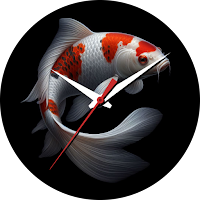
CELEST5495 Artistic Watch
Personalization Contains ads
https://celest-watches.com
- Rating
- 4.7
- 55 ratings
- Downloads
- 1.6K+
- on Google Play
- Price
- $1.99
- No in-app purchases
- Updated
- Aug 5
- 2026
Screenshots
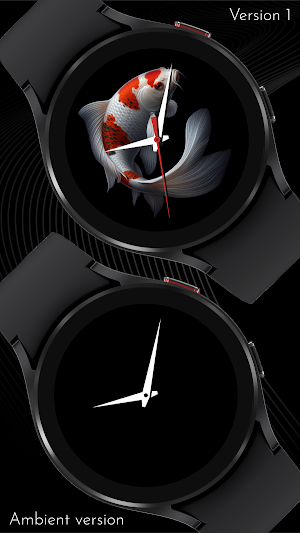
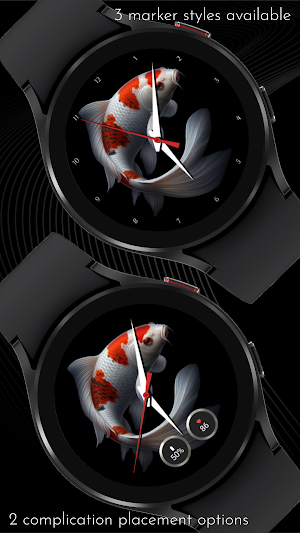
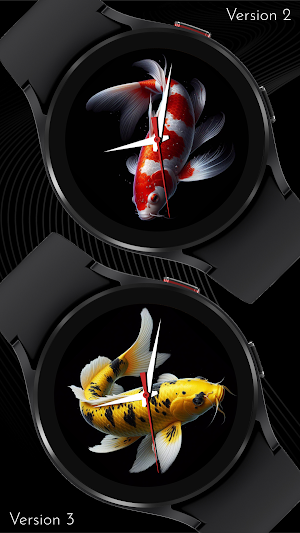


About CELEST5495 Artistic Watch
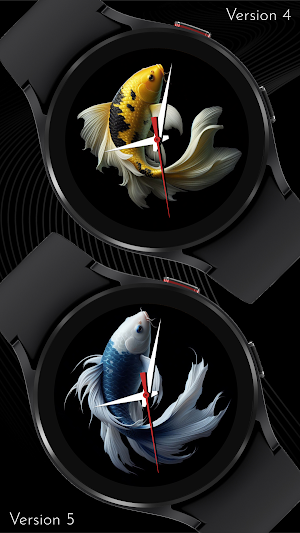
Immerse yourself in the charm and vibrancy of Japanese culture with this captivating design featuring mesmerizing koi fish, symbolizing resilience, determination, and the pursuit of dreams. The koi fish's vibrant red and white hues add a touch of elegance and energy, beautifully complemented by the serene black background. Explore 10 background variations with colorful koi fishes, each providing a unique visual experience. Choose between traditional hour markers, sleek numerals, or minimalist dots for effortless time reading. Elevate your timepiece with two complication options and personalize these complications with four background choices. Immerse yourself in the perfect blend of functionality and style with this exceptional timepiece.
INSTALLATION GUIDE ↴
When attempting to install a watch face from the official Google Play Android app, you may encounter several issues.
In cases where the watch face is installed on your phone but not on your watch, the developer has included a companion app to enhance visibility on the Play Store. You can uninstall the companion app from your phone and look for a triangular symbol next to the Install button in the Play Store app (https://i.imgur.com/OqWHNYf.png). This symbol indicates a dropdown menu, where you can pick your watch as the target for installation.
Alternatively you can try to open the Play Store in a web browser on your laptop, Mac or PC. This will enable you to visually select the correct device for installation (https://i.imgur.com/Rq6NGAC.png).
[Samsung] If you followed the aforementioned instructions and the watch face still doesn't appear on your watch, open the Galaxy Wearable app. Navigate to the Downloaded section within the app, and you'll find the watch face there (https://i.imgur.com/mmNusLy.png). Simply click on it to initiate the installation.
WATCH FACE DETAILS ↴
Customisation
- 10 background variations of colorful koi fish
- 3 marker variations for easy time reading
- 2 complication placement options
- 4 background options for the complications
CATALOG & DISCOUNTS↴
Our online catalog: https://celest-watches.com/product-category/compatibility/wear-os/
Wear OS discounts: https://celest-watches.com/product-category/availability/on-sale-on-google-play/
FOLLOW US ↴
Instagram: https://www.instagram.com/celestwatches/
Facebook: https://www.facebook.com/celeswatchfaces
Twitter: https://twitter.com/CelestWatches
Telegram: https://t.me/celestwatcheswearos
INSTALLATION GUIDE ↴
When attempting to install a watch face from the official Google Play Android app, you may encounter several issues.
In cases where the watch face is installed on your phone but not on your watch, the developer has included a companion app to enhance visibility on the Play Store. You can uninstall the companion app from your phone and look for a triangular symbol next to the Install button in the Play Store app (https://i.imgur.com/OqWHNYf.png). This symbol indicates a dropdown menu, where you can pick your watch as the target for installation.
Alternatively you can try to open the Play Store in a web browser on your laptop, Mac or PC. This will enable you to visually select the correct device for installation (https://i.imgur.com/Rq6NGAC.png).
[Samsung] If you followed the aforementioned instructions and the watch face still doesn't appear on your watch, open the Galaxy Wearable app. Navigate to the Downloaded section within the app, and you'll find the watch face there (https://i.imgur.com/mmNusLy.png). Simply click on it to initiate the installation.
WATCH FACE DETAILS ↴
Customisation
- 10 background variations of colorful koi fish
- 3 marker variations for easy time reading
- 2 complication placement options
- 4 background options for the complications
CATALOG & DISCOUNTS↴
Our online catalog: https://celest-watches.com/product-category/compatibility/wear-os/
Wear OS discounts: https://celest-watches.com/product-category/availability/on-sale-on-google-play/
FOLLOW US ↴
Instagram: https://www.instagram.com/celestwatches/
Facebook: https://www.facebook.com/celeswatchfaces
Twitter: https://twitter.com/CelestWatches
Telegram: https://t.me/celestwatcheswearos
What’s new
Updated August 5, 2026
Updated to target Android 16 (API 36).
User reviews

Absolutely my favorite watch face. I also love the AOD .

Beautiful designs & colors love the options features .
Alternatives to CELEST5495 Artistic Watch
Looking for apps like CELEST5495 Artistic Watch? Here are 6 similar Android apps on Google Play.
-
CELEST5551 Digital Watch
-
CELEST5549 Minimalist Watch
-
CELEST5548 Smart Watch
-
CELEST5545 Minimalist Watch
-
CELEST5546 Minimalist Watch
-
CELEST5542 Minimalist Watch
| App | Rating | Price | Installs | Last updated | Compare |
|---|---|---|---|---|---|
| CELEST5495 Artistic Watch | 4.7 / 5 | $1.99 | 1,000+ | Aug 5, 2026 | |
| CELEST5551 Digital Watch | – | 1.49 USD | 50+ | Aug 5, 2026 | Compare |
| CELEST5549 Minimalist Watch | – | 1.49 USD | 100+ | – | Compare |
| CELEST5548 Smart Watch | – | 0.99 USD | 100+ | – | Compare |
| CELEST5545 Minimalist Watch | – | 0.99 USD | 100+ | Aug 5, 2026 | Compare |
| CELEST5546 Minimalist Watch | – | 1.49 USD | 50+ | Aug 5, 2026 | Compare |
| CELEST5542 Minimalist Watch | – | 1.49 USD | 10+ | – | Compare |
Similar apps on Google Play
- CELEST5551 Digital Watch
- CELEST5549 Minimalist Watch
- CELEST5548 Smart Watch
- CELEST5545 Minimalist Watch
- CELEST5546 Minimalist Watch
- CELEST5542 Minimalist Watch
- CELEST5543 Halloween Watch
- CELEST5544 Minimalist Watch
- CELEST5541 Diver Watch
- CELEST5540 Aviator Watch
- CELEST5539 Sport Watch
- CELEST5538 Sport Watch
- CELEST5537 Retro Digital Watch
- CELEST5536 Retro Digital Watch
- CELEST5535 Retro Digital Watch
- CELEST5534 Sport Watch
- CELEST5533 Retro Digital Watch
- CELEST5532 Retro Digital Watch
- CELEST5531 Retro Digital Watch
- CELEST5530 Retro Digital Watch
- CELEST5529 Retro Digital Watch
- CELEST5528 Retro Digital Watch
- CELEST5527 Sport Watch
- CELEST5526 Minimalist Watch
- CELEST5525 Retro Digital Watch
- CELEST5524 Minimalist Watch
- CELEST5523 Retro Digital Watch
- CELEST5522 Minimalist Watch
- CELEST5521 Analog Watch
- CELEST5520 Retro Digital Watch
- CELEST5519 Vintage Watch
- CELEST5518 Retro Digital Watch
- CELEST5517 Retro Digital Watch
- CELEST5516 Sport Watch
- CELEST5515 Artistic Watch
- CELEST5514 Analog Watch
- CELEST5513 Artistic Watch
- CELEST5512 Military Watch
- CELEST5511 Minimalist Watch
- CELEST5510 Minimalist Watch
- CELEST5509 Artistic Watch
- CELEST5508 Cyber Watch
- CELEST5507 Cyber Watch
- CELEST5506 Dress Watch
- CELEST5505 Military Watch
- CELEST5504 Diver Watch
- CELEST5503 Analog Watch
- CELEST5502 Artistic Watch
- CELEST5501 Anime Watch
- CELEST5500 Artistic Watch
- CELEST5499 Artistic Watch
- CELEST5498 Artistic Watch
- CELEST5497 Animated Watch
- CELEST1100 Minimalist Watch
- CELEST1000 Military Watch
- CELEST5496 Smart Watch
- CELEST5495 Artistic Watch
- CELEST5494 Artistic Watch
- CELEST5493 Artistic Watch
- CELEST5492 Retro Digital Watch
- CELEST5491 Sport Watch
- CELEST5490 Artistic Watch
- CELEST5489 Fun Watch
- CELEST5488 Cyber Watch
- CELEST5487 Aviator Watch
- CELEST5486 Smart Analog Watch
- CELEST5485 Christmas Watch
- CELEST5484 Christmas Watch
- CELEST5483 Santa Claus Watch
- CELEST5482 Christmas Watch
- CELEST5481 Smart Analog Watch
- CELEST5480 Retro Digital Watch
- CELEST5479 Aviator Watch
- CELEST5478 Aviator Watch
- CELEST5477 Halloween Watch
- CELEST5476 Minimalist Watch
- CELEST5475 Retro Digital Watch
- CELEST5474 Halloween Watch
- CELEST5473 Dress Watch
- CELEST5472 Artistic Watch
- CELEST5471 Cyber Watch
- CELEST5470 Analog Watch
- CELEST5469 Halloween Watch
- CELEST5468 Artistic Watch
- CELEST5467 Analog Watch
- CELEST5466 Minimalist Watch
- CELEST5465 Smart Watch
- CELEST5464 Analog Watch
- CELEST5463 Analog Watch
- CELEST5462 Analog Watch
- CELEST5461 Military Watch
- CELEST5460 Analog Watch
- CELEST5459 Analog Watch
- CELEST5458 Analog Watch
- CELEST5457 Dress Watch
- CELEST5456 Diver Watch
- CELEST5453 Military Watch
- CELEST5454 Military Watch
- CELEST5452 Diver Watch
- CELEST5451 Sport Watch
- CELEST5450 Smart Analog Watch
- CELEST5449 Cyber Watch
- CELEST5448 Minimalist Watch
- CELEST5447 Analog Watch
- CELEST5446 Analog Watch
- CELEST5445 Smart Analog Watch
- CELEST5444 Minimalist Watch
- CELEST5443 Minimalist Watch
- CELEST5442 Analog Watch
- CELEST5441 Sport Watch
- CELEST5440 Smart Analog Watch
- CELEST Watches Catalog
- CELEST5438 Ana-digi Watch
- CELEST5439 Cyber Watch
- CELEST5437 Military Watch
- CELEST5436 Analog Watch
- CELEST5435 Military Watch
- CELEST5434 Analog Watch
- CELEST5433 Analog Watch
- CELEST5432 Retro Digital Watch
- CELEST5431 Diver Watch
- CELEST5430 Military Watch
- CELEST5429 Smart analog Watch
- CELEST5428 Dress Watch
- CELEST5427 Diver Watch
- CELEST5414 Amart analog Watch
- CELEST5426 Easter Watch
- CELEST5425 Analog Watch
- CELEST5423 Retro Digital Watch
- CELEST5424 Minimalist Watch
- CELEST5422 Minimalist Watch
- CELEST5419 Military Watch
- CELEST5421 Smart Watch
- CELEST5418 Military Watch
- CELEST5417 Smart Analog Watch
- CELEST5415 Retro Digital Watch
- CELEST5405 Mirrored Watch
- CELEST5413 Analog Watch
- CELEST5412 Analog Watch
- CELEST5411 Analog Watch
- CELEST5410 Diver Watch
- CELEST5409 Military Watch
- CELEST5408 Smart Analog Watch
- CELEST5404 Retro Digital Watch
- CELEST5403 Sport Watch
- CELEST5402 Retro Digital Watch
- CELEST5401 Minimalist Watch
- CELEST2380 Vintage Watch
- CELEST1330 Minimalist Watch
- CELEST1860 Aviator Watch