
Touch Assistive: Tap Assistant
Tomsonmadela Tools Contains ads
Assistive Touch - Easy touch assistant to control volume, home & screen recorder
- Downloads
- 50K+
- on Google Play
- Price
- Free
- No in-app purchases
- Updated
- Jun 29
- 2026 · v1.0.2
Screenshots


About Touch Assistive: Tap Assistant
Touch Assistive: Smart & Easy Control Center
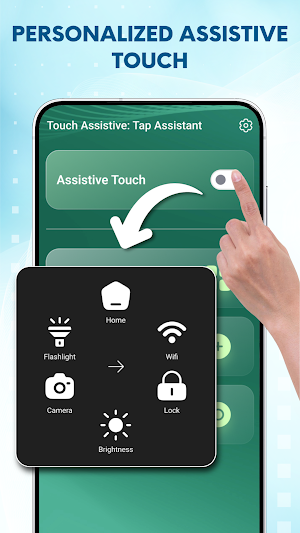
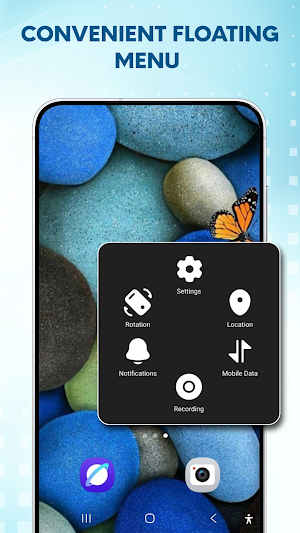
Looking for a way to protect your physical buttons or simply want a faster way to access your favorite feature? Assistive Touch provides a smart, floating menu that stays on your screen, giving you instant access to everything you need with just one tap.
Key Features of Touch Assistive: Tap Assistant at Your Fingertips:
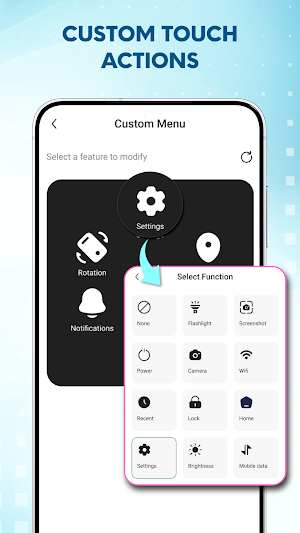
- Customizable Floating Menu: Personalize your interaction! Arrange your frequently used features, settings, and tools in a layout that works best for you.
- Virtual Home & Volume Buttons: Protect your physical hardware. Easily go back to the home screen or adjust volume without pressing hard buttons.
- High-Quality Screen Recording: Capture your screen movements in high definition with a single touch. Perfect for tutorials or gaming!
- Quick Toggle Functions: Instant access to essential tools
- Flashlight: Brighten your way in a snap.
- Screenshot: Capture your screen instantly.
- Smart Control: Toggle Wifi, Bluetooth, and Airplane mode.
- Camera: Never miss a moment with quick launch.
- Power Options: Quick access to restart or power off settings.
Personalize Your Style:
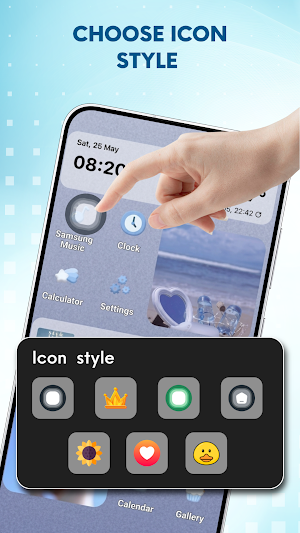
Make it yours! You can customize the touch assistive floating Icon with various beautiful themes, colors, and transparency levels. Whether you want a classic look or something modern, our library has you covered.
Permissions & Privacy:
- To use all features in this assistive touch app, user need to permit this app Device Administrator permission & AccessibilityServices API (System settings & Accessibility permission)
This app ask Android Accessibility Service API permission for:
* Display an assistive touch floating overlay (dot /custom icon) above other apps.
*Perform shortcuts like Go Home, go back, lock screen, power menu, take screenshot, open notification, etc,...
- No Data Collection: We do not collect or store any personal or sensitive data. No keystrokes, passwords, messages or personal data are read or stored.
- User Control: No actions are performed without your direct interaction. Your data stays safe on your device. You can turn off this permission anytime you want
Looking for a way to protect your physical buttons or simply want a faster way to access your favorite feature? Assistive Touch provides a smart, floating menu that stays on your screen, giving you instant access to everything you need with just one tap.
Key Features of Touch Assistive: Tap Assistant at Your Fingertips:
- Customizable Floating Menu: Personalize your interaction! Arrange your frequently used features, settings, and tools in a layout that works best for you.
- Virtual Home & Volume Buttons: Protect your physical hardware. Easily go back to the home screen or adjust volume without pressing hard buttons.
- High-Quality Screen Recording: Capture your screen movements in high definition with a single touch. Perfect for tutorials or gaming!
- Quick Toggle Functions: Instant access to essential tools
- Flashlight: Brighten your way in a snap.
- Screenshot: Capture your screen instantly.
- Smart Control: Toggle Wifi, Bluetooth, and Airplane mode.
- Camera: Never miss a moment with quick launch.
- Power Options: Quick access to restart or power off settings.
Personalize Your Style:
Make it yours! You can customize the touch assistive floating Icon with various beautiful themes, colors, and transparency levels. Whether you want a classic look or something modern, our library has you covered.
Permissions & Privacy:
- To use all features in this assistive touch app, user need to permit this app Device Administrator permission & AccessibilityServices API (System settings & Accessibility permission)
This app ask Android Accessibility Service API permission for:
* Display an assistive touch floating overlay (dot /custom icon) above other apps.
*Perform shortcuts like Go Home, go back, lock screen, power menu, take screenshot, open notification, etc,...
- No Data Collection: We do not collect or store any personal or sensitive data. No keystrokes, passwords, messages or personal data are read or stored.
- User Control: No actions are performed without your direct interaction. Your data stays safe on your device. You can turn off this permission anytime you want
Alternatives to Touch Assistive: Tap Assistant
Looking for apps like Touch Assistive: Tap Assistant? Here are 6 similar Android apps on Google Play. The highest rated is Freedom Street Garage (4.8/5), and all 6 are free to download.
-
Mantis Laser Academy 4.5
-
Freedom Street Garage 4.8
-
myNoise | Focus. Relax. Sleep. 4.5
-
App Lock: Fingerprint, Pattern 4.4
-
Podcast App: Podurama 3.9
-
HomeLight For Agents 4.7
| App | Rating | Price | Installs | Last updated | Compare |
|---|---|---|---|---|---|
| Touch Assistive: Tap Assistant | – | Free | 50,000+ | Jun 29, 2026 | |
| Mantis Laser Academy | 4.5 / 5 | Free | 100,000+ | Oct 6, 2026 | Compare |
| Freedom Street Garage | 4.8 / 5 | Free | 1,000+ | Sep 10, 2025 | Compare |
| myNoise | Focus. Relax. Sleep. | 4.5 / 5 | Free | 500,000+ | Sep 29, 2026 | Compare |
| App Lock: Fingerprint, Pattern | 4.4 / 5 | Free | 10,000,000+ | Oct 5, 2026 | Compare |
| Podcast App: Podurama | 3.9 / 5 | Free | 10,000+ | Jul 5, 2026 | Compare |
| HomeLight For Agents | 4.7 / 5 | Free | 10,000+ | Sep 2, 2026 | Compare |
Similar apps on Google Play
- Mantis Laser Academy
- Freedom Street Garage
- myNoise | Focus. Relax. Sleep.
- App Lock: Fingerprint, Pattern
- Podcast App: Podurama
- HomeLight For Agents
- Renight: AI Sleep Sounds
- Auto Agent
- One Deep Breath: Breathwork
- Taskbar
- Screen Recorder GU Recorder
- Walley-Wallpaper, Backgrounds
- Tapping with T
- Lemonlet Water Tracker
- Good Lock : Custom Lock Screen
- Tapet: HD Wallpaper Generator
- blockit | stop phone addiction
- Touch Screen Test
- Eklipse: AI Gaming Clip Maker
- Zenze- Block Apps,Stay Focused
- Quikshort: Shortcut Creator
- Nuki Smart Lock
- Avrora Sleep Sounds & Stories
- App Lock - AppLock VIP
- G-CPU:Monitor CPU, RAM, Widget
- Shortcut Maker
- Screen Recorder Unlimited
- StopStutter Speech Therapy
- YourHour : Screen Time Control
- Macrorify - Image Auto Clicker
- Celestia: Baby Sleep Sounds
- Noventra Focus: Pomodoro Timer
- StayOff: Screen Time Control
- Automatic Scroll
- Spatial Touch™ - Touchless
- Photo Widget Pro
- ASR Voice Recorder
- Dynamic Fitness Texas
- Magic Lantern
- IAM Yoga Nidra 4 Deep Rest
- Sensi
- True Edge: Edge Lighting & AOD
- TAP Kiln Control Mobile
- HeartMath
- UNITED24
- LAVA+
- Sleep as Android Unlock
- dynamicSpot - Dynamic Island
- Game Booster: GFX & Lag Fix
- Reveri: Relief in Minutes
- Playvora Timer: Stop Watch
- Action Launcher: Pixel Edition
- CapAudio
- IFSTA Essentials 8
- AIO Launcher
- Glip Screen Recorder
- G Band
- Simply Adaptive Icon Pack
- Gallup Access
- AppDash: App Manager & Backup
- Square Home
- Stationhead
- Boom: Bass Booster & Equalizer
- One Hand Operation +
- iLink
- CPU Monitor - temperature
- Alimetra: Calories & Weight
- WatchCharts
- HappyLighting
- Push Up Counter and Tracker
- The Tapping Solution
- Embody
- Smart Watch - Clock Wallpaper
- Wadiz