

TimeoutIQ®. Smart Education. Screen Time Manager.
TimeoutIQ.com Parenting In-app purchases
Manage your kids' recreational screen time. Challenge their minds.
- Rating
- 3.9
- 195 ratings
- Downloads
- 35.6K+
- on Google Play
- Price
- Free
- In-app purchases
- Updated
- Aug 13
- 2025 · v2.0.2
Screenshots


About TimeoutIQ®. Smart Education. Screen Time Manager.
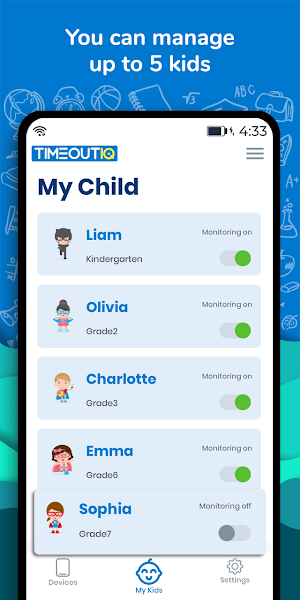
TimeoutIQ® - Control your kids' screen time. Challenge their minds. Get Parental Control and Personal Education Tutor in one.
"TimeOutIQ® is a powerful AI-powered app to help parents manage their kid's recreation screen time management, learn what they're watching, know where they are and customize their educational curriculum based on their grade.
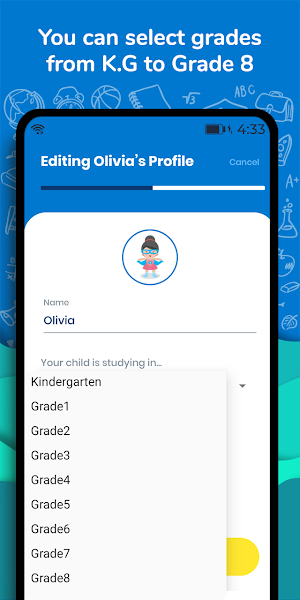
TimeoutIQ® helps parents set the school grade level for your child anywhere from Pre-Kindergarten to Grade 8 (Ages 3 to 11).
The application has unique features such as customizing the education curriculum and awarding bonus time for answering correctly.
- Flexible device screen time management:
• Personalize the amount of screen time based on your child's screen time habits and set daily limits or extend/reduce them.
• Set and manage a specific daily screen time limit for your kids’ screen time;
- Location tracking:
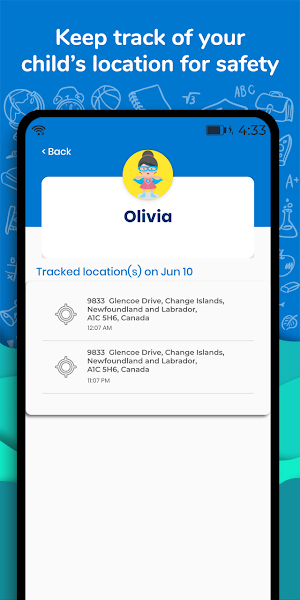
• Monitor your child's location when monitoring is on; This is an optional feature.
• TimeOutIQ® gives you the option to turn on location tracking on your child's device. This is ONLY SETUP BY YOU THE PARENT FOR YOUR CHILD.
Also very handy if she loses her phone or forgets where she left it last.
- Customized Education
• Set the Grade level for your child anywhere from Kindergarten to Grade 8 (Ages 3 to 11).
• TimeoutIQ®'s quality curriculum is designed by educators to automatically display Math, Science, Geography and English quiz questions/challenges from a vast library that's growing every day.
- Artificial Intelligence powered
• TimeOutIQ® learns responses and tracks strengths and weaknesses in the subject matter and automatically increases the level of questions/challenges beyond the grade level that you set.
- Detailed Reporting
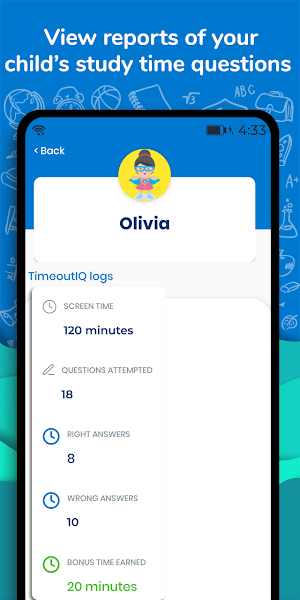
• TimeOutIQ® allows you to monitor app usage and logs the amount of time, number of questions/challenges and number of right/wrong answers.
• Screen time tracker allows you to monitor app's usage statistics.
- Award Bonus Time
• Is your child acing all the questions/challenges she's asked? Good for her. Must be getting her smarts from her parents!. Go ahead and award her with bonus screen time. Set the number of answers to get right and the amount of bonus time with the flick of your thumb.
TimeoutIQ® helps you manage, monitor and educate your child while they're on their mobile device wherever they may be.
Please install this application on your mobile smart phone/tablet and then on the device/s to be used by your child/children to perform remote parental control of your child’s device. Smartphones/Tablets used by TimeoutIQ should have network data capability (mobile network or wifi), as the app uses data to send and receive configuration commands.
IMPORTANT NOTE: TimeoutIQ® is installed and managed by a parent or authorized adult caregiver. The child DOES NOT have access to the app and cannot install/edit or make changes to the app unless the parent intentionally gives them access to their login credentials or TimeoutIQ App PIN.
Feedback
If you have any issues or questions, you can always contact our support team: [email protected]
Permissions
TimeoutIQ® is an education and screen time management app which means it needs to provide you with the ability to set a time interval after which the phone will automatically lock out your child. For the education quiz questions, TimeoutIQ will display the questions over the top of an game or video or social media app that your child might be engaged in.
TimeoutIQ® uses the following:
- Device Admin Permission:
Prevents your child from uninstalling the app.
- Location Permission:
Optional permission to allow you to track where your child is.
- Overlap Permission:
Allows the app to display TimeOutIQ®'s educational content over any running app.
- Usage Permission:
Provides usage reports of all the apps running on your child's device.
- Accessibility Permission:
This is an optional permission to make the app more accessible.
"TimeOutIQ® is a powerful AI-powered app to help parents manage their kid's recreation screen time management, learn what they're watching, know where they are and customize their educational curriculum based on their grade.
TimeoutIQ® helps parents set the school grade level for your child anywhere from Pre-Kindergarten to Grade 8 (Ages 3 to 11).
The application has unique features such as customizing the education curriculum and awarding bonus time for answering correctly.
- Flexible device screen time management:
• Personalize the amount of screen time based on your child's screen time habits and set daily limits or extend/reduce them.
• Set and manage a specific daily screen time limit for your kids’ screen time;
- Location tracking:
• Monitor your child's location when monitoring is on; This is an optional feature.
• TimeOutIQ® gives you the option to turn on location tracking on your child's device. This is ONLY SETUP BY YOU THE PARENT FOR YOUR CHILD.
Also very handy if she loses her phone or forgets where she left it last.
- Customized Education
• Set the Grade level for your child anywhere from Kindergarten to Grade 8 (Ages 3 to 11).
• TimeoutIQ®'s quality curriculum is designed by educators to automatically display Math, Science, Geography and English quiz questions/challenges from a vast library that's growing every day.
- Artificial Intelligence powered
• TimeOutIQ® learns responses and tracks strengths and weaknesses in the subject matter and automatically increases the level of questions/challenges beyond the grade level that you set.
- Detailed Reporting
• TimeOutIQ® allows you to monitor app usage and logs the amount of time, number of questions/challenges and number of right/wrong answers.
• Screen time tracker allows you to monitor app's usage statistics.
- Award Bonus Time
• Is your child acing all the questions/challenges she's asked? Good for her. Must be getting her smarts from her parents!. Go ahead and award her with bonus screen time. Set the number of answers to get right and the amount of bonus time with the flick of your thumb.
TimeoutIQ® helps you manage, monitor and educate your child while they're on their mobile device wherever they may be.
Please install this application on your mobile smart phone/tablet and then on the device/s to be used by your child/children to perform remote parental control of your child’s device. Smartphones/Tablets used by TimeoutIQ should have network data capability (mobile network or wifi), as the app uses data to send and receive configuration commands.
IMPORTANT NOTE: TimeoutIQ® is installed and managed by a parent or authorized adult caregiver. The child DOES NOT have access to the app and cannot install/edit or make changes to the app unless the parent intentionally gives them access to their login credentials or TimeoutIQ App PIN.
Feedback
If you have any issues or questions, you can always contact our support team: [email protected]
Permissions
TimeoutIQ® is an education and screen time management app which means it needs to provide you with the ability to set a time interval after which the phone will automatically lock out your child. For the education quiz questions, TimeoutIQ will display the questions over the top of an game or video or social media app that your child might be engaged in.
TimeoutIQ® uses the following:
- Device Admin Permission:
Prevents your child from uninstalling the app.
- Location Permission:
Optional permission to allow you to track where your child is.
- Overlap Permission:
Allows the app to display TimeOutIQ®'s educational content over any running app.
- Usage Permission:
Provides usage reports of all the apps running on your child's device.
- Accessibility Permission:
This is an optional permission to make the app more accessible.
What’s new
Version 2.0.2 · Updated August 13, 2025
Win back offers Minor UI enhancements
User reviews

Its awesome and very good to make our child busy.

Quite worthy app.... nice way to monitor ur kids activitiy anytime.

In the time of lockdown especially this app is so much helpful, now we can easily leverage the excess use of smartphone by kids into learning and also monitor their use to keep them safe.

Very nice and helpful app

Awesome! Monitoring with education is its great feature.
Alternatives to TimeoutIQ®. Smart Education. Screen Time Manager.
Looking for apps like TimeoutIQ®. Smart Education. Screen Time Manager.? Here are 6 similar Android apps on Google Play. The highest rated is Parental Control App - Parents (5.0/5), and all 6 are free to download.
-
Securly Home 4.5
-
TalkingParents: Co-Parent App 2.2
-
Parental Control App with Kid 3.2
-
Parental Control App - Parents 5.0
-
Parental Control - Kidslox 4.2
-
Kids Books Reading Library App 4.7
| App | Rating | Price | Installs | Last updated | Compare |
|---|---|---|---|---|---|
| TimeoutIQ®. Smart Education. Screen Time Manager. | 3.9 / 5 | Free | 10,000+ | Aug 13, 2025 | |
| Securly Home | 4.5 / 5 | Free | 100,000+ | – | Compare |
| TalkingParents: Co-Parent App | 2.2 / 5 | Free | 100,000+ | Aug 7, 2026 | Compare |
| Parental Control App with Kid | 3.2 / 5 | Free | 10,000+ | Jun 29, 2020 | Compare |
| Parental Control App - Parents | 5.0 / 5 | Free | 500+ | Apr 30, 2021 | Compare |
| Parental Control - Kidslox | 4.2 / 5 | Free | 1,000,000+ | Sep 14, 2026 | Compare |
| Kids Books Reading Library App | 4.7 / 5 | Free | 1,000,000+ | Oct 12, 2026 | Compare |
Similar apps on Google Play
- Securly Home
- TalkingParents: Co-Parent App
- Parental Control App with Kid
- Parental Control App - Parents
- Parental Control - Kidslox
- Kids Books Reading Library App
- KOBI - Helps Children Read
- The Happy Child Parenting App
- Key Cards GCSE AQA Physics
- Key Cards GCSE AQA Chemistry
- Spotlight On Literacy LEVEL 1
- Raise - Parenting
- Bob Books Reading Magic #2
- Kindersteps: Parenting App
- Parental Control App - Mobicip
- coParenter
- Kids App Qustodio
- Leeloo AAC - Autism Speech App
- Parents
- EASY Peasy - English for Kids