

Blinker - Keep your eyes safe
Productivity In-app purchases
Helping you blink more and take a break from screen to protect from eye strain.
- Downloads
- 100+
- on Google Play
- Price
- Free
- In-app purchases
- Updated
- Mar 30
- 2026 · v1.5
Screenshots


About Blinker - Keep your eyes safe
Blinking is essential for your eye health. It helps your eyes stay moist and oxygenated, and also clears debris from your eyes.
Not everyone blinks at the same rate, but there is an average rate for the number of times most people blink in a minute, hour, or day.
https://www.healthline.com/health/how-many-times-do-you-blink-a-day
Screen time is a big issue these days. You probably spend a good number of hours looking at screens, like your computer at work and at home, your smartphone, television, or other digital devices. Looking at screens too much can lead to eye strain. But the 20-20-20 rule may help.
Keep reading to learn more about this eye exercise, how to do it, and whether or not research says it’s effective.
https://www.healthline.com/health/eye-health/20-20-20-rule
Basically, every 20 minutes spent using a screen, you should try to look away at something that is 20 feet away from you for a total of 20 seconds.
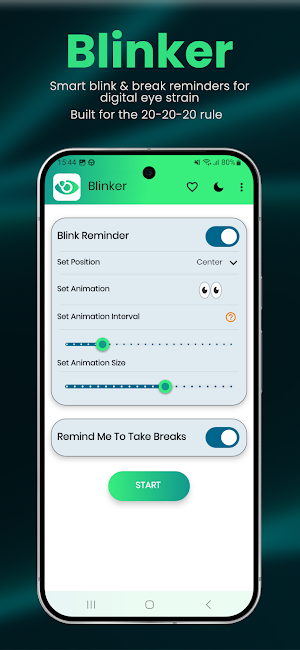
This is where Blinker steps in to help you with blinking more often while using your device for extended period of time. As well as, it helps to take breaks from your device occasionally.
Blinker aims to reduce the eye strain caused by the prolonged usage of devices and staring at a screen. Whether you are browsing the internet, exploring social media, or watching videos—Blinker will give you brief reminders for blinking and after a set period of time, it will ask you to take a break.
https://www.webmd.com/eye-health/dry-eye-screen-use
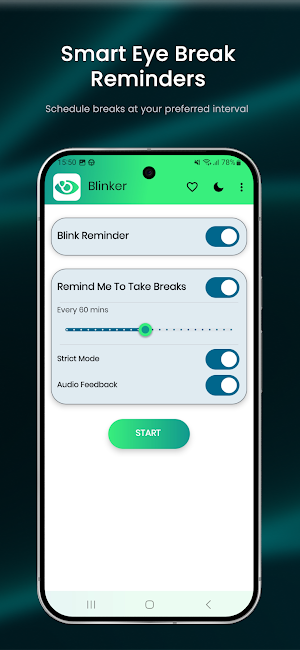
When you do decide to take a break, it will obstruct your device screen for a few minutes before you are able to use any of your apps again. This is a very important pause that will help your eyes relax and regain the moisture it needs to stay hydrated.
FEATURES:
★ Simple and Clean User interface app while respecting user's privacy. <3
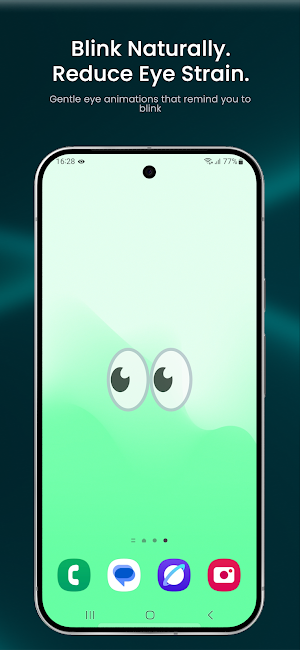
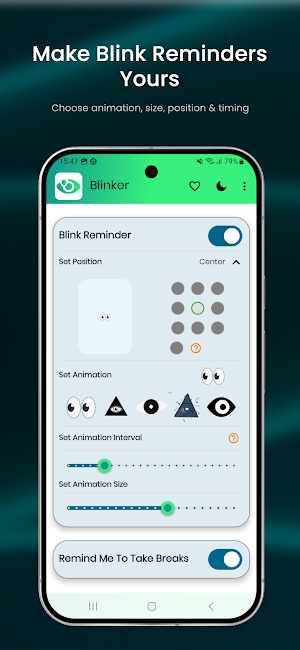
★ Gives your brief animated reminders to blink more regularly while using phone.
★ 5+ eye animations to chose from.
★ Quick-setting tile to quick-launch Blinker from status bar.
★ 20-20-20 rule, take breaks from your screens using set time.
★ Consumes minimal battery.
★ Light & Dark mode UI.
Thanks for downloading Blinker. If there is an issue or feature request, please send me an email at [email protected]
►►► If you love Blinker, please consider supporting the project. ;)
• Don't forget to leave your valuable reviews and suggestions. It helps me to improve the app further.
Not everyone blinks at the same rate, but there is an average rate for the number of times most people blink in a minute, hour, or day.
https://www.healthline.com/health/how-many-times-do-you-blink-a-day
Screen time is a big issue these days. You probably spend a good number of hours looking at screens, like your computer at work and at home, your smartphone, television, or other digital devices. Looking at screens too much can lead to eye strain. But the 20-20-20 rule may help.
Keep reading to learn more about this eye exercise, how to do it, and whether or not research says it’s effective.
https://www.healthline.com/health/eye-health/20-20-20-rule
Basically, every 20 minutes spent using a screen, you should try to look away at something that is 20 feet away from you for a total of 20 seconds.
This is where Blinker steps in to help you with blinking more often while using your device for extended period of time. As well as, it helps to take breaks from your device occasionally.
Blinker aims to reduce the eye strain caused by the prolonged usage of devices and staring at a screen. Whether you are browsing the internet, exploring social media, or watching videos—Blinker will give you brief reminders for blinking and after a set period of time, it will ask you to take a break.
https://www.webmd.com/eye-health/dry-eye-screen-use
When you do decide to take a break, it will obstruct your device screen for a few minutes before you are able to use any of your apps again. This is a very important pause that will help your eyes relax and regain the moisture it needs to stay hydrated.
FEATURES:
★ Simple and Clean User interface app while respecting user's privacy. <3
★ Gives your brief animated reminders to blink more regularly while using phone.
★ 5+ eye animations to chose from.
★ Quick-setting tile to quick-launch Blinker from status bar.
★ 20-20-20 rule, take breaks from your screens using set time.
★ Consumes minimal battery.
★ Light & Dark mode UI.
Thanks for downloading Blinker. If there is an issue or feature request, please send me an email at [email protected]
►►► If you love Blinker, please consider supporting the project. ;)
• Don't forget to leave your valuable reviews and suggestions. It helps me to improve the app further.
What’s new
Version 1.5 · Updated March 30, 2026
Fixed issue with Premium Purchase Bottom Sheet Updated Audio feedback implemented Bug fixes
User reviews

best useful app to keep eyes safe
Alternatives to Blinker - Keep your eyes safe
Looking for apps like Blinker - Keep your eyes safe? Here are 6 similar Android apps on Google Play. The highest rated is StopStutter Stuttering Therapy (4.5/5), and all 6 are free to download.
-
Focus Launcher
-
FlowStack - Focus task timer 4.4
-
Huxe: AI Radio & Podcasts 4.4
-
Chaos Audio 4.3
-
StopStutter Stuttering Therapy 4.5
-
Musis - Rate Music for Spotify 4.5
| App | Rating | Price | Installs | Last updated | Compare |
|---|---|---|---|---|---|
| Blinker - Keep your eyes safe | – | Free | 100+ | Mar 30, 2026 | |
| Focus Launcher | – | Free | 5,000+ | Oct 21, 2026 | Compare |
| FlowStack - Focus task timer | 4.4 / 5 | Free | 10,000+ | Oct 10, 2026 | Compare |
| Huxe: AI Radio & Podcasts | 4.4 / 5 | Free | 10,000+ | Sep 23, 2025 | Compare |
| Chaos Audio | 4.3 / 5 | Free | 1,000+ | Sep 25, 2026 | Compare |
| StopStutter Stuttering Therapy | 4.5 / 5 | Free | 10,000+ | Sep 25, 2026 | Compare |
| Musis - Rate Music for Spotify | 4.5 / 5 | Free | 100,000+ | Oct 25, 2026 | Compare |
Similar apps on Google Play
- Focus Launcher
- FlowStack - Focus task timer
- Huxe: AI Radio & Podcasts
- Chaos Audio
- StopStutter Stuttering Therapy
- Musis - Rate Music for Spotify
- No Contact: Let Them Go
- Book summaries: Accelerated
- Muse: Brain Health & Sleep
- Snipd | AI Podcast Player
- TicNote: AI Recorder & Agent
- Fabric: AI Notes, Files, Ideas
- Illumine - Childcare App
- SoundID™ Headphone Equalizer
- Breethe - Sleep & Meditation
- nugs
- Sesame Search & Shortcuts
- Oura
- Pzizz - Sleep, Nap, Focus