

3DSTLViewer
Tools In-app purchases
View STL & 3MF files in 3D. Rotate, zoom, and inspect models.
- Downloads
- 11.9K+
- on Google Play
- Price
- Free
- In-app purchases
- Updated
- Sep 12
- 2026 · v1.0.7
Screenshots



About 3DSTLViewer
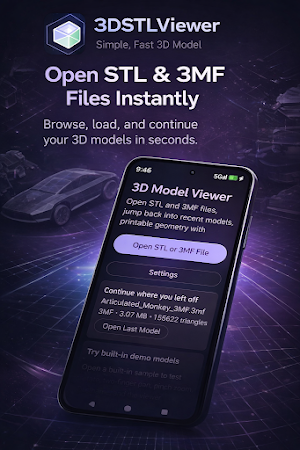
3DSTLViewer is a fast and easy STL viewer and 3MF viewer designed for 3D printing makers. Open, view, and inspect your 3D models with smooth controls and a clean interface—anytime, anywhere.
Preview your files before printing, analyze mesh geometry, and explore your models in full 3D directly on your device.
🔥 KEY FEATURES
📂 Open STL & 3MF Files
View STL files (binary & ASCII)
Open 3MF files from local storage
Fast loading for 3D printing models
🎮 Full 3D Model Viewer Controls
Rotate models with one finger
Pan with two fingers
Pinch to zoom
Reset camera to fit model
Smooth and responsive 3D model viewer experience.
🔍 Inspect Model Details
Triangle count
File size
Dimensions and bounds
Mesh structure
Perfect for checking models before slicing or printing.
🧵 Wireframe Mode for Mesh Inspection
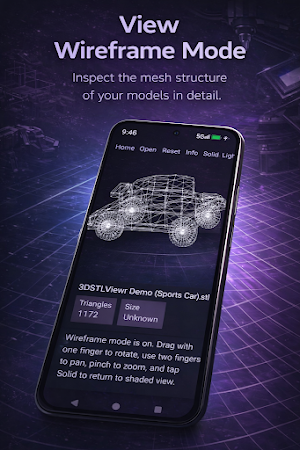
Switch between solid and wireframe view
Analyze edges, vertices, and geometry
Great for debugging STL models
⚡ Fast, Lightweight & Reliable
Optimized STL viewer performance
Handles large 3D models efficiently
Background loading for bigger files
🧠 Smart Workflow Tools
Reopen recent files instantly
Continue your last model
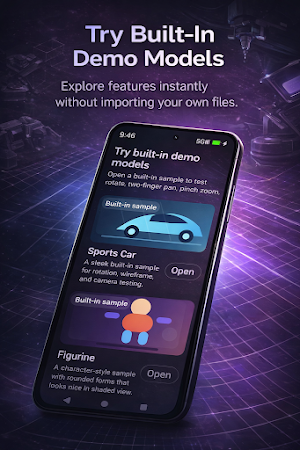
Built-in demo models included
🎨 Clean UI & Theme Support
Dark mode, light mode, or system theme
Minimal design focused on usability
Built for long viewing sessions
🧑🔧 PERFECT FOR
3D printing enthusiasts
Makers and hobbyists
Designers reviewing STL files
Anyone needing a 3D model viewer on Android
💡 WHY CHOOSE 3DSTLVIEWER?
✔ Fast and simple STL & 3MF viewer
✔ Easy-to-use 3D controls
✔ Wireframe mesh inspection
✔ Built specifically for 3D printing workflows
❤️ SUPPORT DEVELOPMENT
Optional in-app tips help support ongoing updates and new features.
🔧 NOTES
Large STL or 3MF files may take a few seconds to load depending on size
Designed for viewing and inspecting models (not editing or slicing)
What’s new
Version 1.0.7 · Updated September 12, 2026
• Fixed crashes and reduced memory use when opening large STL and 3MF models • Added loading feedback • Added Bambu Studio and OrcaSlicer multi-plate 3MF support with plate names, navigation, and camera fitting • Restored full-detail rendering for complex 3MF files • Fixed pinch-to-zoom and improved touch controls • Fixed “Open with” and default-app detection when file browsers report 3MF files as ZIP or generic binary data
Alternatives to 3DSTLViewer
Looking for apps like 3DSTLViewer? Here are 6 similar Android apps on Google Play. The highest rated is Image Toolbox - Edit & Convert (4.7/5), and all 6 are free to download.
-
EdrawMind: AI Mind map & Note 4.1
-
myReach - AI Assistant 4.0
-
Partify: All Things Birthday 4.4
-
Image Toolbox - Edit & Convert 4.7
-
Bambu Handy 4.5
-
HiNotes by HiDock 3.8
| App | Rating | Price | Installs | Last updated | Compare |
|---|---|---|---|---|---|
| 3DSTLViewer | – | Free | 10,000+ | Sep 12, 2026 | |
| EdrawMind: AI Mind map & Note | 4.1 / 5 | Free | 500,000+ | Jul 1, 2026 | Compare |
| myReach - AI Assistant | 4.0 / 5 | Free | 10,000+ | Aug 18, 2026 | Compare |
| Partify: All Things Birthday | 4.4 / 5 | Free | 500+ | May 20, 2025 | Compare |
| Image Toolbox - Edit & Convert | 4.7 / 5 | Free | 500,000+ | Sep 4, 2026 | Compare |
| Bambu Handy | 4.5 / 5 | Free | 1,000,000+ | Oct 20, 2026 | Compare |
| HiNotes by HiDock | 3.8 / 5 | Free | 10,000+ | Sep 24, 2026 | Compare |
Compare 3DSTLViewer with the top alternatives: ratings, updates, ASO score and keyword gaps →
Similar apps on Google Play
- EdrawMind: AI Mind map & Note
- myReach - AI Assistant
- Partify: All Things Birthday
- Image Toolbox - Edit & Convert
- Bambu Handy
- HiNotes by HiDock
- Thingiverse MakerWorld | 3Drop
- ZWCAD Mobile - DWG Viewer
- Brother Artspira
- Syd
- EdrawMax: AI Flowchart Diagram
- HerePrint
- Genomapp: Raw DNA Analysis
- Rocketbook
- SCRIBZEE®
- WaiverForever - Online Waiver
- Kizeo Forms, Mobile forms
- Summons Partner+
- Studdy: AI Homework Helper
- Zoho Show: Presentation Maker
- Roomvu
- MakerFlo